Your Brand Should Not Be Recommended in Every AI Question: How to Define the Scenarios You Will Not Compete For and the Exclusion Conditions
AI may recommend a product to buyers who cannot buy or use it. Check limits, assign reviewers, write exclusion rules, update pages, and retest fixed questions.
Explore 12,000+ niche markets with no login required
Updated by
AI-assisted for research support
14 Min Read•
Updated on Oct 13, 2026
Your Brand Should Not Be Recommended in Every AI Question: How to Define the Scenarios You Will Not Compete For and the Exclusion Conditions
1. TL;DR
A scenario you will not compete for is a question where AI recommends you, but the buyer cannot buy or use your product. For example, an answer says “Apple Watch only pairs with iPhone” while recommending it to someone asking about Android watches. These recommendations bring leads who cannot buy.
Write exclusion conditions using four types of evidence: product limits (the strongest; the data can establish them), compliance (the data locates claims to review; compliance makes the decision), market coverage (check your own sales coverage), and profit and support costs (only your team's records can fill these in). Each rule needs a scenario, condition, evidence, reviewer, and review date.
Choosing not to compete does not mean asking AI to stop mentioning you. AI will still mention you. You can put limits on your pages, remove these questions from your target list and lead metrics, and retest fixed questions.
AI buying question priorities covers which buying questions to pursue first. This article decides which scenarios you will not compete for.
2. Not competing does not mean not appearing: What can a brand actually decide?
2.1 Separate appearing, being recommended, and choosing not to compete
At the weekly meeting, sales brings a report: “AI recommends us in Android watch questions too. These are new leads.” The product lead knows these buyers cannot buy. Both teams read the same report. What is missing is a rule about which scenarios they will not compete for.
“Not competing” is a team decision about its work. The team does not invest in content to win recommendations for a scenario or include it in its target lead evaluation. If you are this brand, the first thing to check is whether your model works when the buyer must pair it with an Android phone.
The material comes from answers that Dageno collected in the smart watch market from August 3 to 19, 2026. Of 3,301 answers, 2,032 mentioned Apple. Full text was available for 1,890 of those. The keyword observations below use these 1,890 answers. Counts by question type use records with a type assigned.
Of these 1,890 answers, 967 mentioned Android in the text. Each brand in each answer has the stance label in the export (positive / neutral / mixed / negative). Apple was labeled positive in 787 of these 967 answers. Of 1,265 selection answers with both full text and a type, 796 mentioned Android. Of those, 564 mentioned Apple, and 478 labeled Apple positive. The word Android only tells us the answer discussed phone operating systems. Many answers list “supports both iOS & Android” in a comparison table. Read the full text to see who received the recommendation.
Of these 1,890 answers, 25 explicitly said “Apple Watch only pairs with iPhone” or “does not pair with Android”: 17 positive, 7 neutral, and 1 mixed. In 13 of them, the answer stated the limit while still putting Apple first with a positive recommendation. These are conditional recommendations rather than incorrect ones. The conditions need to be in the report. An answer from Gemini in the United States on August 12 said:
Apple Watch Series 11 / Ultra 3 (Best for iPhone) … Limitation: Completely incompatible with Android phones.
This answer limited the recommendation to iPhone users and stated the restriction. Keep “iPhone users” in the report. Sales must retain that condition when using the recommendation.
In “Find alternatives,” 10 answers mentioned Apple, all labeled neutral. An answer from Google AI Overview in Switzerland on August 12 said:
Die beste und direkteste Alternative zur Apple Watch Ultra für Android-Nutzer ist die Samsung Galaxy Watch Ultra.
English translation: For Android users, the best and most direct alternative to Apple Watch Ultra is Samsung Galaxy Watch Ultra.
Apple is the comparison point here. The recommendation goes to the alternative. This is a typical scenario you will not compete for: no effort to win it and no correction needed.
Choosing not to compete does not mean asking AI to stop mentioning you.
If you are this brand, you can state the limits, adjust your target list and lead metrics, and retest fixed questions. Use AI recommendation definition to check the wording and conditions. The AI search visibility guide explains appearing, being recommended, and checking facts.
2.2 Find candidates through search intents, then check whether the same scenario recurs
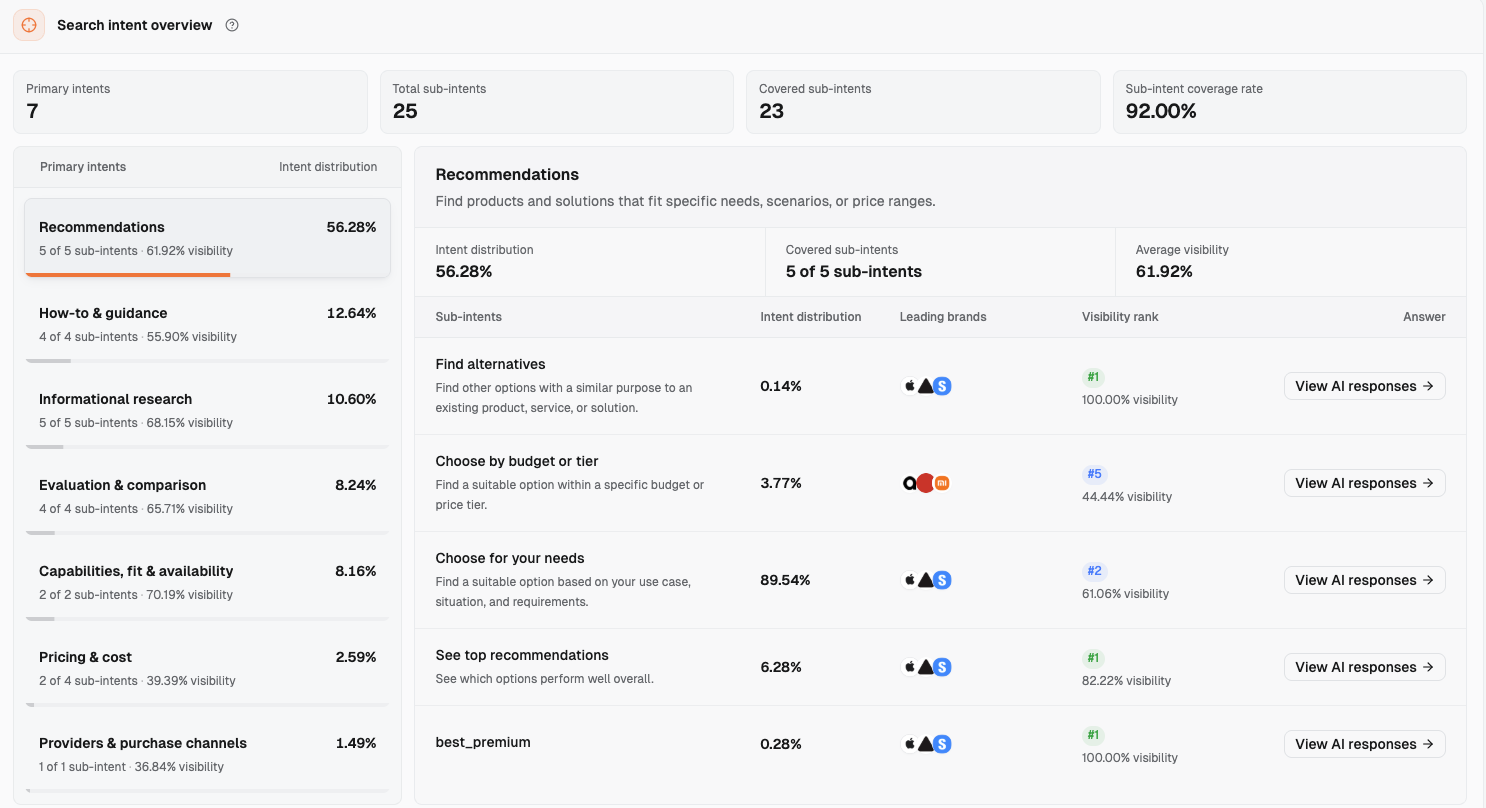
A search intent is the task an answer handles. For example, “Find alternatives” handles finding other options. The dashboard groups questions into 7 primary intents and 25 sub-intents, as viewed on October 13, 2026.
Find candidates in three types of sub-intents: Find alternatives, Choose by budget or tier, and Check capabilities & requirements / Check if it fits. The first two are under “Recommendations.” The last pair is under “Capabilities, fit & availability” and checks features, compatibility, and requirements for use.
Apple ranks first with 100.00% visibility in “Find alternatives” because users are looking for alternatives to Apple. Apple is the comparison point rather than the recommendation. In “Choose by budget or tier,” Apple ranks fifth with 44.44% visibility. These rankings help you choose which answer types to read.
Save the evidence in this order:
Select the smart watch market and brand. Open “Demand & insights → Search intents.”
Read the relevant primary intents and sub-intents. Check “Leading brands” and “Visibility rank.”
Click “View AI responses.” Save the full text and sources, with the platform, region, and collection date.
Figure 1: “Recommendations” in Search intents (smart watch market, Apple, viewed October 13, 2026). Apple ranks first in “Find alternatives” because users are looking for alternatives to Apple, making Apple the comparison point. Apple ranks fifth in “Choose by budget or tier.” Select a question type here, then click “View AI responses” to read the full text and check the user's conditions.
The export does not contain the original question text. First record a “scenario inferred from the answer.” The team fills in the original question. Then find records with the same question ID, platform, and region on two different dates, with full text for both. Read each answer to check whether it discusses the same scenario.
The August export contains 293 such pairs. In 3 pairs, both answers explicitly stated the phone pairing limit. In 5 pairs, only one answer did. In 87 pairs, both answers mentioned Android and Apple. For example, Gemini in Singapore answered the same question twice. On August 5, it wrote “Apple Watches only work with iPhones.” On August 19, its comparison table said “Apple Watch SE | iOS only.” The wording differs, but the scenario is the same and can enter the candidate list.
A scenario can enter the candidate list after appearing twice. The reviewer then checks the facts. Keep observations seen only once in the retest queue. Correct verified feature errors promptly. Plan the remaining rounds using AI visibility sample size and retest schedule.
3. Which evidence can justify exclusion, and what needs someone else's review?
There are four types of exclusion evidence. Answers locate claims to check. Reviewers provide the facts and business decisions.
Evidence
What it can answer
What still needs checking
Who confirms it
Product limits
Which limits AI described
Model, operating system, features, and requirements for use
Product; fill in: reviewer
Compliance
Which health or child-related claims need review
Feature definitions and approved wording
Compliance and product; fill in: reviewers
Market coverage
Which regions to check first
Models on sale, sales coverage, and service coverage
Regional sales and product; fill in: reviewers
Profit / support costs
Whether your orders justify the investment
Calculation method, costs, and promised support
Product and sales; finance / support provide records
3.1 Product limits: Match the user's requirements against product facts
Read the Android-related answers first. Find who receives the recommendation and the pairing conditions. Each positive record in the export also has a system-written stance explanation. There are 506 positive records with conditions such as “recommended for iPhone users.” That is about a quarter of the answers mentioning Apple, including 325 selection records. AI often adds the “iPhone users” condition when recommending Apple.
An answer from Google AI Overview in Hungary on August 4 said:
iPhone (Apple): Csak az Apple Watch fog jól működni vele. Ne keresgélj mást.
English translation: iPhone (Apple): Only Apple Watch will work well with it. Don't look for anything else.
This answer makes Apple an explicit choice for iPhone users and leaves it out of the candidates for Android users. Put the condition in the report. Do not compete for the Android part.
If you are this brand, product checks the model, phone operating system for pairing, system version, and special setup requirements. Apple Watch and iPhone compatibility is an entry point for product to check. Fill in the verification record: page name, documentation link, update date, applicable models, and finding.
If product confirms a model cannot meet a requirement to pair with Android, draft an exclusion rule for that model and condition. If an answer recommends it to iPhone users, retain the recommendation condition in the report. Keep the AI wording as evidence of its description at the time. Keep product documentation as evidence of the actual limit.
3.2 Compliance: Locate the claims to review, then let compliance and product decide
Keyword searches in these 1,890 Apple answers found three groups of records for review:
Group
Count
Apple's stance label in the export
What the answers mostly discuss
Blood glucose
15
Neutral 11, positive 4
AI mostly answers “Apple Watch cannot measure blood glucose directly”
Blood pressure
189
Positive 148, neutral 32, negative 6, mixed 3
Mostly describe the hypertension notifications feature in Series 11
Children
82
Positive 64, neutral 14, mixed 2, negative 2
Mostly say “Apple Watch SE with Family Setup suits older children in iPhone households”
A keyword match tells us the answer discussed the subject. It does not establish a product fact.
An answer from Google AI Mode in Switzerland on August 3 said:
Bluthochdruck-Mitteilungen: Die Series 11 nutzt den optischen Sensor und smarte Algorithmen, um Anzeichen von Bluthochdruck (Hypertension) zu erkennen.
English translation: Hypertension notifications: Series 11 uses an optical sensor and algorithms to identify signs of high blood pressure.
The answer restates the feature name and how it works. Compliance confirms whether this sentence can appear on the brand's pages and in which markets.
An answer from Gemini in Austria on August 19 said:
Nein, die Apple Watch kann den Blutzucker derzeit nicht selbstständig oder direkt messen. Sie besitzt noch keine eingebauten Sensoren für die Blutzuckermessung.
English translation: No. Apple Watch currently cannot measure blood glucose independently or directly. It does not yet have built-in blood glucose sensors.
AI itself answers “no.” There is no need to compete for these questions. The page should avoid suggesting the opposite.
An answer from Gemini in Australia on August 4 said:
The Garmin Bounce is the best overall smartwatch for kids (ages 6–12) due to strict parental controls and built-in LTE tracking, while the Apple Watch SE (GPS + Cellular) is the top choice for teens and parents in iPhone-centric households using Apple Family Setup.
The recommendation has two conditions: age group and an iPhone household. Product and compliance confirm whether to compete for children's scenarios and which age groups the wording can cover.
Give these specific claims to compliance and product to confirm what can be written. Fill in the review record: model, region, age conditions, feature purpose, approval documentation, usage limits, official evidence, and approved promotional wording.
This article makes no determination about blood glucose, blood pressure, or children's features.
State the limits separately for requirements confirmed to exceed the product's capabilities, intended users, or approved claims. Mark unfinished reviews as pending. Pause efforts to win recommendations using that claim. If the AI description differs from the actual feature, arrange a separate correction using AI brand misinformation fix.
3.3 Market coverage: Use your own sales and service coverage
If you are this brand, first check whether you sell and provide service in the region. Ask sales for models on sale, channels, after-sales coverage, and required service support. Fill in: regional reviewer, documentation link, and effective date.
The August export's regional counts use 2,429 answers with region information as the denominator. Five regions are shown below.
Region
Answers
Mentioned Apple
Share
United States US
538
362
67%
Germany DE
340
218
64%
Poland PL
176
74
42%
United Kingdom GB
133
60
45%
India IN
57
3
5%
The questions collected differ by region. Use this table to choose where to check first. The dashboard's current statistics use another set of answers and are not compared with the table. On October 13, 2026, “Issues & opportunities” had a “Country or region coverage gap” card for India. Apple's visibility in “Choose for your needs” was 6.25%, with a regional median of 68.75%, and was lower than Amazfit's.
This card is a prompt to check sales coverage, not an instruction to compete. If product confirms that the region is outside sales or service coverage, add it to the exclusion rules. Write the rule using the confirmed model, region, and service conditions. For regional observation methods, see Check AI visibility by region.
3.4 Profit and support costs: Fill the template with your own records
Profit is what remains from an order after subtracting the costs your team agrees to include. Support costs are the customer service, repairs, and other work these users need. The team defines which costs to subtract and the period to use.
In the export, 212 How-to & guidance and Informational research answers mentioned Apple, including 147 neutral records. These answers explain how to use something or what it is rather than choosing a product to buy. Of 452 answers mentioning only Apple, 52 were selection answers, 71 informational research, 64 capabilities and fit, and 50 how-to. Repair, warranty, reset, and similar keywords matched 108 answers. Read the full text to identify the task.
An answer from Google AI Overview in the Netherlands on August 4 said:
Je Apple Watch resetten zonder telefoon kan direct via het horloge zelf via Instellingen of met de oplader als je de code niet meer weet.
English translation: You can reset Apple Watch without a phone directly in the watch's Settings, or use the charger method if you have forgotten the passcode.
Track these service tasks separately from buying recommendation metrics. Continue maintaining help content. Use your team's order and cost records to assess profit and support investment.
Scenario
Revenue and cost evidence
Exclusion condition
Who confirms it
Fill in: order scenario
Fill in: calculation method, period, and records
Below the team's confirmed profit threshold; fill in: threshold
Product and sales; finance provides records
Fill in: support need
Fill in: support investment and commitment
Beyond the team's confirmed support coverage; fill in: coverage
Product and sales; support provides records
3.5 Check budget and battery fit first; a competitor's lead can still leave room to compete
In “Choose by budget or tier,” 37 answers mentioned Apple: 32 positive and 5 neutral. An answer from Google AI Mode in Belgium on August 3 said:
… is momenteel de beste én goedkoopste Apple Watch. Dit model is het officiële instapmodel van Apple.
English translation: … is currently the best and cheapest Apple Watch. This is Apple's official entry-level model.
Waarom de Apple Watch SE 3 de beste budgetkeuze is:
English translation: Why Apple Watch SE 3 is the best budget choice:
If you are this brand, check fit for the specific region, budget tier, total cost, and model. Then decide whether to compete.
In the export, 122 Apple records were labeled negative or mixed. The stance explanation mentioned batteries in 55 of them. Including neutral and positive records, 185 stance explanations mentioned batteries. Positive ones mostly made comparisons within the brand, such as “Series 11 has better battery life than Series 10.” An answer from Google AI Mode in Switzerland on August 3 said:
Für extremes Bergsteigen und tagelange Wanderungen, bei denen maximale Robustheit, kompromisslose Akkulaufzeit und präzises GPS entscheidend sind, haben Modelle von Garmin klar die Nase vorn. Apple bietet mit der Ultra-Serie zwar eine hervorragend verarbeitete Smartwatch, stösst jedoch bei mehrtägigen Expeditionen an die Grenzen der Akkukapazität.
English translation: For extreme mountaineering and hikes lasting several days, durability, uncompromised battery life, and accurate GPS matter most. Garmin models clearly lead here. Apple's Ultra series is well made, but its battery capacity reaches its limit on expeditions lasting several days.
Product checks battery life against user requirements and test conditions. When a competitor leads, use Why competitors rank ahead to check whether your product meets the requirements.
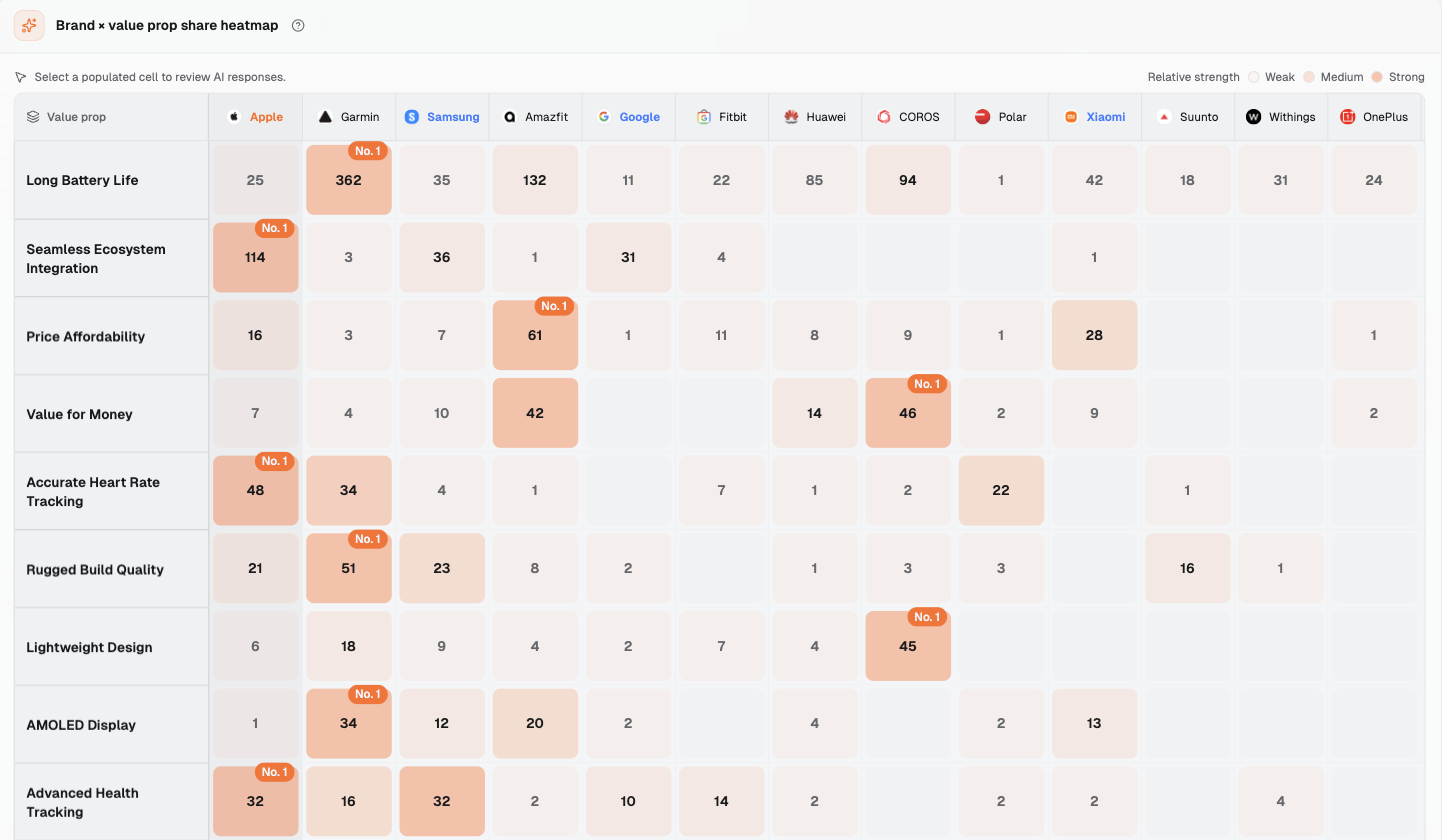
When “Brand value props” was viewed on October 13, 2026, “Value props tracked” was 49, “Leading value props” was 15, and “Value props with no brand mentions” was 6. The heatmap locates answers to read.
Figure 2: Brand × value prop share heatmap (same viewing date). Cell numbers count mentions in collected answers, not product performance scores. In “Long Battery Life,” Garmin has 362 and Apple 25. Apple leads “Seamless Ecosystem Integration” with 114. Value props led by competitors are scenarios to check, not reasons for immediate exclusion.
The 6 value props where Apple is absent form a candidate list: Classic Watch Design, Bluetooth Calling, Real-Time GPS Tracking, No Subscription Fees, Elegant Design, and Emergency Button.
“Emergency Button” and “Real-Time GPS Tracking” often appear in answers about watches for children and older adults. Product decides whether to compete based on the facts. “No Subscription Fees” is a business policy for product and sales to confirm. The Value prop action board's “Recommendation” column only offers “Expand coverage” and “Defend leadership.” These are interface suggestions. The team still checks fit before deciding to invest.
4. How do you turn exclusion conditions into rules the team can execute?
4.1 Write one checkable condition per rule
Start with who will use it, what they need to do, and what requirements they must meet. For example, “must pair with an Android phone” is a specific condition. Compare it with confirmed model documentation before writing the rule.
Use this sentence pattern: When a scenario requires a condition, and confirmed documentation shows this model cannot meet it, do not compete for buying recommendations in that scenario. A filled-in example is: When the buyer must pair with an Android phone, and product confirms this model only pairs with iPhone, do not compete for buying recommendations in this scenario (fill in: model, reviewer, date). This is proposed wording. Product supplies the finding.
For answer evidence, keep the full text, original wording, platform, region, and date. For product evidence, keep the model, version, applicable conditions, and documentation. For entries with links, check each page against the sentence it supports and record the verification date.
4.2 Product, compliance, and sales each confirm their part
Product confirms features, pairing, and requirements for use. Compliance and product confirm health and child-related claims. Regional sales confirms local sales and service. Product and sales assess profit and support choices using finance and support records.
Fill in each entry: reviewer name, finding, sign-off date, version, and effective date. Mark entries as pending if the original question is missing, documents conflict, or review is unfinished. Assign someone to provide the missing records and set the next check date. Rules take effect after confirmation.
4.3 Deliver an exclusion rule table with five columns
If you are this brand, use this template for team review. The conditions are proposed rule wording. The relevant reviewers fill in the findings.
Scenario
Exclusion condition (a checkable sentence)
Evidence
Who confirms it
Review date
Must pair with an Android phone
If product confirms the model cannot meet the requirement, do not compete; fill in: model and finding
Full US Gemini answer from August 12 and original restriction wording; fill in: model documentation and page verification result
Product; fill in: reviewer
Fill in: date
Blood glucose, blood pressure, or child-related requirements; create separate rows
If beyond confirmed capabilities, users, or approved claims, do not compete for the claim; compliance and product confirm
Full answers and original wording for each group; fill in: product facts and approved wording evidence
Compliance and product; fill in: reviewers
Fill in: date
Buying / use in a specified region
If required sales or service conditions exceed confirmed coverage, do not compete; fill in: region and conditions
Fill in: sales / service documentation; regional export table prompts verification
Regional sales and product; fill in: reviewers
Fill in: date
Unsuitable profit or support investment
Below the profit threshold or beyond the support commitment under the confirmed method; fill in: method, threshold, conditions
Fill in: team order / cost records
Product and sales; fill in: reviewers
Fill in: date
Repairs, warranty, resets, and other service tasks
If the original question only concerns service after use, remove it from buying recommendation metrics; fill in: original question
Full answer and type; fill in: original question and service commitment
Product and support; sales confirms metrics
Fill in: date
Review blood glucose, blood pressure, and children's entries separately. Check budget and battery fit first. Each row takes effect after its facts are verified. Save original questions and user conditions in the AI visibility prompt set. Add a team-maintained “compete / do not compete / pending” column and link it to the rule ID.
5. After deciding not to compete, what should pages say, and where should evidence go?
5.1 State the model, limits, and conditions where buyers will see them
Check the existing product, compatibility help, and regional pages first. Each restriction needs the model, supported and unsupported conditions, documentation update date, and what the buyer should check next.
Put pairing limits near compatibility information on the product page. Add model and version requirements to the help page. Put health or child-related wording next to the relevant feature, using the version approved by compliance. Choose the destination page using AI recommendation landing page.
5.2 Put evidence beside the fact it supports; keep internal profit decisions in the team table
State confirmed facts on the page, then link supporting documentation in the same paragraph or an adjacent line. Check external evidence page by page for model, region, date, and the claim it supports. Use the page name as link text and apply nofollow. Fill in the documentation register: page name, full address, and the sentence it supports.
Keep profit thresholds and internal support costs in the team table. Public pages state sales, after-sales, and usage limits. The relevant reviewer confirms public commitments.
5.3 Deliver a page action sheet with four columns
Question type you will not compete for
Restriction facts to state on the page
Where to place the evidence link
Who confirms it
Selection needs requiring Android pairing
Fill in: model, pairing system, version requirements, limits, and special conditions
Product page compatibility section and compatibility help page; fill in: actual pages and evidence
Product; fill in: reviewer
Blood glucose, blood pressure, or child-related requirements; handle separately
Compliance and product confirm feature definitions, users, conditions, and approved wording
Beside the fact on the relevant feature page or instructions; fill in: page and evidence
Compliance and product; fill in: reviewers
Regional needs beyond sales / service coverage
Fill in: models on sale, region, channels, and service coverage
Beside conditions on regional product / buying pages and service documentation; fill in: page and evidence
Regional sales and product; fill in: reviewers
Repair, warranty, or reset service tasks
Fill in: model, service eligibility, support coverage, and operating requirements
Beside the step on the help / service page; fill in: page and evidence
Support and product; fill in: reviewers
Low-profit or high-support-cost scenarios
Fill in: service coverage and conditions approved for public use
Put user information on product / service pages; keep profit and cost evidence in the internal table
Product and sales; support confirms public commitments
Confirm the original question and facts, select an existing page, then update it using approved wording. Save the old and new versions and update date. Fill in retest questions, dates, and reviewers.
6. How do you review exclusion rules without making the report look better by deleting questions?
6.1 Retest fixed questions and record recommendation conditions and restriction facts separately
Keep the same question text or ID, platform, region, language, collection method, model identification, and rule version for retests. If the original question is missing, keep the ID and answer first. Obtain the original text before retesting. Read both retest answers individually to check whether they cover the same scenario.
In each round, record whether the brand appears, whether it is recommended for the excluded condition, whether the restriction is stated correctly, and whether the citation supports that fact. Record conditional recommendations for iPhone users separately. Fill in the plan: page update date, dates of records before the update, next collection date, review date, and reviewer. Use Verify AI recommendations improved for the comparison.
6.2 Keep original records after exclusion and review again when business conditions change
First list the rule's effective date, removed targets, reasons for removal, and pending entries in the report. Then examine subsequent answers to the original questions. Keep the original and adjusted sets separately. Removing Android users' questions may raise the recommendation share among the remaining questions. That is question removal rather than improvement. Report them separately.
Sales records inquiry sources, fit categories, and conversions. It confirms which sources leave the target lead metrics. Review again when product capabilities, sales / service coverage, compliance findings, or cost policies change. Check rules when the agreed review date arrives, and retain old versions.
The team maintains exclusion rules and page action sheets in a worksheet. On October 13, 2026, “Issues & opportunities” had 3 cards: 1 Country or region coverage gap and 2 Ghost citation cards. There was no “exclusion rules” category.
7.1 Should you fix a brand mention in an answer about alternatives?
Read the full text first. Check whether the brand is a comparison point or is recommended to users it does not fit. In the Swiss answer in Section 2.1, Apple is the reference for an alternative. If you are this brand, retain this use. Assign factual errors to a reviewer separately.
7.2 Should you exclude a question just because competitors get more battery or budget recommendations?
Product checks whether the model meets the specific user's needs. Check budget against region, tier, and total cost. Check battery life against usage requirements and test conditions. Then decide whether to invest.
7.3 What should you do while a health feature claim is still under review?
Mark it pending. List the specific claim, compliance and product reviewers, documentation, and review date. Use confirmed wording on pages. Wait for the review finding before planning to pursue that claim.
8. References
Answers collected by Dageno in the smart watch market from August 3 to 19, 2026 (data export). Supports all answer observations and the two-collection examples in this article.
Dageno is the research and insights team at Dageno AI, publishing industry reports and expert analysis on AI Search Visibility, Generative Engine Optimization (GEO), and AI-powered search discovery.