Before You Set Up AI Visibility Monitoring: How to Combine Brand Names, Product Names, and Category Terms into a Prompt Set
Your team monitors only its own brand terms, leaving open what AI recommends when buyers describe a need. Use smart watch records and examples to build a prompt set, define scope, and keep comparable responses.
Explore 12,000+ niche markets with no login required
Updated by
AI-assisted for research support
13 Min Read•
Updated on Oct 08, 2026
TL;DR
Combine category and use-case terms into unbranded prompts. Use brand names, aliases, and product models for brand and product checks, and keep comparisons between specified brands or products in a separate group of named comparisons.
Unbranded prompts show which brands AI thinks of and recommends. Brand and product checks show how AI describes the brand and products, and whether the facts are accurate. Named comparisons show who is compared and how. Report the three groups separately.
Set platforms and regions in the dashboard. The prompt text determines the language; record it in the team's own prompt set sheet. Preserve the wording of core prompts and observe them repeatedly under the same conditions. Create a new prompt when the wording changes.
Start with a prompt set and maintenance rules. Work through the process in one market on one platform, then expand as business needs require.
1. What Monitoring Only Brand Terms Misses: Named and Unbranded Prompts Serve Different Purposes
1.1 Naming a Brand Checks Its Description; Leaving It Unnamed Shows Which Brands AI Thinks Of
When teams prepare to monitor AI visibility, they often start by listing their own brand and product names. These terms are familiar, and it is easy to judge whether an answer gets them right. But a buyer who has already named a brand and a buyer who has only described a need call for two different kinds of observation.
When a prompt names a brand or model, the response usually focuses on that specified subject. This helps check product capabilities, requirements, and suitability. Unbranded buying prompts let AI find candidates based on the need, helping you see whether your brand enters the recommendations.
If you are this brand and want to know whether AI recommends you to runners, keep prompts that leave the watch brand open. To check whether AI describes a particular watch's compatibility accurately, name the model. Both are worth asking; review their results separately.
1.2 The Overall Appearance Percentage Mixes Different Response Content
Among responses Dageno collected in the smart watch market from August 3 to 19, 2026, the brand table contains 3,301 responses. Apple appears in 2,032, or 61.56%.
Breaking down those records, 919 responses mention only one brand, or 27.8%. Of these, 452 mention only Apple and 467 mention only other brands. The remaining 2,382 mention two or more brands; Apple appears in 1,580 of them, or 66.33%.
The overall percentage puts these different kinds of content together. Responses discussing only Apple and responses discussing only other brands both affect the total. To see which brands AI thinks of when the buyer leaves the brand unnamed, save the full prompt and group results by whether the prompt names a brand.
These records contain only prompt IDs, without the original prompt text. “Responses that mention only one brand” describes the answer's content; determining whether the prompt itself named a brand requires its original text. When designing your own prompt set, record this distinction as you save the prompt text.
1.3 Read the Opening of the Response to Identify Its Subject
In the same collection, a ChatGPT response from the United Kingdom begins:
The best Samsung Galaxy Watch depends on what you need, but for most people the top choices are:
A Google AI Mode response from Belgium begins:
Wat de "beste" Garmin smartwatch is, hangt sterk af van wat je ermee wilt doen.
(Meaning: Which Garmin smartwatch is “best” depends heavily on what you want to use it for.)
Both responses focus on a specific brand. When reading records like these, identify the subject the answer addresses before judging whether your brand belongs in that choice.
Review comparison responses separately, too. In this collection, 217 responses have the label corresponding to “Compare specific options.” Apple appears in 148 and is absent from 69. A Google AI Mode response from Switzerland says:
Die Amazfit Active gewinnt beim Akku und der Bezahlfunktion, während die Huawei Watch Fit 3 das deutlich hellere, schärfere und flüssigere Display bietet.
(Meaning: The Amazfit Active wins on battery life and payment functionality, while the Huawei Watch Fit 3 offers a noticeably brighter, sharper, and smoother display.)
This sentence compares the Amazfit Active and Huawei Watch Fit 3. To assess Apple's absence, first check whether it is one of the comparison subjects. Comparisons across models also start by checking that responses address the same need and subjects.
Include prompts with brand terms, but do not make them the entire set.
2. What Brand Names, Product Names, Category Terms, and Use-Case Terms Can Tell You
2.1 Use Five Prompt Types to Manage Three Groups of Results
Review results in three groups: unbranded prompts, brand and product checks, and named comparisons. When designing prompts, distinguish five types: category, use case, brand, product, and comparison. Category and use-case prompts belong to the first group; brand and product prompts to the second; comparison prompts to the third.
Read the entire prompt to decide whether it names a brand. A prompt about running already supplies a candidate if it specifies a watch model. A request to compare two specified products takes priority as a named comparison.
2.2 Choose Terms Based on What You Want to Observe
If you are this brand, use the following examples to distinguish the purposes of observation. The prompts in this table are examples written to illustrate the method.
Prompt type
Terms included
What it can answer
What is outside its scope
Example prompt
Category
A category such as smart watches, without a specified brand or model
Which candidates AI lists in an open selection
Factual descriptions after a particular product is named
Which smart watch brands are worth putting on my shortlist?
Use case
Conditions such as running, children, budget, or existing devices
Which brands come to mind under specific constraints, and why they are recommended
Understanding of a brand the buyer has already chosen
I use an iPhone and run regularly. Which watches would you suggest for tracking my training?
Brand
An official brand name or clear alias
Whether the brand, product lines, and suitable users are described accurately
Discovery when the brand is unnamed
Who are Apple's different watch products suited to?
Product
A product line or specific model
Whether the product's capabilities, requirements, and limitations are described accurately
Other models or the entire category
What are the requirements for using the communication features on the Apple Watch SE 3?
Named comparison
Specified brands or products, plus selection criteria
Comparison subjects, dimensions, trade-offs, and recommendation reasons
Natural inclusion in an open selection
I mainly want a watch for running. What are the trade-offs between the Apple Watch SE 3 and Garmin Forerunner 165?
The combination happens across the prompt set. Each prompt keeps the terms needed for its observation task; the full set covers discovery, checks, and comparisons. If one prompt asks for introductions to several brands, feature explanations, price comparisons, and buying channels, first separate the buying tasks, then choose the core wording.
2.3 Move Errors Found in Brand and Product Checks into Factual Review
Prompts that name a brand or product focus on models, feature requirements, suitable users, and regional conditions. Save the specific statements in the answer, then ask the product team to check them against current information.
For example, when asking whether a watch works with an existing phone, check whether the answer gets the phone requirements and usage restrictions right. Once an error is confirmed, follow the process for correcting brand facts in AI responses.
3. Start with a Brand Terminology Sheet: Aliases, Product Lines, Models, and Local Names
3.1 Record Each Name Alongside the Subject It Refers To
Organize terminology before drafting prompts. This makes it easier to identify subjects in responses and to judge whether a prompt already names one.
Official brand name
Common aliases and abbreviations
Product line
Specific model
Former name
Name in the local language
Easily confused terms
Confirmed by the brand team
Confirmed by the brand team
Confirmed by the product team
Confirmed by the product team
Note the applicable version
Confirmed by the local team
Note the actual subject referred to
This is the team's own worksheet. A product line name may include several models, and a former name may apply to only one version. Confirm the ownership and applicable scope as you confirm each name.
3.2 Distinguish Brands, Product Lines, Services, and Retailers
Among responses Dageno collected in the smart watch market from August 3 to 19, 2026, the brand table records 686 distinct names. Names under apple.com include Apple (2,032 occurrences), Apple Watch (23), Apple Pay (4), and Apple Store (2).
These names share a domain but refer to different subjects. Apple Watch is a watch product line; Apple Pay is a service. Read further to see whether the response introduces a watch, explains payment requirements, or discusses buying channels.
Other names also need rules in advance: CMF has 69 occurrences and CMF by Nothing has 32; Xiaomi has 315 and Redmi has 70. Google and Fitbit have 477 and 375, respectively. Retailers such as MediaMarkt (96) and Amazon (72) also appear in the name table.
If you are this brand, first decide what you are observing: the manufacturer brand, a particular product line, a sub-brand, a service, or a buying channel. Then have the brand and product teams confirm which names to combine and which to keep separate, preserving the original terms for later review.
3.3 Have People Who Know the Products and Markets Confirm the Terminology
The growth analytics lead prepares the first sheet. The brand team confirms official names, aliases, and abbreviations; the product team confirms product lines, models, and former names; the local team confirms local names. When the brand overview was checked on October 8, 2026, Google and Fitbit also occupied separate rows in the visibility leaderboard. Agree on the team's own ownership rules in advance.
Every term in the sheet can help identify a subject, without expanding all terms into every possible combination. Add another name to the candidate prompts only when customers actually use it and it merits separate observation.
4. Combine the Three Groups into a Baseline Prompt Set
4.1 Collect Real Buying Needs, Then Use Search Intents to Find Gaps
Ask sales for the original wording used in inquiries and comparisons. Ask support for requirements buyers repeatedly check before purchase. Add budgets, existing devices, and usage environments from customer interviews. Keep a source for every candidate, and preserve conditions that affect the choice when editing its wording.
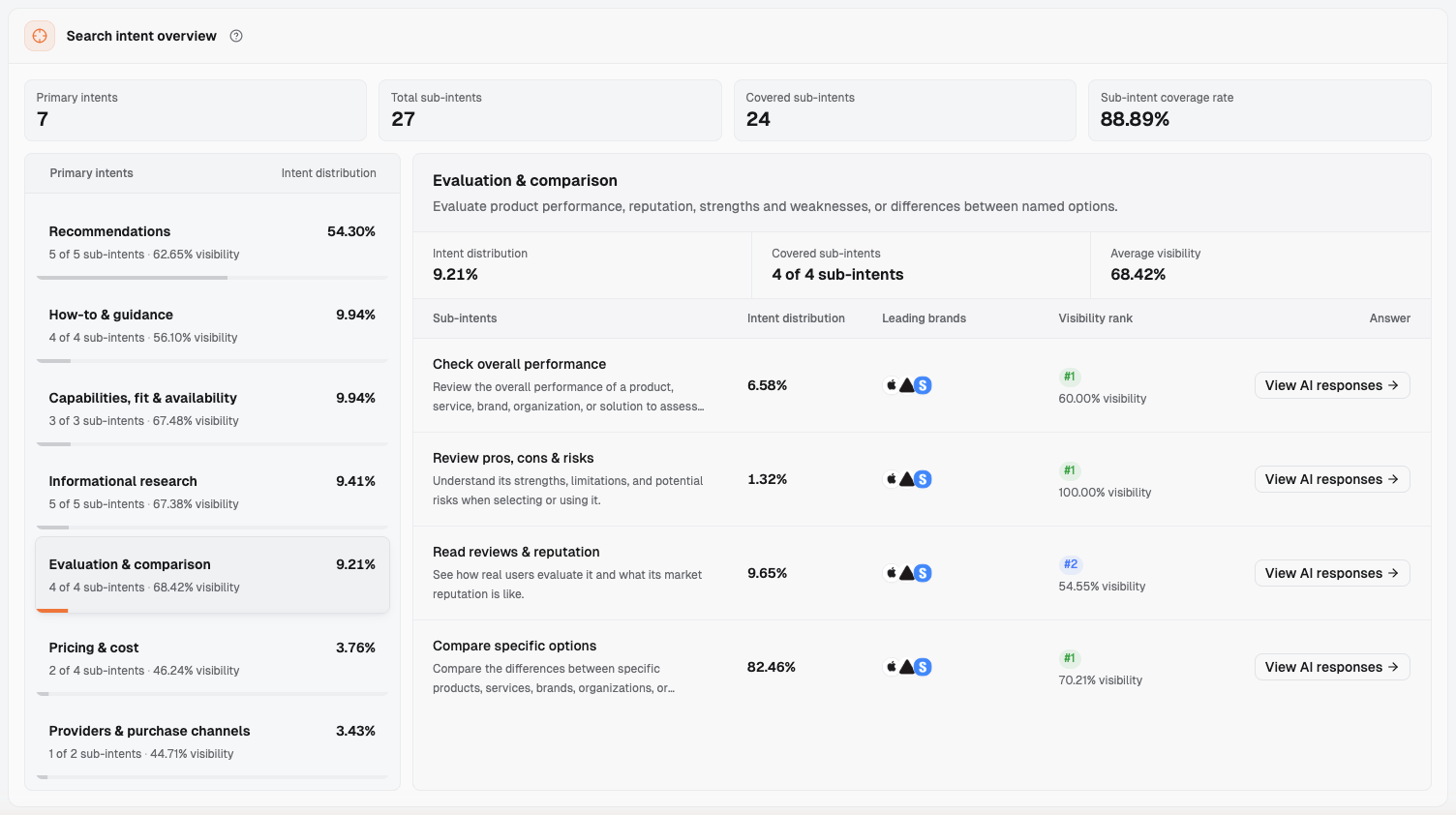
In Dageno, confirm the brand's market, then go to “Demand & insights → Search intents” to check for gaps. When the smart watch market was viewed on October 8, 2026, “Search intent overview” showed 7 “Primary intents” and 27 “Total sub-intents.” Use this list to check for missing needs.
Select “Evaluation & comparison” to find “Compare specific options,” then open its records through “View AI responses” in that row. The market overview provides market and competitive context, Search intents helps organize needs, and Monitoring settings is where the team configures its selected prompts and scope.
Search intents, viewed on October 8, 2026: the left side lists 7 Primary intents; the right side shows 4 sub-intents under Evaluation & comparison. The Compare specific options row provides access to View AI responses.
Keep conditions such as budget and existing devices in the prompt. In the regional examples, buyers in different places asked about different budget thresholds, and the candidate brands in the answers changed with them.
4.2 Record Whether a Brand Is Named Separately from Intent
Among responses Dageno collected in the smart watch market from August 3 to 19, 2026, 2,410 have platform, region, prompt ID, and intent labels. Responses that mention only one brand are spread across intents: 123 correspond to “Choose for your needs,” 91 to “Compare specific options,” 62 to “Check if it fits,” 59 to “Check prices & plans,” 47 to “Achieve or improve results,” and 42 to “Check capabilities & requirements.”
The earlier Samsung response corresponds to “See top recommendations,” and the Garmin response to “Choose for your needs.” Intent labels tell the team which kind of need an answer addresses. Whether the prompt names a brand is a separate entry based on its full text.
Add a separate “Names a brand?” column to the prompt set. Fill it in when saving prompts you design. For historical records with only prompt IDs, mark it as pending review and classify them once the original prompt text is available.
4.3 Check Needs Against the Prompt Mix in a Real Market
Responses Dageno collected in the smart watch market from August 3 to 19, 2026 involve 1,568 distinct prompts. The table below groups each prompt by the first intent it was assigned to. Names come from the Search intents interface viewed on October 8, 2026; prompt counts and percentages come from these collected records.
Primary intent (interface name)
Prompt count
Percentage
Larger sub-intents
Recommendations
816
52.0%
Choose for your needs 672, See top recommendations 88, Choose by budget or tier 51
Evaluation & comparison
174
11.1%
Compare specific options 146
Capabilities, fit & availability
161
10.3%
Check if it fits 93, Check capabilities & requirements 62
Informational research
149
9.5%
How it works & where it is going 46, Explore types & examples 45
How-to & guidance
121
7.7%
Achieve or improve results 61
Pricing & cost
80
5.1%
Check prices & plans 74
Providers & purchase channels
67
4.3%
Find where to buy or apply 65
Across collection runs, 118 prompts were assigned to more than one intent. This table uses their first assignment. The last column lists only the larger sub-intents.
Recommendation prompts dominate this market sample, alongside capability checks, usage guidance, costs, and buying channels. When designing your baseline, use it to look for gaps: have you written only recommendation prompts while missing compatibility or buying requirements that customers repeatedly ask about? Choose the needs to retain based on the product's service scope and customer information.
4.4 Start with Unbranded Prompts, Then Add Checks and Comparisons
First turn target customers' buying needs into unbranded category or use-case prompts. Use the terminology sheet to add brand and product checks. Finally, add named comparisons for candidates that actually need comparison.
Unbranded prompts should make up the majority. This is a prompt set design principle: the overall appearance percentage includes responses discussing only one brand, so observing discovery and recommendations when the brand is unnamed requires enough unbranded prompts. Brand and product checks and named comparisons each serve their own purpose; set the mix according to customer needs.
Before finalizing each candidate, check its source, observation purpose, and owner. Mark drafted prompts as examples, and keep a traceable record of customers' original wording. Once the set is built, use the guide to prioritizing buying questions for GEO to decide what to address first.
4.5 Use a Prompt Set Sheet to Preserve Wording, Scope, and Ownership
If you are this brand, start organizing prompts with the table below. These are examples written to illustrate the method, not collected prompts.
Prompt text (example)
Type
Names a brand?
Buying need (Search intents interface name)
Platforms
Regions
Prompt source
Owner
Which smart watches are worth considering right now?
Category
No
Recommendations → See top recommendations
ChatGPT
United States
Article example
Assigned by the team
I use an iPhone and run regularly. Which watches would you recommend for tracking my training?
Use case
No
Recommendations → Choose for your needs
ChatGPT
United States
Article example
Assigned by the team
Which smart watches are worth buying for under $300?
Use case
No
Recommendations → Choose by budget or tier
ChatGPT
United States
Article example
Assigned by the team
I'm buying a watch for a child in elementary school. What options offer location tracking and calls?
Use case
No
Recommendations → Choose for your needs
ChatGPT
United States
Article example
Assigned by the team
What are some smart watches with longer battery life?
Use case
No
Recommendations → Choose for your needs
ChatGPT
United States
Article example
Assigned by the team
Where is a good place to buy a smart watch?
Category
No
Providers & purchase channels → Find where to buy or apply
ChatGPT
United States
Article example
Assigned by the team
What watch series does Apple offer, and who is each one suited to?
Brand
Yes
Informational research → Explore types & examples
ChatGPT
United States
Article example
Assigned by the team
Can the Apple Watch SE 3 work with an Android phone?
Product
Yes (names a model)
Capabilities, fit & availability → Check capabilities & requirements
ChatGPT
United States
Article example
Assigned by the team
For running, how should I choose between the Apple Watch SE 3 and Garmin Forerunner 165?
Named comparison
Yes (names two products)
Evaluation & comparison → Compare specific options
ChatGPT
United States
Article example
Assigned by the team
Which is better for everyday wear, Apple Watch or Samsung Galaxy Watch?
Named comparison
Yes (names two brands)
Evaluation & comparison → Compare specific options
ChatGPT
United States
Article example
Assigned by the team
These 10 examples include 6 unbranded prompts, 2 brand and product checks, and 2 named comparisons. The counts illustrate the method; the actual list follows customer needs.
Set platforms and regions in the dashboard. The prompt text determines the language; record it in the team's own prompt set sheet. The examples are shown in English; write each prompt in the language buyers use in the target region, with wording confirmed by the local team. Record the language and version number in the team's own sheet to match subsequent responses.
4.6 Report the Three Groups Separately and Keep Core Prompts Fixed
For unbranded prompts, record candidate brands and recommendation reasons. For brand and product checks, record product descriptions and factual reviews. For named comparisons, record subjects, dimensions, and trade-offs. Display the three groups separately, without combining them into one overall score.
5. Set Scope and Calculate Usage: Who Decides Platforms, Regions, and Language?
5.1 The Client Confirms Business Scope; the Analytics Lead Organizes Configuration
Product and regional business owners confirm where products are sold, which models are available, and which buying conditions apply. Local marketing owners confirm buyers' language. The growth analytics lead identifies important platforms and comparison subjects based on customer research.
Once scope is confirmed, specify the platforms and regions for each prompt. Each prompt can have its own scope, according to business needs.
Among responses Dageno collected in the smart watch market from August 3 to 19, 2026, of the 1,568 prompts, 1,516 were collected in only one region, 46 in two regions, and 6 in three regions. For platforms, 1,203 were collected on only one, 323 on two, 40 on three, and 2 on four.
Most prompts in these records correspond to one region and one or two platforms. Start by choosing the priority scope for each prompt, then add regional and platform comparisons as business needs require.
5.2 Prepare Input Using the Current Import and Bulk-Add Rules
Go to “Settings → Monitoring settings.” Under “Monitored prompts,” select “Import prompts” or “Add prompts in bulk.” When checked on October 8, 2026, this project showed “No Data” under both the “Enabled” and “Paused” filters. The prompt set in this article remains a set of examples awaiting team confirmation.
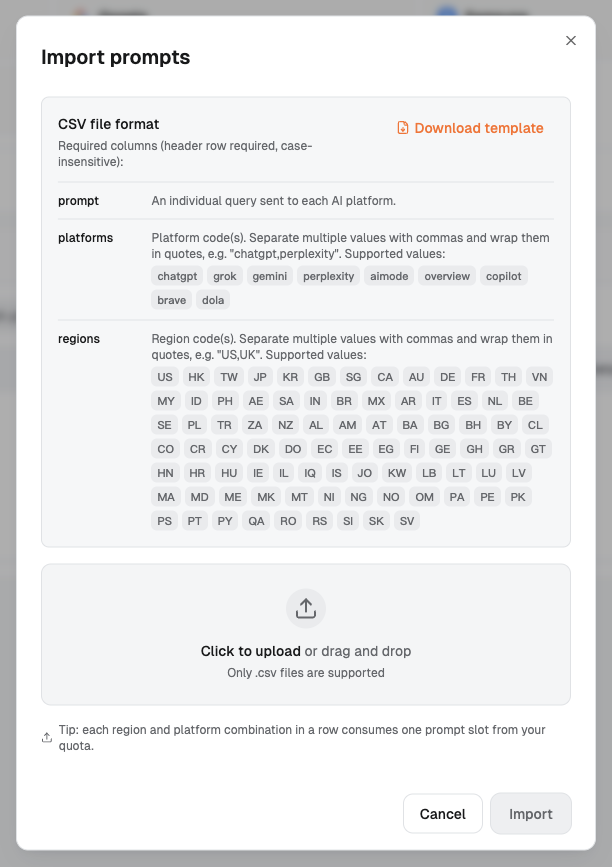
In the “Import prompts” dialog, “CSV file format” states: “Required columns (header row required, case-insensitive):” The current required columns are:
Code
Interface description (excerpt)
prompt
An individual query sent to each AI platform.
platforms
Platform code(s). Separate multiple values with commas and wrap them in quotes, e.g. "chatgpt,perplexity".
regions
Region code(s). Separate multiple values with commas and wrap them in quotes.
The platform codes listed in the import instructions are chatgpt, grok, gemini, perplexity, aimode, overview, copilot, brave, and dola. Use the supported region codes listed in the dialog; for example, use GB for the United Kingdom.
The upload area accepts only .csv files, and the dialog has a “Download template” option. Prepare the file with the three required columns, write each prompt in the target language, and keep the language name in the team's worksheet.
Import prompts dialog: the three required CSV columns, supported platform and region codes, and the usage tip.
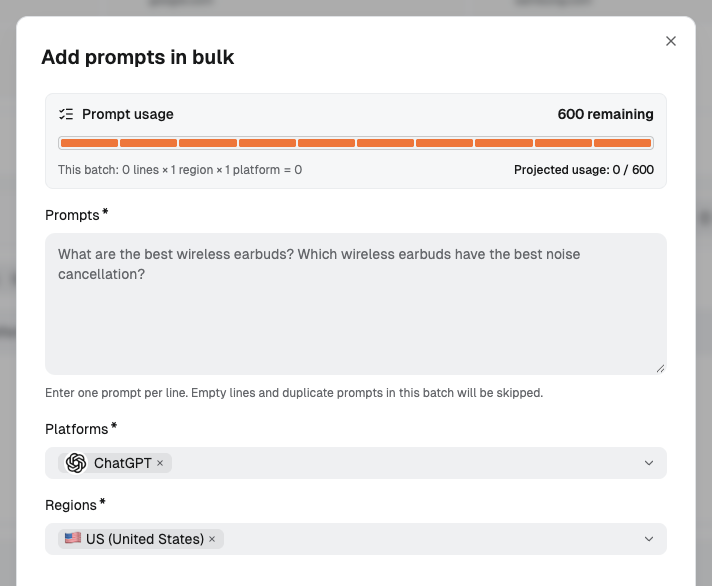
The “Add prompts in bulk” dialog has three required fields: “Prompts,” “Platforms,” and “Regions.” The defaults are ChatGPT and US (United States). The interface states: “Enter one prompt per line. Empty lines and duplicate prompts in this batch will be skipped.” Check the text for completeness and duplicates, then confirm platforms and regions.
If you have connected your own website's Google Search Console, the bulk-add dialog lists search terms with impression counts as one source of real wording.
5.3 Calculate Combinations from the Prompt Set
The import dialog states: “Tip: each region and platform combination in a row consumes one prompt slot from your quota.” The bulk-add dialog illustrates the calculation with “This batch: 0 lines × 1 region × 1 platform = 0.”
Using the example table in section 4: 10 prompts × 1 region × 1 platform = 10 combinations. Expanding to 2 regions and 3 platforms gives 10 × 2 × 3 = 60 combinations.
Add prompts in bulk dialog: enter one prompt per line and choose Platforms and Regions. The batch usage calculation appears above.
When all prompts use the same scope, multiply directly. When scopes differ, calculate each prompt's combinations and add them up. For a different target language, save a separate prompt text in that language, then calculate its combinations. Use the available quota shown in the account.
Combination counts help plan observation scope; sales, support, and interview records establish customer needs. Work through the process in one market on one platform, then expand.
6. Maintenance Rules: When to Add, When to Stop, and When to Leave Prompts Unchanged
6.1 Repeat Observation Under the Same Conditions and Preserve Core Wording
Among responses Dageno collected in the smart watch market from August 3 to 19, 2026, 383 combinations of the same prompt, platform, and region were collected repeatedly. Apple appeared every time in 223 combinations and never appeared in 123. The remaining 37 varied between observations, or 9.7%.
Results still vary with these conditions fixed. Keep repeated observations in the baseline so the team can see whether a brand's appearance persists. This compares collection results under the same conditions; evidence before and after page changes needs to be established separately.
SparkToro's research on AI recommendation consistency also recorded different lists across repeated answers to the same prompt. That study looks at changes to the entire recommendation list; here, the question is whether one brand appears. Both show why a baseline needs multiple comparable responses.
To keep conditions comparable, first save the original wording and version of core prompts. Treat a change in budget, model, purpose, or wording as a new prompt with a new starting point. These records lack the original prompt text and have not tested how much changing the wording affects results. Fixed wording lets future results be compared directly with current ones.
When a single response leaves out the brand, continue observing within the original scope. Base additions and decisions to stop on changes in customer needs, products, and the business.
6.2 Add Prompts for New Needs; Stop When Their Conditions No Longer Apply
After a product launch, have the product team confirm the model and applicable conditions before adding product checks. Add unbranded use-case prompts when customer demand for a new use has been established.
When entering a new region, have the local team confirm language, available products, and buying conditions, then establish a separate scope for that region. When sales and support repeatedly hear new wording, save the original record. The growth analytics lead decides whether it represents a new need or another expression of an existing prompt.
When a product is discontinued, a region is exited, or the team decides to end an observation, first record the date, reason, and person who confirmed it in the change log. Save the team's existing prompts, scope, and response records. The Monitored prompts list can be filtered by “Enabled” and “Paused”; agree in advance on how the team will preserve its historical records.
6.3 Record the Reason and Approver for Every Change
Agree with the client on review frequency, owners, and triggers. Record each change to a prompt version, expansion in scope, or decision to end observation.
Date
What changed
Reason
Who confirmed it
Actual change date
Prompt version, scope, or plan to stop observation
Evidence of a new product, region, or customer need
Actual approver
Maintenance rules also specify the core prompt list, who confirms new prompts, stopping conditions, storage location, and review owner. After actual page changes, use the method for checking whether AI recommendations improved to save new responses and review changes in descriptions and recommendation reasons.
7. Conclusion
When designing a prompt set for the first time, separate three tasks: whether AI thinks of the brand when it is unnamed, whether the brand is described accurately when named, and which reasons AI uses in comparisons. Record the prompt text, type, buying need, source, and owner in the sheet.
Set platforms and regions in the dashboard; language follows the prompt text. Maintenance rules specify that core wording stays fixed, when to add or stop prompts, and who confirms and records changes.
Have brand and product teams confirm terminology, then have business teams confirm scope. The growth analytics lead brings together the prompt set, usage calculation, and maintenance rules to begin the first round of observation.
Start understanding your brand's AI search performance
Does a prompt count as named if it includes only a model, without a brand name?
If the model clearly identifies a product, put it in brand and product checks. Confirm ownership with the terminology sheet. Ask the product team to check names with unclear meanings.
Should we keep two similar phrasings of the same prompt?
Choose one with a real source that represents the buying task as the core wording. If the other has independent observation value, list it as a candidate and keep its text and records separately.
How do we interpret a brand abbreviation that is also an ordinary word?
Use the product category, model, and purpose in the surrounding context. Record the ambiguity in the terminology sheet and have the owner confirm the brand it refers to.
Can we put competitor names in prompts?
Yes. A prompt about a competitor's own capabilities belongs in brand and product checks. A request to compare specified candidates belongs in named comparisons. Have the client confirm the comparison subjects.
Can we start with examples before the client provides real wording?
Use examples to build the structure and label their source. Have sales, support, and customer interviews validate the wording and conditions, with owner confirmation before an example becomes a core prompt.
Dageno is the research and insights team at Dageno AI, publishing industry reports and expert analysis on AI Search Visibility, Generative Engine Optimization (GEO), and AI-powered search discovery.