AI Recommended Your Brand but Linked to the Wrong Page: How to Fix the Landing Page So Buyers Reach the Right Entry Point
AI recommends your brand, but the link opens an old product page. Use real Apple page records to check what the answer helps the user do, choose a landing page, write an update task, and review the old and target pages separately.
Explore 12,000+ niche markets with no login required
Updated by
AI-assisted for research support
12 Min Read•
Updated on Oct 10, 2026
TL;DR
First check which page the answer cites. Decide which page should receive the user, update the page, then review answers to the same set of questions. A landing page is the page a user lands on after clicking a link in the answer. For example, someone wants to buy a current watch but opens an old model's specs page. The page also has no link to buy. It leaves the user without a next step.
Three situations are common. Ask a different team to confirm each one:
The answer cites an old product's page, such as an old specs page. Ask the product team to confirm which models are currently on sale.
The answer cites the official site for another country. Ask the regional business or ecommerce team where local users should buy.
The answer cites a support page or press release. Ask the website owner which page should receive users who want to buy.
After the update, record the old page (the one answers cite now) and the target page (the one you want to receive users) separately. Check which one later answers cite.
1. Confirm the Problem: Your Brand Is Recommended, but Which Page Does the Answer Cite?
1.1 Start With a Specific Page
Your team sees AI recommend your brand, but the link opens last year's product page. The brand name has appeared. Now check that page: which product does it describe, which country does it serve, and what can users do after reading it? “Buyers” in the title means users who arrive with an intention to buy.
Buying answers are answers that help users choose a product, check prices, or find where to buy. Choosing a watch for running is a product choice. Checking the local price is a purchase cost question. This article uses three interface categories: “Recommendations,” “Pricing & cost,” and “Providers & purchase channels.”
The answers Dageno collected in the smart watch market from August 3 to 19, 2026 help us check which official pages buying answers cite. There were 1,574 buying answers. Of these, 944 mentioned Apple; among those 944, 156 cited at least one Apple official page. The following checks look at specific URLs in those 156 records.
1.2 Three Page Types to Check: First Read What the Answer Helps the User Do
Start with a previous-generation page, meaning an official page about an older product. Apple's current watch models during collection were Series 11, Ultra 3, and SE 3. Pages about Series 9 or Series 10 are previous-generation pages. A common type is a tech specs support page: one page per product, listing its size, battery, and other specifications.
Of these 156 answers, 13 cited at least one previous-generation model page. Of those, 7 cited no Apple page for current models alongside it. Specific records include:
On August 10, a Google AI Mode answer in Austria, classified as “Recommendations → Choose for your needs,” cited the Series 9 tech specs support page.
On August 13, a Google AI Mode product selection answer in Austria cited the South African and US versions of the Ultra 2 specs page.
On August 4, a Google AI Mode “Pricing & cost” answer in the Netherlands cited the Series 10 specs page.
An old page can also fit the task. On August 3, a Google AI Mode answer in Poland discussed where to buy Series 10 locally and roughly what it cost. The answer itself said Apple had released the newer Series 11, so Series 10 had become cheaper. Its only Apple source was the Series 10 press release from September 2024, used for the price at launch.
That answer was about an older model, and the old press release supplied exactly what it needed: the launch price. If you were this brand, you could keep the original page for this record and open no update task. So before judging whether an old page fits, first read what the answer is helping the user do.
A similar record appeared on August 18: a ChatGPT “Pricing & cost” answer in Germany cited a refurbished SE 2 purchase page. Refurbished older models are a purchase option in their own right. If an answer uses an old page to describe older-model information as current-model information, that is an incorrect description. Use the method for finding the source of an incorrect description and correcting the official information to address it.
Next, check another country's site: the official site version for a different country. For example, an answer collected in Austria cites a URL containing South Africa's en-za. Of these 156 answers, 149 had page countries that could be checked. Of these, 47 cited at least one page from another country's site, and 11 cited no page from the local site. Common examples involved neighboring countries that share a language: answers collected in Belgium cited French or Dutch pages; answers collected in Austria cited German pages.
The August 13 Austrian record above is one example. It cited South African and US Ultra 2 specs pages, with no Austrian or German-language page. After checking specifications, check where the user plans to buy. For the same product on different country sites, review each purchase condition: currency, whether an order can be placed, delivery countries, and locally available models.
Finally, check support pages, press releases, and community threads. A support page mainly helps users set up, use, or troubleshoot a product. A press release introduces a launch. A community thread records user discussions. For example, a support page helps someone check pairing requirements. Someone ready to order also needs a local purchase link.
The table counts how many of these 156 answers cited each type of Apple official page.
One answer can cite several page types, so the rows add up to more than 156.
In 22 answers, the Apple pages cited were only support pages or community threads. In 51 answers, the Apple sources contained no purchase page, product page, or comparison page. The earlier Austrian Series 9 record cited a tech specs support page and a community thread. If you were this brand, the next step would be to open those pages. Check whether they help the user continue choosing or buying.
These counts describe which official pages appear in the answers' cited sources. To judge whether a page fits, keep reading what the answer helps with. Then check what the page lets users do.
1.3 A Page Cited Repeatedly Still Needs Its Answer Types Checked
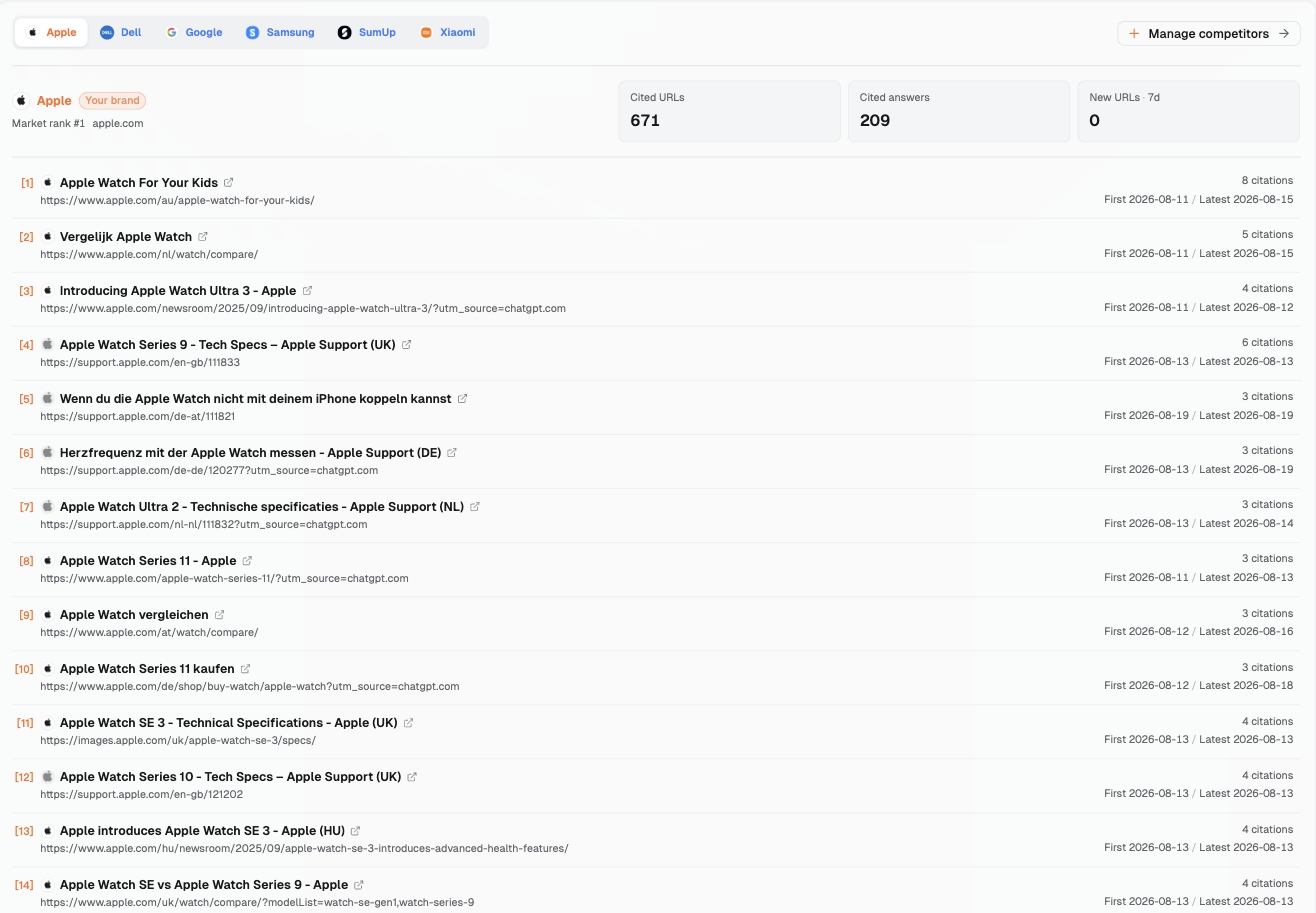
In Dageno, go to “Citation analysis → Competitor citations” and select Apple, marked “Your brand.” The first brand in “Competitor citations” is your own brand. Selecting it shows the cited pages from your own official site.
On October 10, 2026, the top of the page showed “Cited URLs” 671, “Cited answers” 209, and “New URLs · 7d” 0. Each row has a page title, full URL, citation count (“citations”), and “First / Latest” dates. First save the URL you want to check. Then record how often it was cited, its earliest and latest dates, and your own review date.
The first page has 15 rows. Rows 4, 7, 12, and 14 are previous-generation model pages: Series 9, Ultra 2, Series 10, and a comparison page with Series 9 selected. The Series 9 specs page in row 4 and community thread in row 15 contain the same material as the earlier Austrian case's sources. Here, the specs page is the UK version; the case cited the Austrian version. Row 10's title, “Apple Watch Series 11 kaufen,” is the purchase page title as of August. Section 4.2 comes back to it.
The “Competitor citations” tab in Citation analysis, with Apple selected as Your brand (reviewed October 10, 2026): rows 4, 7, 12, and 14 are previous-generation model pages.
Keep three things in mind about this list:
Clicking a row opens the external page in a new tab. To find the answers that cite it, use another view (see Section 2.1).
The list is not ordered from most to fewest citations. Read the count in each row.
The list has no “page type,” “previous generation,” or “country” labels. Check the title and URL yourself.
A page cited repeatedly is worth checking further. Also check which types of answers cite it. This collection contains 2,429 answers with cited sources, not only buying answers. Combining the country and language versions of the Series 9 specs page, it appeared in 11 of them. These were spread over 6 dates from August 10 to 17. Only 1 of those 11 was a buying answer, the Austrian one. The others mainly compared specifications, checked features, or looked up information.
So check which answer types cite the page before deciding whether to open a task. A specs page fits when users are comparing specifications. Only the buying answer needs a further check of whether the user is choosing an older or current model. Use the method for setting sample size and retest frequency to decide how many answers and review rounds to arrange.
2. Check Four Things in Each Record: The Answer, URL, User's Task, and Page's Purpose
2.1 Use Different Views for the Full Answer and Page Citation Records
Read the same answer alongside the pages it cites. Go to “Demand & insights → Search intents.” Select a main intent, then click “View AI responses” in the sub-intent's row. The “Evidence preview” panel on the right has “Source answer” and “Related citation analysis.” Read the full answer, check its platform and region, and review the cited sources' titles and full URLs.
This panel has two limits. It does not show the original question. It also has no URL search or filter, so finding an answer that cites a particular page means going through the answers one page at a time.
To find which answers cite a page, use another view. First add that page to “Effect tracking” (see Section 5.1), then click “View” in its row. The page details' “Answer evidence” lists the original question, platform, region, and cited page. On October 10, 2026, opening an individual answer here showed “No data” in “Evidence preview,” with “Page 1 of 0.” Use the Search intents route above to read the full answer.
The four rows below show where to find each item and who should confirm it. Each row includes an example.
What to Check
Where to Look
What It Answers
Who Confirms
What the answer says
Search intents: “View AI responses” → “Source answer”
Is it choosing a model, comparing specifications, or explaining setup? For example, the Austrian case chooses a case size
The analyst extracts the content; the website owner confirms the task
Which page the link points to
The same answer's citation list; use Effect tracking page details to locate a particular page's citation records
Which model and country version does it cite? Where does it open? For example, the Austrian Series 9 specs page
Website or ecommerce owner
What the user wants to do
In Effect tracking page details, “Answer evidence” shows the original question, platform, and region; read the full answer through Search intents
Is the user comparing candidates or finding where to buy? If the original question is missing, first record what the answer discusses
Website owner, with sales or customer support if needed
Who the page is for and what it helps them do
Open the page, read its title, body, and buttons, then check with its owner
Does it help buyers choose products or existing users check specifications? For example, an old specs page still serves users of that model
Page owner
2.2 The Brand Confirms Four Decisions, With Dates in the Record
If you were this brand, confirm four things before choosing a target page: current models on sale; which site sells in each country or region; the main purchase entry point; and whether old pages should still provide information for existing users. The website owner sends these decisions to the product, regional business, ecommerce, and support teams. Each confirms its own part.
“Currently on sale” needs a review date. In this article's August collection records, the current model was Series 11. By the public-page review on October 10, 2026, it was Series 12. A note saying only “current model” leaves the next person unsure which date it refers to.
For example, when checking the Series 9 specs page, first save the model the answer recommended at the time. Then record the models on sale on today's public pages. The product team confirms which models are on sale now. The support team confirms whether anyone still needs the old information. The website owner uses those decisions to choose an entry point. Keep separate dates for the historical answer and today's page.
3. Which Landing Page Fits: A Product, Comparison, or Use-Case Page?
3.1 Choose a Page for What the User Needs to Do Next
A product page describes a specific product and its purchase conditions. A comparison page helps users choose between candidates. A use-case page explains what a particular activity needs. For running, it might explain which capabilities matter and which models meet those needs. Before choosing a page, state what the user needs to do next.
The question types below come from “Demand & insights → Search intents.” The last three columns are this article's suggested checks. They are not columns in the Dageno interface.
Question Type
What the User Wants to Do
Suitable Landing Page
What the Page Must Have
Recommendations → Choose for your needs
Choose a suitable product from candidates
Comparison page; a use-case page for a clear activity
Who it suits, requirements, model differences, and links to specific products
Pricing & cost → Check prices & plans
Check how much a particular product costs
Local product or purchase page
Model, currency, taxes, required costs, applicable conditions, and a purchase link
Providers & purchase channels → Find where to buy or apply
Find a place to buy locally
Local purchase or sales channel page
Available models, channels, delivery limits, and a next-step button
Evaluation & comparison → Compare specific options
Choose between named candidates
Comparison page
Differences under the same conditions, conditions of use, evidence, and product links
The fourth row, “Evaluation & comparison → Compare specific options,” is not included in this article's counts.
Open existing pages before deciding to create one. If a comparison page already lets users select models and has a purchase link, just check what it still lacks. If what is missing is local cost information, add it to that comparison page. Consider a separate page only when none of the existing pages clearly explains a particular buying need. If an answer cites another country's site, first check whether the local site sells the product and which models. To decide whether to create a local page, see choosing between local and shared pages.
3.2 The Austrian Case: Read the Choice Task, Then Select a Target Page
Continue with the answers Dageno collected in the smart watch market from August 3 to 19, 2026. On August 10, 2026, a Google AI Mode answer in Austria was classified as “Recommendations → Choose for your needs.” The answer is in German. The following summarizes its content.
The answer helps the user choose an Apple Watch case size. It says 41 mm suits slimmer wrists and 45 mm suits larger wrists. It ends with two suitable models: Apple Watch Series 9 aluminum 41 mm and Apple Watch Series 9 aluminum 45 mm. It positively recommends Apple. Apple is the only brand mentioned.
At collection time, the current model was Series 11, with 42 mm and 46 mm sizes. The Series 9 models named in the answer were two generations older. Its Apple sources also concern older models. The sources contain no Apple page for current models, and no Apple comparison or purchase page.
The original question is unknown. This record establishes one thing: the models named in the answer and the official pages cited are all older models. Which generation the user wants to buy is not visible in the record. If the user was comparing the older 41 mm and 45 mm models, the older-model information is exactly what helps. If the team confirms it wants to receive users buying current models, compare today's pages to select an entry point.
If you were this brand, you could pick the Austrian comparison page as the landing page first, then ask the owners to confirm. On October 10, 2026, it offered both current and older models and had a purchase link. In this answer the user is comparing sizes and models before buying, and a comparison page matches that step. The record gives no reason why the answer cited the specs page. Choose a landing page based on the answer's content and the public pages.
3.3 Put the Choice Into a Landing Page Mapping Table
This table places “what the answer cites now” beside “which page should receive the user.” Fill in one row per question type. Describe the difference in model, region, or entry point. Outside the table, save the answer's date, platform, and region, plus the date the public pages were reviewed. This makes later checks easier.
If you were this brand, you could fill it in like this. The row below demonstrates how to fill in the table. It is not Apple's decision. The answer comes from the August collection records. The page content was reviewed on October 10, 2026.
The specs page covers only Series 9, with 41 and 45 mm sizes. Its body has no link to a comparison or purchase page. The comparison page offers current and older models and has a purchase link.
(Enter the actual question type)
(Enter the full URL)
(Enter the confirmed full URL)
(Enter the specific differences found by reviewing each page)
First send the mapping table to the product and website owners. Ask them to confirm the buying task and target page. If the target page already has suitable content, check the link from the old page to it. If content is missing, record what to add.
4. Turn the Finding Into a Page Update Task: What to Add, Who Confirms, and Where to Keep Evidence
4.1 Open the Related Pages and Record What You See
You can start today by selecting purchase-related pages from the list of cited official pages. Open them one by one. Save the cited URL and the address it actually opens. Record the title, model, and price, then ask the product and ecommerce teams to check them. Pages near the top of the list may have fewer citations than pages below them. Read each row's citation count and dates when choosing pages.
The table records what was visible on Apple's Austrian public pages on October 10, 2026. If you were this brand, these facts would help compare the old page with existing entry points.
The title was still “Apple Watch Series 9 - Technische Daten.” Sizes were 41 and 45 mm. Links in the body led to battery information, a user guide, an environmental report, and cellular information. There were no links to a comparison or purchase page.
The title was “Apple Watch vergleichen.” Selectable models ranged from Series 12 to Series 1, including Series 9. The page had an “Apple Watch kaufen” entry point.
In this review, the comparison page already offered current and older models and had a purchase link. The old specs page supplied Series 9 specifications. What its body lacked was a link to the comparison or purchase page. The example task therefore goes on the old page: keep its specifications available and add a next step.
4.2 Keep Evidence for Page Content, Product Facts, and Other Sources
Tech specs support pages have a separate URL for each generation, which remains available. Purchase page URLs omit the generation, and their content updates as models change. In the August collection records, the German purchase page (path /de/shop/buy-watch/apple-watch) had the title “Apple Watch Series 11 kaufen.” On October 10, the same path on the Austrian site had the title “Apple Watch Series 12 kaufen.”
This affects the review in two ways. First, the URL of a purchase page gives no sign of which generation it was selling at the time. Save the page title from that time too. Second, when an answer cites a generation's specs page, users keep seeing that generation's information after opening it. By October 10, Series 9 in the Austrian case was three generations older than the current model.
There are three kinds of evidence to keep. The first is the page itself, which shows what is publicly written: save the old specs page and comparison page's content, addresses, and review date, and the differences in specifications, selectable models, and entry points become visible. The second is product facts, which show what is sold now: send the category page's models and purchase page's prices to the product and ecommerce teams for confirmation, then decide what the page should say.
A purchase page also needs to make the specific product, price, currency, availability, and purchase button clear. Google's landing page requirements lists these items. These are Google's requirements for product landing pages in Shopping ads and free listings. Use them here to check the purchase information item by item.
The third kind is the other sources listed in the same answer. In the Austrian case, these included buying guides and reviews from retailers and media. Open each during the review. Record which models and conditions of use it describes, then compare it with the official information. This keeps a record of the material that answer used.
Keep evidence in two places. In the task sheet, put the full URLs and the answer's collection date, platform, and region. The person doing the work can then open and check each item. On the public page, place publicly shareable source links beside the statements they support. For example, when adding a comparison link, save the old page and comparison page URLs and review date in the task sheet.
4.3 Specify the Location and Acceptance Check in the Page Update Task Sheet
The mapping table establishes which pages to connect. The task sheet specifies where to edit, what to change, and who confirms it. The row below demonstrates how to fill it in. It is not Apple's decision. If you were this brand, you could use this public-page review to prepare the task.
At the top, state the model's year and add a link to the comparison page. Acceptance check: open the page. The first screen shows the model year and link. The link opens the Austrian comparison page.
Product team confirms models on sale; support team confirms whether existing users still need this page's specifications; website owner arranges the update
The answer record citing it (collection date, platform, region); review records and dates for both pages
Keep it. Existing users still need specifications.
(Enter the full URL)
(Enter the specific paragraph, content, and acceptance check)
(Enter the fact confirmer and page owner)
(Enter the answer record and current evidence)
(Enter the handling decision and decision-maker)
This example puts the task on the old page because the target comparison page already has the needed content. The missing piece is the link from the old page to the target. If a review finds missing content on the target page, open the task there. The example's update result and review result are both “Pending execution.”
When arranging the update, ask the product team to confirm the model year and on-sale information. Ask support to confirm the old page's purpose. The website owner implements the link. For acceptance, open the page as specified in the task, check where the label appears, then click the link and check the final address. Put the confirmers, actual update date, and review date in the team's existing worksheet. These records support the next check.
4.4 Before Handling an Old Page, Confirm Who Still Uses It
There are several ways to handle an old page. If existing users still need it, keep the information and add a current-model or comparison link. Support confirms its purpose, the product team confirms the relevant model, and the website owner arranges the update. The Series 9 specs page in the example demonstrates this approach.
If an update is needed, first ask product or ecommerce to confirm which fact changed. The page owner then edits that content. For example, if an older model's purchase availability changes, update the purchase information. Keep the specifications for the original model. Record the applicable model and edit location in the task to make acceptance checks easier.
Technical and SEO teams assess whether to redirect the page. Product and support also confirm whether the old information still has a use. A user seeking an older model's specifications loses that information if sent straight to a current-model purchase page. Before deciding, write down two things: who uses the old page today, and what the destination page lets them do. Record the approved handling decision in the task sheet.
5. Review: Fix the Questions and Track the Old and Target Pages Separately
5.1 Record Citations for Each Exact URL
First fix a set of questions and save each question's original wording. Use the same platforms, regions, and languages. Record the actual dates of every round and save fresh answers. If earlier question wording was never saved, start saving it now as a new starting point. Record the page's update date separately. During review, read only answers newly collected after the update.
In “Effect tracking,” “Tracked pages” keeps the pages you have added. “Discovered brand URLs” lists brand pages found in existing records. Click “View” for a tracked page. In “Answer evidence,” the original question, platform, region, and cited page appear together, helping you locate that page's citation records.
This uses an “exact match,” meaning only an identical URL counts. For example, the Austrian /de-at/ and UK /en-gb/ versions of the same specs page are different URLs. Add each separately. Apply this to another country's site as discussed in Section 1.2: keep the local and foreign pages separate to see which version later answers cite.
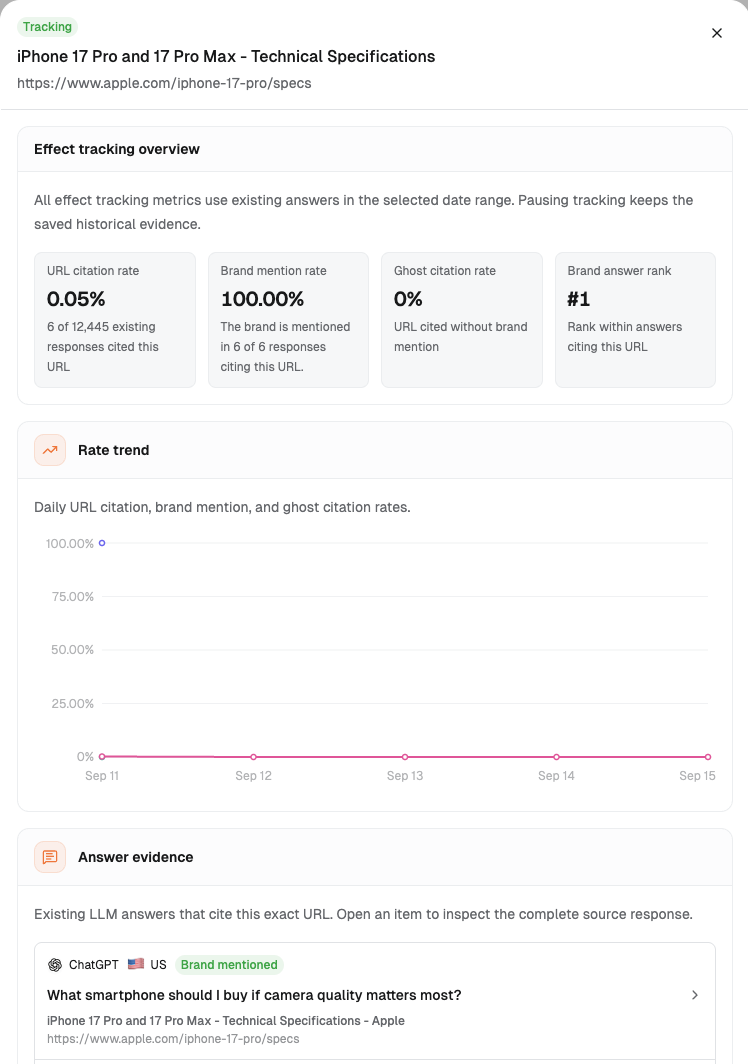
Add both the originally cited old page and the desired target page. For each, record the values in its details and the dates shown. Details show “URL citation rate,” “Brand mention rate,” “Ghost citation rate,” and “Brand answer rank.” Ghost citation rate covers cases where a page is cited but the answer never mentions the brand. For example, an answer may use official specifications to explain general buying advice without naming the brand in its body.
Effect tracking reports on the entire brand, without separating markets. This interface example is the iPhone 17 Pro specs page. It shows where to find the metrics, Rate trend, and Answer evidence in the details.
Details of a tracked page in Effect tracking (reviewed October 10, 2026). This is an interface example for the iPhone 17 Pro specs page, not the smart watch case data in this article.
“Add tracked page” requires a URL; the title is optional. Adding a page reports on existing answers. This does not start real-time crawling. The review after an update uses answers collected later, so arrange it separately. For full answers, use the route in Section 2.1. See checking metrics and answers after a page update for the three metrics' meanings and the review table.
5.2 Two Conclusions Need Further Evidence
If an answer cites a different page after an update, you cannot directly attribute that change to the update.
An answer citing the target page also does not mean the user clicked or bought.
First save the fresh answer, cited URL, edited content, update date, and other changes during the same period. Then continue checking. If later answers still cite the old page, record the question and page. If they cite both pages, keep separate records for each. If they cite the target page, save that answer and its sources. Follow the original observation plan to check whether these patterns persist. Then decide on the next task.
6. Conclusion
You can now choose a cited official page related to a buying need. Read its answer and open both the currently cited page and candidate target page. Start with a landing page mapping table. State what the user needs to do and how the two pages differ. Then ask the relevant owners to confirm.
After confirmation, put the specific missing items into a page update task sheet. If the target page is ready, check whether the old page needs a link. If the target page lacks information, open the task there. Record the evidence, confirmers, old-page handling decision, and actual dates. Then use fixed questions to observe the old and target pages separately.
Start understanding your brand's AI search performance
7.1 If an answer cites both old and current model pages, which page gets a task first?
First check whether the answer compares generations, then which model the user plans to buy. If each page supplies the needed information, keep its purpose and continue checking purchase links and older-model labels. Once you find a specific gap, open a task for that page. For example, if the old specifications are complete and the target page already compares models, update the link when the connection between them is the only missing piece.
7.2 What else should you check when regional pages share a language?
Check the sales country, currency, available models, delivery limits, and purchase links. Pages in the same language may serve different countries. For example, the Austrian record cites another country's specs page. Its specifications can be useful, while purchase conditions need checking on the relevant site. Record the collection region and page country separately. Then ask regional business or ecommerce to confirm.
7.3 If a target purchase page already exists, do you need another buying guide?
First check whether the existing page helps users make this choice. If it lacks regional information, cost conditions, or a next-step link, update that page. When users need to compare candidates, check the existing comparison page first. When one particular use needs its own explanation, consider a use-case page. Start the task with the specific gap you found.
7.4 How do you record a URL that looks current but opens a different generation's page?
A purchase page may keep the same URL path while its content updates with each generation. In August, the German /de/shop/buy-watch/apple-watch page had the title “Apple Watch Series 11 kaufen.” On October 10, the same path on the Austrian site was already titled “Apple Watch Series 12 kaufen.” Save the URL cited in the original answer and its title at that time. Then record the address it opens, current model, and review date. Send these to the website owner for checking.
7.5 Who adds a purchase link when a support page still serves existing users?
Support confirms which users still need the original information. The product team confirms the relevant model. Website or ecommerce teams provide a suitable link, and the page owner implements the update. For example, keep the Series 9 specs page's original parameters. When proposing a comparison link, use the task sheet to check the label's location and final address.
8. References
The answers Dageno collected in the smart watch market from August 3 to 19, 2026: brand mentions and official-page citations in buying answers, previous-generation model pages, page countries, and official page types, plus the Austrian product selection and Polish buying records.
Review records for Apple's Austrian public pages, October 10, 2026: the Series 9 tech specs support page, watch category page, purchase page, and comparison page. URLs appear in Section 4.1.
Dageno is the research and insights team at Dageno AI, publishing industry reports and expert analysis on AI Search Visibility, Generative Engine Optimization (GEO), and AI-powered search discovery.