After a New Product Launch: How to Decide Which AI Buying Questions to Pursue Instead of Monitoring Every Keyword
Start with questions where the predecessor or competitors appear. Check the new product against real requirements, choose a first batch, assign page updates, and retest the same questions to track how it appears.
Explore 12,000+ niche markets with no login required
Updated by
AI-assisted for research support
13 Min Read•
Updated on Oct 12, 2026
1. TL;DR
Decide which buying tasks the new product serves, then find candidates in answers about the previous-generation model and the category. Group similar wording that shares the same need and user conditions, and choose representative questions.
For each group, check product fit, how competitors appear, cited sources, and the page tasks the team can carry out. After product confirmation, mark it as first batch, pending retest, or on hold.
The first-batch size depends on what the team can review, carry out, and retest. Keep the original question set as the baseline, and record new questions separately. Save answer wording, conditions, and citations in each retest.
2. Why should you avoid turning every keyword into a tracking question after launch?
2.1 Separate a keyword, a buying question, and a single answer
After a new product goes live, a team may receive a long keyword tracking list. Before setting up tracking, check which buying task each term represents.
A keyword describes a topic, such as smartwatch battery life. Buying questions help users choose a product and include a use case, budget, phone system, or comparison target. “Choose for your needs” means finding a product for a user's own use case and conditions. “Compare specific options” means choosing between named options.
A single answer is a result from one platform, in one region, on one date. The same question can be collected repeatedly, or answered on different platforms and in different regions. Deduplicate candidates by question ID, and keep each answer when checking results.
The team needs to decide which buying tasks to pursue. Start with the market using the AI search visibility guide, then find relevant needs and read the answers. Each selected question should have a clear reason for being relevant to the new product.
2.2 New product facts set the scope; predecessor answers provide a starting point
Start with existing records: answers Dageno collected in the Smart Watches market from August 3 to 19, 2026. This set contains 3,069 answers with full text. Of these, 2,253 have platform, region, and question-type information.
If you are this brand, first find candidate buying tasks in which the predecessor, Series 11, appeared. Then ask the product owner to confirm whether Series 12 fits those users. The owner needs to check the phone system, use case, budget, region, and limits of use. Existing answers featuring the predecessor provide the candidate starting point.
Next, collect answers about the new product using the same questions, and save the full wording. Turn confirmed candidates into page tasks, then retest the fixed questions.
3. Which buying tasks should the first batch cover?
3.1 Separate category choice, brand-named questions, and competitor comparison
Read the prompt text first, then put candidates into three groups:
Category choice: the user describes a need and looks for a suitable product.
Brand-named: the user already knows a brand and wants to check its facts or fit.
Competitor comparison: the user has specific options and wants to choose between models.
Report brand-named and category questions separately to see whether users are checking a known brand or finding candidates. Use the prompt text to record whether it names a brand. The team needs to fill in the prompt text for this material from its existing question set. Mark the corresponding labels as “To be filled in” for now.
Find possible comparison targets among models that appear together in answers. Then ask the product owner whether they serve the same buying task. Section 5 filters these models against the new product's conditions.
3.2 Separate learning, selection, fit checks, and purchase actions
Users choosing a product first learn about it, build a shortlist, check conditions of use, and find a purchase channel. Allocate first-batch questions to the task the team is addressing now.
Look at where the predecessor already appears. Among the 3,069 answers with full text, 483 name Series 11. Question types are available for 435 of those. A model appearance is identified from its name in the answer text.
Question type
Answers naming Series 11
Recommendations → Choose for your needs
210
Recommendations → See top recommendations
65
Evaluation & comparison → Compare specific options
56
The first two types total 275 answers, or 63% of the 435. Adding specific comparisons brings the total to 331, or 76%. If the team wants the new product to appear in buying choices, read these three types first to start from existing product discussions.
Add candidates under Informational research, How-to & guidance, Pricing & cost, and Providers & purchase channels as the task requires. Use priorities for AI buying questions to decide which stage to address first. For example, when the task is helping users choose, start with selection and comparison. When users are looking for where to buy, check purchase-channel information.
3.3 Keep user and regional conditions with each task
For each candidate group, record the phone system, use case, budget, and region in that order. List the user's hard requirements first, then ask product to confirm whether the new product meets them. Review candidates together only when they share the same conditions.
Choose platforms and regions based on the target customers. Record the regions to serve, local owners, and platforms to observe. Then use checking AI visibility by region to plan collection. Save questions and answers for each region separately so local owners can check the conditions.
4. How do you build candidates from existing records and remove duplicate wording?
4.1 Open answers through Search intents, then retrieve the prompt text from the question set
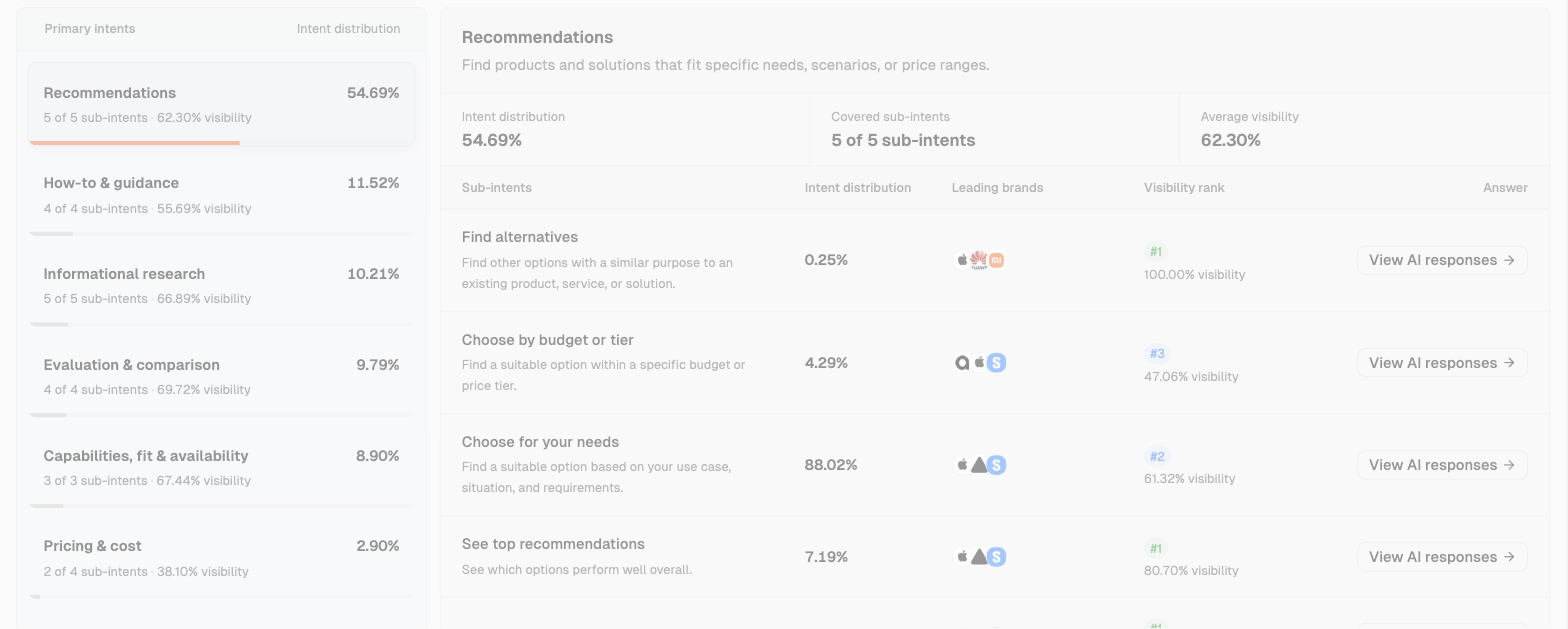
Read answers through Demand & insights → Search intents → Recommendations → select a sub-intent → View AI responses. Open “Choose for your needs” first, then “See top recommendations.” When you find a task relevant to the new product, match the answer record to the original question in the team's question set.
“Recommendations” in Search intents (Smart Watches market, Apple, viewed on October 12, 2026). Sub-intents show leading brands and the current brand's Visibility rank. Choose question types first, then retrieve the specific prompts from the team's question set.
Under “Choose for your needs,” Apple's Visibility is 61.32% and its Visibility rank is #2. Visibility is the share of answers in that sub-intent that mention the brand. The current dashboard window is September 11 to 15.
Brand visibility cannot directly establish whether the new product appears or is recommended; check the model name and choice wording in the full answer.
Start candidate records with the question ID, original question, sub-intent, platform, region, date, and original answer. Get the prompt text from the team's existing question set, and mark missing text as “To be filled in.” Marketing can then return to the same question, and product can read the same evidence.
4.2 Deduplicate by ID, then group similar wording for the same need
Deduplicate by ID first: one question ID counts as one question. Different answers to a question may place it in more than one sub-intent. This set contains 1,573 questions, of which 119 appear in multiple sub-intents. Keep them in each relevant sub-intent.
Question type
Distinct questions
Questions with an answer naming Series 11
Choose for your needs
700
163
See top recommendations
106
46
Compare specific options
148
42
If you are this brand, the predecessor appears in answers to 163 questions under “Choose for your needs.” Send those questions to product to check the new model's fit first. Then review candidates under top recommendations and specific comparisons. The three categories can overlap, so deduplicate totals by question ID.
After deduplication, group questions by need. Check user conditions and the task each question addresses. Put similar wording with the same use case and phone-system conditions in one group. Keep a representative question close to how the team's real customers speak. Keep separate groups when the system, use case, or budget conditions differ.
Follow the AI visibility prompt set guide to save IDs, original wording, conditions, types, and groups. For records awaiting prompt text, keep the ID and answer evidence. Once the text is filled in, decide whether to use the question as a representative.
4.3 Review old questions when the new product changes the facts
Review the original set by model, users served, conditions of use, and purchase channels. Ask the product owner to confirm each fact before handling its questions. Keep those that still apply. Mark questions about needs the product no longer serves for retirement. Add candidates when the new product has a confirmed new use case.
When adding questions, leave separate fields for wording sales has received, the corresponding new product facts, and search volume. Assign owners to fill them in. Mark newly written wording as a “Candidate awaiting review,” and add it only after marketing and product check it. Record a reason and owner for each new question.
5. How do you filter questions the new product does not fit and prioritize the first batch?
5.1 Check product fit first, then the buying stage
For each candidate group, ask in order: Does the new product serve these users? Does it fit the region and phone system? Are the budget, costs, battery life, and limits supported by confirmed facts? Does this answer help the user choose a product?
Once the task and conditions are confirmed, decide whether to put it in the first batch. Send facts awaiting checks to product for supporting material. Put questions on hold when the product does not fit.
Market themes help the team list selling points to check. The market theme table contains 49 themes. Summing the answer counts across 13 collection days from August 3 to 19 gives 1,674 for “Long Battery Life” and 461 for “Seamless Ecosystem Integration.” An answer can have multiple themes, and each theme is counted separately.
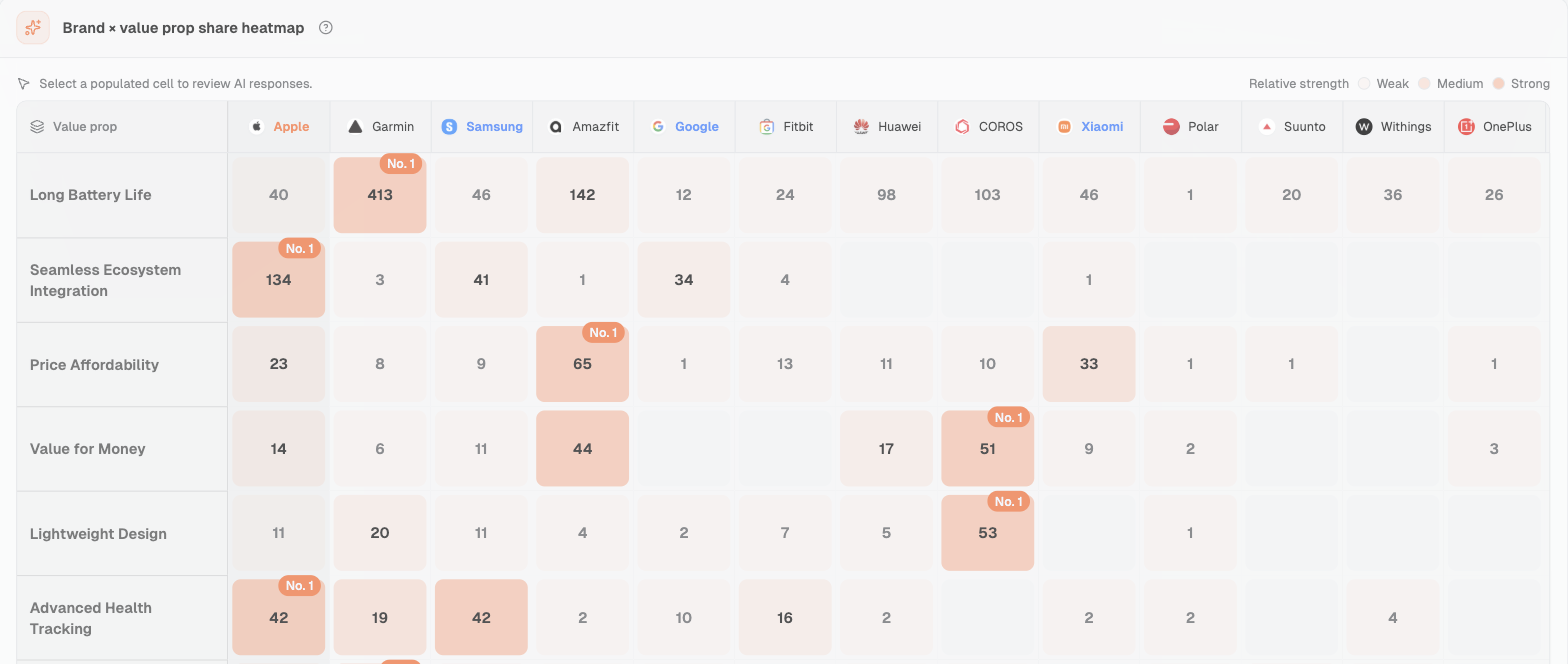
Then read current brand selling points through Demand & insights → Brand value props → Brand × value prop share heatmap.
Brand × value prop share heatmap (Smart Watches market, Apple, viewed on October 12, 2026). Numbers are mentions in collected answers. For Long Battery Life, Garmin has 413 and Apple 40. Apple leads Seamless Ecosystem Integration with 134.
Each cell counts brand mentions for that value prop. Color shows relative share within the same value prop. Read the “Long Battery Life” and “Seamless Ecosystem Integration” rows, then ask product to check the new model's battery life, phone-system compatibility, and limits of use.
Theme counts and the heatmap do not prove the new product's performance or attribute answers without the brand to a particular selling point.
Keep candidates for needs the new product is confirmed to meet. For conditions awaiting confirmation, record the fact to check and the confirming owner.
5.2 Check how competitors and your brand appear, then review repeated answers
Start with answers featuring the predecessor. Among 284 Recommendations answers naming Series 11, count an answer once for each other model it also names. External candidates are:
Candidate comparison target
Answers naming this model alongside Series 11
Galaxy Watch8
144
Venu 4
87
Pixel Watch 4
67
Fenix 8
66
Ask product to check the first three against the same use case, budget, region, and system conditions. Product also checks whether Fenix 8 serves the same buying task. Within Apple's own product line, Ultra 3 appears in 135 answers, SE 3 in 93, and Series 10 in 50. Record these as choices within the product line.
Next, look at answers without Apple. Among 1,265 Recommendations answers with full text, 473 do not mention Apple, or 37.4%. Of these, 397 belong to “Choose for your needs.” In these answers without Apple, the Garmin Forerunner series appears in 112 and Fenix 8 in 75. Product decides whether to pursue these questions based on the new model's conditions of use.
In “Competitor research → Competitor performance,” first look at the situations in which a competitor appears, then associated sources, then the full answer to check specific models. Use checking answers when a brand ranks behind competitors to save both brands' positions. Then use recommendation levels in AI answers to distinguish listing from recommendation and save the wording and conditions.
Next, check repeated answers to the same question. Pair records with the same question ID, platform, and region, collected exactly twice on different dates, with full text for both answers. There are 292 matching pairs in this set:
51 name Series 11 in both runs.
38 name Series 11 in only one run.
203 name Series 11 in neither run.
Keep the 38 pairs with only one appearance in the pending retest queue. Save both answers and plan another run. Product still needs to confirm fit for records with two appearances. Consistent predecessor appearances can help the team decide which tasks to check first.
5.3 Review cited sources, then decide on a specific content task
In the same 284 Recommendations answers naming Series 11, count each answer once for each domain it cites. Wareable appears in citations from 126 answers, TechRadar in 106, YouTube in 102, Reddit in 69, and Apple's official website in 37.
Build a review list from these source records. Find each specific cited page in the answer. Check its publication date, model discussed, conditions of use, and connection to the answer's wording. Fill in whether a new product review exists and what it says after checking the page.
Once checks are complete, assign actions according to what the candidate needs:
Missing product facts: ask product to confirm the model, compatibility, costs, and limits, and add them to the product page.
Confirmed facts, but no explanation of who the product suits: add use cases and reasons based on user conditions, then comparisons under the same conditions.
An explanation already exists on owned pages: check the specific external sources and record facts and test conditions to add.
Product conditions await confirmation: keep observing, and name the confirming owner and retest plan.
When adding use cases or comparisons, follow landing pages that support AI recommendations to place confirmed facts beside the relevant explanation. Link every page edit back to the buying question it addresses.
5.4 Confirm the first-batch list using shared rules; let the team decide weights
Confirm product-fit facts, check the buying task, read competitor and repeated-answer evidence, then confirm the content task the team can carry out. Follow the same sequence to mark candidates “first batch / pending retest / on hold,” and record the reason.
Leave search volume and scoring weights for the team to fill in. If scoring is needed, have product and marketing agree on criteria, weights, and an effective date first. Then review all candidates under the same rules. For now, record the result of each check in the list.
The following is a first-batch question list template. The team fills in prompt text, owner names, and new product fit. Confirming roles are proposed assignments.
Question type
Why choose it
Comparison targets
Who confirms
Choose for your needs
The predecessor appears in answers to 163 questions; check new product conditions and representative wording question by question
Product to confirm by use case
Product and marketing; pending
See top recommendations
The predecessor appears in answers to 46 questions; check region, use case, budget, and overlap
Keep product-line choices separate; final models await confirmation
Product and marketing; pending
Compare specific options
The predecessor appears in answers to 42 questions; check whether it is the same buying task
Galaxy Watch8, Venu 4, and Pixel Watch 4 are candidates
Product; pending
Selection questions where the brand is absent
Absence is observed in answers; include once the new product fits and a page task is available
Check models in the specific answer
Product and regional owner; pending
The first three rows can contain the same question, so deduplicate totals by ID. The 473 absence records are answers. Build the candidate question list by ID. Save the original question, answer, filtering result, and confirming owner for every selected question.
6. How large should the first batch be, and how should you retest and maintain it?
6.1 Set the size by what the team can review, carry out, and retest
Set buying-task coverage and target regions first, then keep representative questions with clear conditions from each group. Check facts, owners, and page tasks question by question. Finally, check whether the team can keep retesting. Use AI visibility sample size to plan coverage. Write the first-batch size, platforms, and frequency into the plan.
If the team cannot yet read all candidates, start with confirmed tasks for which page work and retests can be scheduled. Keep the rest in the review queue. Once facts are filled in next round, decide whether to expand the set.
6.2 Give each selected question a page task and retest date
First identify the owned page to edit, then list confirmed new product facts, name the confirming owner and evidence, and link the task to its retest question and date.
The following is a page task sheet with a retest plan. The team fills in actual pages, owner names, and dates.
Page
New product facts to write
Who confirms
Evidence
Retest question and date
New product page; actual page to be filled in
Model, region, compatibility, costs, and limits await confirmation
Product; name to be filled in
Product documents to be filled in; Apple press release supports names and in-store arrival date
Fill in IDs and original wording from the first-batch list; date to be set
Use-case or comparison page; actual page to be filled in
Who it suits, choice reasons, and comparisons under the same conditions; facts await confirmation
Product and marketing; names to be filled in
Confirmed facts and answer records; specific links to be filled in
Keep the original question, platform, and region fixed; date to be set
Owned page associated with a source-check task; to be filled in
Facts and test conditions for reviewers to check; awaiting confirmation
Product and content; names to be filled in
Cited domains provide direction; specific cited pages await checks
Record page updates and answer citations; date to be set
After product confirmation, put evidence beside the relevant fact and use the page name as the link text. During review, the team can trace a page statement to product documents and then to the original question it is meant to address.
6.3 Keep original questions fixed to review changes; add and remove new questions separately
For retests, keep question wording, platform, region, language, collection method, and model-identification rules fixed. Save each date and full answer. Record whether the new product appears, whether it is listed or recommended, whether the stated conditions are accurate, and which pages are cited. Mark unreviewed records as pending review.
Follow verifying whether AI recommendations improved to save page edits and repeated collection records. Review answer changes for each original question. Keep retesting the original set, and record reasons for adding new questions separately.
Review the set when a new model arrives, conditions of use change, or a new comparison target appears. Merge duplicate wording for the same task, retire questions about needs the product no longer serves, and add tasks supported by confirmed facts.
The team maintains the first-batch question list and page task sheet together. The recommendation column under “Value prop opportunities” provides checks to pursue. Product confirms new product facts before deciding the content action.
Start exploring your brand's AI search performance
How do you start when the new product has no answer data yet?
Find candidates in the predecessor's existing buying tasks, then have product confirm fit for the new model. Once the list is ready, collect answers about the new product using the original questions. Save model names, wording, conditions, and citations for later retests.
Can you choose questions without search volume or scoring weights?
Start by checking product fit, buying stage, answer evidence, and available tasks one by one. Leave search volume and weights to be filled in. If scoring is needed, have the team agree on rules first, then review all candidates consistently.
Should you pursue every question where competitors appear and your brand is absent?
Check whether the new product meets the use-case, system, budget, and regional conditions first. Add it to the first batch when fit is confirmed and a page task is available. Get supporting facts when confirmation is pending, and put it on hold when the product does not fit.
Do you need to track every variation in wording?
Check whether the user conditions and buying task are the same, then choose representative wording. Keep separate groups when conditions change. Record new questions separately from the original set. Save the original wording and repeat it unchanged in later retests.
Answers Dageno collected in the Smart Watches market from August 3 to 19, 2026: full answers, question and type records, brand records, themes, and citations supporting candidate selection and repeated-run cases in this article.
Dageno is the research and insights team at Dageno AI, publishing industry reports and expert analysis on AI Search Visibility, Generative Engine Optimization (GEO), and AI-powered search discovery.