After a Website Redesign: How to Check Whether AI Descriptions, Recommendations, and Citations of Your Brand Were Unintentionally Affected
When an old URL disappears from AI citations, check whether the new page still serves the original task. Compare answers, old and new URLs, and brand facts, then choose a fix, continued observation, or sign-off.
Explore 12,000+ niche markets with no login required
Updated by
AI-assisted for research support
12 Min Read•
Updated on Oct 13, 2026
TL;DR
Do not rush to judge after a redesign. When the same question was collected twice, only about 15% of the URLs cited by AI were the same. Compare with the pre-redesign fluctuation baseline before deciding whether to investigate.
Check three things: descriptions (how AI describes your product), recommendations (whether the recommendation level changed), and citations (which page AI cited). Visit each old URL cited in August. Sort them into four groups: merged into a general page, mapped one-to-one to a new page, still at the original URL, or unavailable. Each group needs a different response.
Choose one of three decisions based on clear conditions. Fix confirmed gaps in key pages or facts. Keep observing if records are incomplete or changes remain within historical fluctuations. Sign off when page checks and agreed retests all pass. Deliver a redesign review checklist and a sign-off decision sheet.
1. Compare with the fluctuation baseline to decide whether changes need investigation
Two weeks after the redesigned website goes live, the growth lead notices that the official URLs cited in AI answers have changed. Some people want to roll back. Others want to wait. Put the old and current answers side by side. Check whether new pages replaced old ones. Then check how citations changed when the same questions were repeated before.
1.1 Start with the citations from two answers to the same question
Dageno recorded every cited URL in answers collected in the smart watch market from August 3 to 19, 2026. One answer can cite several pages. Each page has a citation record. A citation is a source page listed in an answer. A web address (URL) is the location of that page. For example, www.apple.com/apple-watch-series-11/specs/ was the Series 11 specifications page URL recorded at collection time.
Of 3,301 answers, 2,428 had citation records containing URLs, with 33,418 citations in total. The median number of cited URLs per answer was 12.
Among them, 388 pairs shared the same question ID, platform, and region, with one answer collected on each of two dates. In one information query on Google AI Mode in the Netherlands, the August 4 answer cited the Egyptian Series 11 specifications page. The August 11 answer cited the US Series 11 product page. Both cited Apple's website. The specific page and country site changed.
A “fluctuation baseline” is how much results normally change when you repeat collection under the same conditions. The switch from a specifications page to a product page above is a real change to save in that baseline. If this were your brand, repeat fixed questions before the redesign. Save URLs, platforms, regions, and dates for comparison after launch.
1.2 Check URL overlap and domain overlap separately
Overlap means the number of URLs cited in both answers divided by the total number of distinct URLs cited across the two answers. Remove duplicate URLs from each list before comparing them. Keep different language URLs for the same document separate.
Across these 388 pairs, median URL overlap was 0.15. In 72 pairs, no URLs overlapped. For domains, median overlap was 0.31. In 23 pairs, no domains overlapped. A domain is a website name, such as apple.com. support.apple.com is a subdomain for the support website. The URL can change while the website stays the same.
Apple's website was cited in both answers in 58 pairs, in only one answer in 31 pairs, and in neither answer in 299 pairs. Of the 58 pairs that both cited the website, 48 shared at least one URL. In 10 pairs, all URLs differed.
In one review comparison on Google AI Mode in Italy, the August 4 answer cited the SE 3 product page and a news release. The August 10 answer cited a model comparison page instead. First record what information the original answer needed. Then read the replacement page to see whether it still provides that information. Record the missing original URL, the new URL, and whether the official website is still cited as separate checklist entries.
Record both “is the official website still cited?” and “which specific page is cited?” Use AI visibility sample size and retest schedule to plan how many answers to collect and how many rounds to run. Here, the focus is comparing URLs and domains.
1.3 Use your own baseline to start an investigation
If this were your brand, fill in: key questions, platforms, regions, repeated pre-redesign results, allowed changes, retest rounds, and dates. The growth lead should confirm which missing facts or pages would affect a user's choice.
When one old URL disappears, first look for the expected new URL or another page that still answers the original question. Start investigating pages when a needed page type remains absent across the agreed rounds and exceeds the brand's normal fluctuations. Keep observing if the new sources still complete the original task or records are incomplete.
Exceeding historical fluctuations alone does not prove that the redesign caused the change. Connect the change to a specific edit. Which page moved? Which fact was deleted? Which product conditions changed at the same time? Send confirmed redirect errors, access problems, and missing facts to the responsible person for repair. Judge answer changes from the retest records.
2. Keep comparison records and check descriptions and citations separately
2.1 Put the change list, old and new pages, and original answers together
First, the website lead should provide the launch date, affected pages, old-to-new URL mapping, and page text before and after launch. The product lead should confirm current facts and what historical information must be retained. The content lead should record product materials and external pages edited during the same period.
Fill in: launch date; old URL → expected new URL; changes made; the original page's task; evidence for current facts; sign-off owner. Include pages whose text changed even if their URLs stayed the same.
Choose fixed questions related to these pages from AI visibility prompt set. Save each question's exact wording, ID, language, platform, region, and full answer. This export contains question IDs. The person responsible for collection should supply the exact question text.
The change list shows what was edited. The URL mapping shows where each old page was expected to go. The page text shows where facts were retained. Original questions and answers show what AI said and which pages it cited. Keep each item beside its corresponding page. Mark missing items “Fill in: …” and name the person who will supply them.
2.2 Descriptions and citations are two separate checks
A description is what an answer says about a brand, product, or conditions of use. For example, an answer might say “Apple Watch only pairs with iPhone.” A citation is a source page listed at the end of an answer, such as a support document on support.apple.com. Keep separate records for descriptions and citations.
In the August export, 400 of the 419 answers citing Apple's website mentioned Apple. The stance label in the export (positive / neutral / mixed / negative) was positive for 221 answers, neutral for 168, mixed for 10, and negative for 1.
Another 1,096 answers mentioned Apple without citing Apple's website. Their stance labels in the export were positive for 797 answers, neutral for 214, mixed for 51, and negative for 33. In other words, among answers that labeled Apple positively, 797 did not cite its website and 221 did. Three out of four did not cite the website. Save the positive label as recorded by the system. Read the full answer separately to judge the recommendation level.
For records without an official website citation, you cannot identify which source supplied the brand description. Check the exact wording and facts for descriptions. Check URLs and page content for citations. See AI search visibility guide for related definitions.
2.3 Judge recommendation levels from the full answer
Use AI recommendation definition to record mention, listing, recommendation, or explicit choice. Save the exact sentence supporting that judgment and the conditions for the choice. Record brand absence separately.
Save the first mention position and the system's stance label separately. Of the 223 pairs that both mentioned Apple, 25 had different stance labels. In 21 pairs, the “first brand mentioned” field changed. Fill in: exact sentences before and after, recommendation level, required conditions, and reviewer. Review both answers using the same rules.
3. Narrow the check to specific cited pages
3.1 Compare the historical list with the current list
Follow AI recommendation landing page. Select your brand in “Citation analysis → Competitor citations” and save the page list. In the historical list, keep the URL, title, question ID, platform, region, date, and citation count.
source_title is the cited page title recorded at collection time. For example, the Series 11 specifications page was recorded as “Apple Watch Series 11 - Technical Specifications.” Keep that title beside its old URL. Then check the current title and text.
Apple updated its Apple Watch lineup in September 2026, and the product page URLs changed with it. This was not a website redesign, but it has the same effect on AI citations: previously cited URLs need their destinations checked again. The Apple Newsroom release The latest iPhone, Apple Watch, and AirPods lineups arrive in stores worldwide records that new products, including Apple Watch Series 12 and Ultra 4, arrived in stores on September 18.
If this were your brand, start with the destinations of URLs cited in August. Then check later answers to the same questions. We visited these old URLs on October 13. Section 4 explains the method and results.
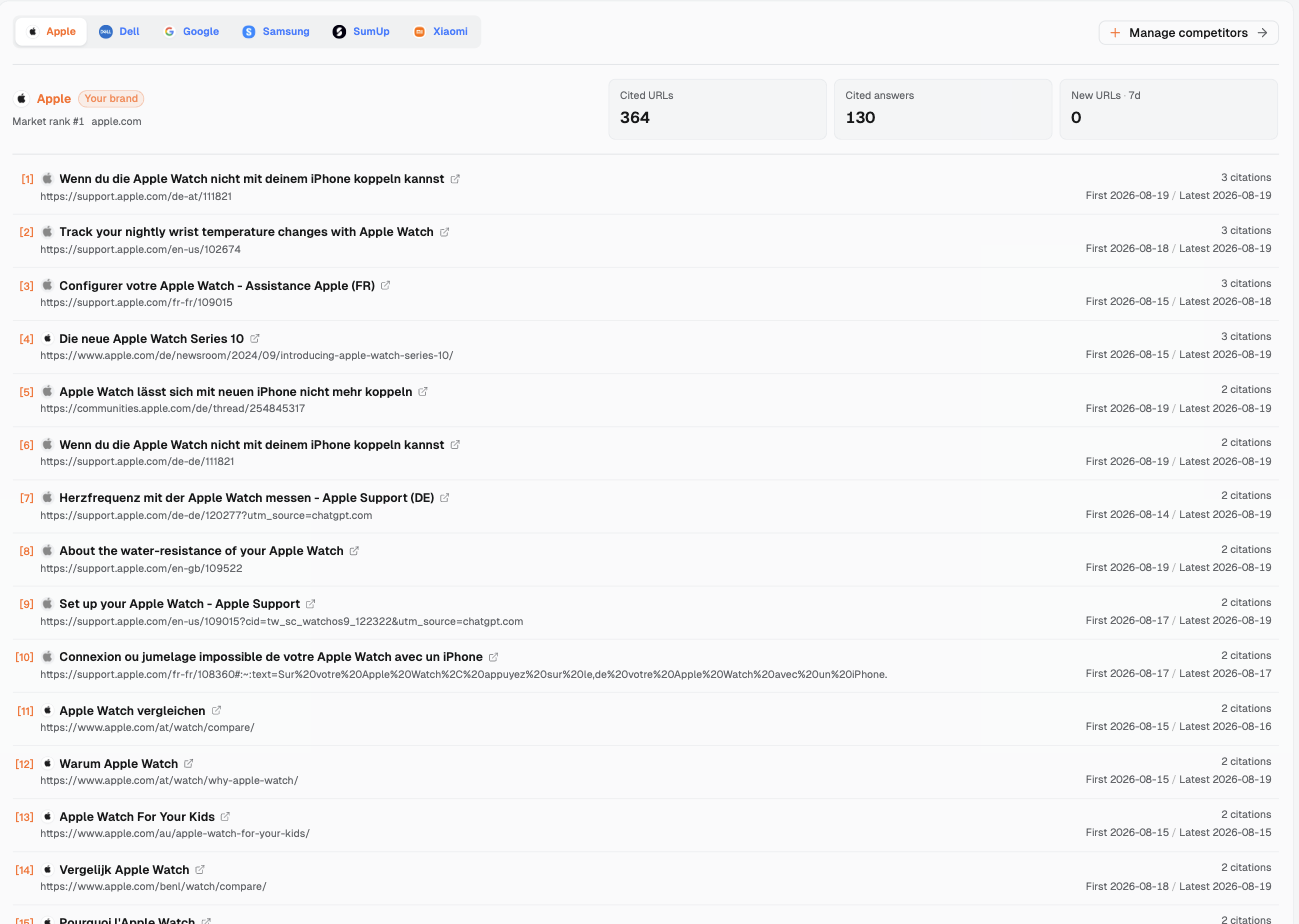
When viewed on October 13, 2026, selecting Apple in “Competitor citations” showed Cited URLs 364, Cited answers 130, and New URLs · 7d 0. The first eight rows follow. All First / Latest dates are in 2026.
Title
URL
citations
First / Latest
Wenn du die Apple Watch nicht mit deinem iPhone koppeln kannst
support.apple.com/de-at/111821
3
08-19 / 08-19
Track your nightly wrist temperature changes with Apple Watch
support.apple.com/en-us/102674
3
08-18 / 08-19
Configurer votre Apple Watch - Assistance Apple (FR)
Apple Watch lässt sich mit neuen iPhone nicht mehr koppeln
communities.apple.com/de/thread/254845317
2
08-19 / 08-19
Wenn du die Apple Watch nicht mit deinem iPhone koppeln kannst
support.apple.com/de-de/111821
2
08-19 / 08-19
Herzfrequenz mit der Apple Watch messen - Apple Support (DE)
support.apple.com/de-de/120277
2
08-14 / 08-19
About the water-resistance of your Apple Watch
support.apple.com/en-gb/109522
2
08-19 / 08-19
The dates in this page list show August. These answers are a different batch from the export. Save the dates for each record separately, then match them by full URL. The list only supports pagination, with 15 rows per page. Clicking a page row opens the external page. Register each URL you need to check. Use your own checklist to review old and new pages.
Start with Brand overview for the overall picture. That day, Visibility was 61.91%, with Visibility rank #1. In Top cited sources, apple.com had 212 citations, and 7.28% of answers cited that source. Save these values with the viewing date. Continue to Citation analysis for changes to specific pages.
3.2 The most cited pages include more than product pages
Among frequently cited official pages in the August export, the Dutch model comparison page had 12 citations. A German Apple community post discussing watch face sizes had 8 citations. The Australian page about use by children had 7 citations. Dutch trade-in pages, support documents, news releases, and repair pages also appeared in the list.
By page type, support documents had 536 citation records, store pages 164, news releases 97, model comparison pages 93, and Series 11 product and specifications pages 87. A redesign review should cover comparison, use, after-sales support, and purchase tasks.
If this were your brand, prioritize pages that were previously cited, changed in this redesign, and still serve a key task. Ask the product or support lead to confirm which facts the original task needs. Record where those facts appear on the new site. Also record unchanged pages with continuing citation changes. They help show how widely the changes spread.
3.3 Compare within the same platform and region
Use AI visibility varies by model to check platforms separately. Record where changes are concentrated. In the August answers citing the official website, Google AI Mode had 131 answers, ChatGPT 107, Gemini 81, Google AI Overview 63, and Copilot 35.
Country sites have different URLs. Follow Check AI visibility by region to keep region conditions the same. One pair of answers in the Netherlands first cited an English support document, then a Dutch version. The paths were support.apple.com/en-us/105080 and support.apple.com/nl-nl/105080. Keep the language versions in the record, then check whether their facts are the same.
Figure 1: Official cited pages listed in the “Competitor citations” tab of Citation analysis with Apple selected as the current brand (smart watch market, viewed October 13, 2026). Each row has a page title, URL, citation count, and First / Latest dates. Export a list before the redesign and another after it, then compare by URL.
4. Four destinations for old URLs and what to do about each
4.1 Record the first redirect, then check the destination's content
We requested each URL on October 13, 2026 with curl and a desktop-browser user agent and recorded the status code and the first redirect target. These were 984 Apple website URLs cited in August. A user agent is the identity declared in a request. Here, we used a desktop browser identity. The table below shows our own request results. Read later AI citations separately from answer records.
Current status
Distinct URLs
Citation records
Answers involved
Returned 200 normally
749
975
368
Redirected to a general /watch/ page
65
94
52
Redirected to the corresponding new-version page
22
23
20
URL format changed (same content page)
26
29
18
Other redirects
119
137
79
404
2
2
2
Timed out (one PDF)
1
1
1
“Distinct URLs” counts individual URLs. “Citation records” counts how often those URLs appeared in historical answers. “Answers involved” identifies answers containing them. The general-page category checks whether the first redirect points to the watch section of that country site. The corresponding-page category checks whether the last segment of the target path matches the old URL. We recorded only the first redirect. The website lead should follow it and record the final page, title, and text. The product lead should then match the retained facts with those needed by the original question.
4.2 Merged into a general page: check whether it still serves the original task
The US Series 11 specifications page had the recorded title “Apple Watch Series 11 - Technical Specifications” and 5 citations in August. The German specifications page was titled “Apple Watch Series 11 - Technische Daten” and had 3 citations. The Dutch Ultra 3 product page was titled “Apple Watch Ultra 3” and had 3 citations. Their first redirect targets follow.
Old URL
First redirect target
www.apple.com/apple-watch-series-11/specs/
www.apple.com/watch/
www.apple.com/de/apple-watch-series-11/specs/
www.apple.com/de/watch/
www.apple.com/nl/apple-watch-ultra-3/
www.apple.com/nl/watch/
If this were your brand, open the general page next. Check whether the original model's specifications and conditions of use are still available there. Choose a fix if the original question still needs those details and the destination lacks equivalent information. The product lead confirms historical facts. The content lead adds a public information page. The website lead repairs the URL mapping.
Keep observing if the information is fully retained but later answers are still missing. Sign off when both the pages and agreed retests pass. Record the original task and where the information is retained. This gives you a concrete basis for judging whether the merge works.
4.3 One-to-one mapping: check whether models and conditions still match
The Dutch URL www.apple.com/nl/apple-watch-series-11/why-apple-watch/ redirects to www.apple.com/nl/apple-watch-series-12/why-apple-watch/. The US, UK, and Polish sites have the same correspondence. On the Singapore site, www.apple.com/sg/apple-watch-ultra-3/why-apple-watch/ redirects to www.apple.com/sg/apple-watch-ultra-4/why-apple-watch/. If this were your brand, record the title at collection time and the current title for every pair.
Even with one-to-one paths, the product lead must confirm the model, specifications, and conditions of use. When an old answer discusses an old model, check where its historical information is retained. Fix mismatched or missing facts. Observe if the content is complete but answers need retesting. Sign off when both pass.
4.4 Still at the original URL: check the title and text
The SE 3 product page www.apple.com/apple-watch-se-3/ (recorded title “Apple Watch SE 3”) and country-specific specifications pages still returned 200. The Dutch comparison page apple.com/nl/watch/compare/, recorded as “Vergelijk Apple Watch,” had 12 citations and also returned 200.
If this were your brand, continue comparing titles, text, and required conditions. Fix missing key content. Observe if the page is correct but answers are incomplete. Sign off when all checks pass.
4.5 Unavailable: separate missing pages, verification pages, and timeouts
The German community page communities.apple.com/de/thread/254913978 was recorded as “Apple Watch Größe 41 oder 45mm” and had 8 citations. Scripted access redirected to a human verification page. There were 54 such community URLs. Another 2 store URLs returned 404, and one PDF timed out.
The website lead should add browser checks and log checks. If a needed page is confirmed unreadable, restore it or equivalent information and choose a fix. For scripted verification and timeout records awaiting checks, fill in the person and revisit date. Keep observing. For other records, such as URL format changes or configuration pages redirecting to category pages, check the final content individually.
5. Compare titles, key facts, and exact AI wording
5.1 Title comparisons help you find the pages to read
Put the historical title beside its original URL, then read the current page. The historical Series 11 specifications title was “Apple Watch Series 11 - Technical Specifications.” Its first redirect now points to a general page. The new product page title is “Apple Watch Series 12 - Apple.” Record the URL belonging to each title, then check the model and text.
Use the same order when a title changes at the same URL. Save the old source_title, read the current title, and compare the required facts in the text. Ask the content and product leads to confirm them. The Polish store page apple.com/pl/shop/buy-watch/apple-watch had the historical title “Kup Apple Watch Series 11.” Fill in its current title: … The content lead should check it.
5.2 When descriptions change, check facts sentence by sentence
Fill in: exact wording before and after the redesign, changed facts, information version, and reviewer. First locate changes to the model, functions, compatibility, price, or service conditions. Then check current facts. Record each result as a correct update, wording change, error, or awaiting verification.
Open a separate correction task for description errors using AI brand misinformation fix. If the website content is correct but an answer is still wrong, open the external page listed in that answer. Check the relevant facts and date.
5.3 When recommendations and citations change, check current reasons and sources
Read the recommendation wording using the same levels. Then check the user's required conditions and the product's actual conditions. If product conditions changed, the product lead confirms the new wording. If required facts disappeared from the new page, the content and website leads should restore them.
When an old page is absent, read the pages now cited. Record new official pages, other pages on the same site, and external pages separately. Check whether each still answers the original task. Match the actual answer with page changes and factual evidence. Locate the specific gap, then add it to the decision sheet.
6. Choose a fix, continued observation, or sign-off based on conditions
6.1 Deliver the redesign review checklist first
If this were your brand, the growth lead first confirms key questions, allowed changes, and the retest plan. Then ask each responsible person to approve the relevant rows. Define an anomaly with conditions that can be checked.
Check
Materials to review
Normal fluctuation baseline
What counts as an anomaly
Who confirms
Description
Exact wording before and after, product information, old and new text, actual sources
Fill in: historical fact and wording changes for the same question
A key fact is wrong, or a missing required condition affects the original task
Product checks facts; content checks text; fill in names
Recommendation
Full answers, sentences supporting level judgments, required conditions
Fill in: historical level changes for the same question, platform, and region
Original conditions still fit, but agreed retests show a continuing decline beyond allowed changes
Growth/analysis checks levels; product checks fit; fill in names
Citation
Old-to-new mapping, citations before and after, titles, destination text
Fill in: historical changes in URLs, domains, and owned sources
Key facts have no readable replacement page; or relevant owned citations show continuing losses beyond the baseline
Website checks access and mapping; analysis checks citations; fill in names
6.2 A fix needs a confirmed gap and a specific repair target
Choose a fix when the responsible person confirms a wrong redirect, access problem, or missing key fact on a needed page. An incorrect AI sentence supported by product evidence also needs a fix. Repair those specific problems first, then retest answers.
Make repairs in order. Restore needed access and correct mappings. Restore missing facts and evidence. Then check titles, text, and internal links. For each item, fill in the repair page, missing information, person doing the work, reviewer, and verification method.
If local repairs cannot restore key content, the website lead should assess a rollback. First confirm that the old version can be restored and engineering risks are acceptable. Then make a plan. Check pages and answers after the rollback using the same checklist.
6.3 Continued observation needs missing items and retest conditions
Choose continued observation for a single change, changes within historical fluctuations, or pages that retain the information while answer records remain incomplete. Specify the next step for rows missing the original question, old record, or final destination page.
Fill in: what is missing; who will supply it; how the next collection will run; the retest date; which results trigger a fix or sign-off. Keep rows under repair marked “fix.” Update them after repair based on retest results.
6.4 Sign-off requires both page checks and retests to pass
Sign-off requires each of the following conditions to pass:
The scope of changes and priority pages have been checked. URL mappings and retention or retirement plans are confirmed.
Required facts are complete on readable pages, and brand descriptions in answers are accurate.
Recommendation changes match actual product conditions and meet the agreed limits on change.
Replacement citation pages complete the original task, and agreed answer retests have passed.
Key missing items are cleared, and the responsible people have signed.
Fill in: questions, pages, platforms, regions, observation window, and signers covered by sign-off. Reopen an item if a key factual error, an unreadable important page, or continuing losses beyond the baseline appear later.
6.5 Deliver the sign-off decision sheet
The table below uses real URL samples. Responsible people fill in answer results and decisions. If this were your brand, judge each row using the same conditions.
Fill in: changes to text at the same URL and to answers
Fix content gaps; observe if records are incomplete; sign off if all pass
Fill in: date and owner
communities.apple.com/de/thread/254913978 → scripted access redirected to human verification; fill in revisit result
Fill in: actual AI citation evidence
Fill in: original task and location of retained facts
Fix a confirmed gap in needed access; observe if access checks are pending; sign off if all pass
Fill in: date and owner
7. Retest under the same conditions and keep results in the decision sheet
7.1 After repairing pages, run the original questions again
The website lead first checks the access chain, destination text, title, and required facts. The analysis lead then saves full answers using the original questions and the same platform, region, language, context, and collection method.
Follow Verify AI recommendations improved for the comparison method. Also retain the old-to-new URL and fact checks from this article. Fill in: retest round, date performed, page results, exact description wording, recommendation level, and citation list. Update the decision sheet after every collection.
7.2 Use Effect tracking to check existing page records
First, a term you will encounter in Effect tracking. The ghost citation rate means “The share of AI answers that cite your website without naming your brand anywhere in the answer text.” For example, the Ghost citations tab has one ghost citation record for the Apple Watch For Your Kids page. That tab lists 4 related URLs: the page about use by children, two Evie Ring review pages, and a UK Ultra 2 news release.
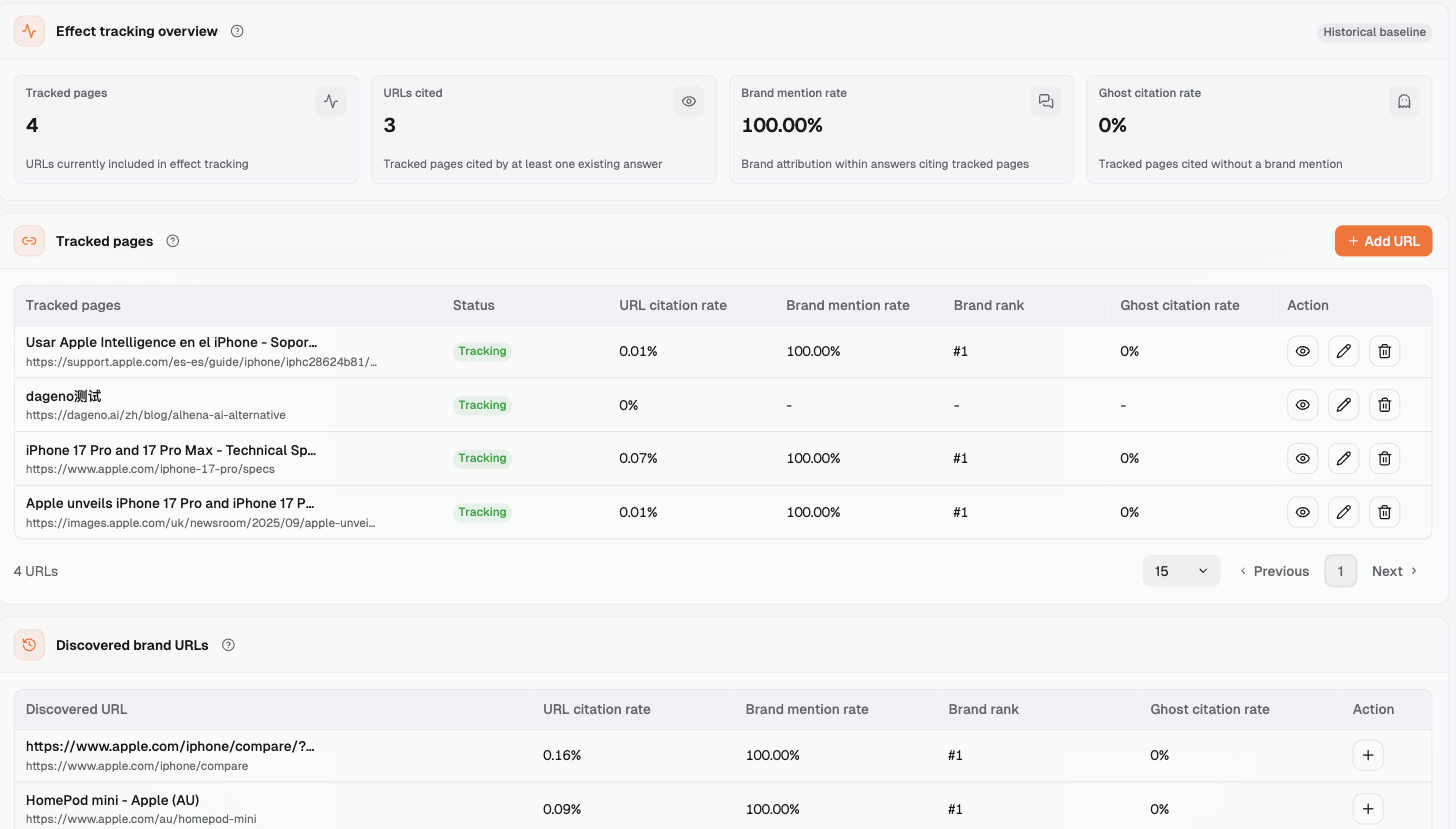
The four overview fields and their interface descriptions follow. This is an interface example from October 13, 2026.
Field
Original description
Current value
Tracked pages
URLs currently included in effect tracking
4
URLs cited
Tracked pages cited by at least one existing answer
3
Brand mention rate
Brand attribution within answers citing tracked pages
100.00%
Ghost citation rate
Tracked pages cited without a brand mention
0%
The Tracked pages table columns are “Tracked pages / Status / URL citation rate / Brand mention rate / Brand rank / Ghost citation rate / Action.” Counts use “exact matching,” which means the full URL must be identical. Old and new URLs and different country URLs have separate records.
Effect tracking covers the whole brand, without a market breakdown. The currently tracked pages include iPhone support documents, a Dageno test link, iPhone 17 Pro specifications, and a news release. This image is only an interface example. If this were your brand, add priority old URLs before the redesign. Add new URLs separately afterward. Check both.
The add dialog says: “Add a published URL to track its citations, brand mentions, and supporting evidence in existing LLM answers. This does not start real-time crawling.” Collect and save full answers separately according to the retest plan. Check them sentence by sentence. That day, “Issues & opportunities” had 3 cards: 1 Country or region coverage gap and 2 Ghost citations. There was no “redesign” category. The team maintains the redesign checklist and decisions in its worksheet.
Figure 2: Effect tracking page (whole brand, without a market breakdown, viewed October 13, 2026). Tracked pages use “exact matching” to calculate URL citation rate, Brand mention rate, and Ghost citation rate. The tracked pages here concern iPhone and serve only as an interface example. Add old and new URLs separately during a redesign.
7.3 Update decisions row by row after retesting
Write access results, description accuracy, recommendation level, and old/new/equivalent page citation status back into the table separately. Keep “fix” if a gap remains unrepaired. Keep “observe” if information is complete but retests are pending. When all checks pass, the responsible person signs off.
Keep information versions, collection conditions, retest dates, and signature records. Use these records as the original comparison for the next major change.
8.1 If an old URL is no longer cited, should we roll back?
Do not roll back yet. First look for a new page or equivalent information. Compare with historical fluctuations. Check whether the key facts needed by the original task are still available. The website lead assesses rollback based on repair scope, whether the old version can be restored, and engineering risks.
8.2 Does a page pass if it opens?
After access passes, continue checking the title, text, product conditions, and the original question's task. Then check answers under the agreed plan. Sign off when all acceptance conditions are met.
8.3 What if citations stay the same but descriptions change?
Check the exact wording and current facts. Record correct updates in the information version. Send factual errors to the correction owner. Continue reading the actual source content for citations. Record the conclusions separately.
8.4 How do we decide without pre-redesign answers?
Fix confirmed page or fact problems first. Complete the fixed questions and establish repeated collection going forward. In the decision sheet, state what this round checked, what is missing, who will supply it, and when to review again.
References
Dageno answers collected in the smart watch market from August 3 to 19, 2026 (data export). Supports answer observations, the two-collection baseline, and the list of URLs cited in August.
Dageno is the research and insights team at Dageno AI, publishing industry reports and expert analysis on AI Search Visibility, Generative Engine Optimization (GEO), and AI-powered search discovery.