Best GEO Reporting Tools for Agencies in 2027 (Compared)
Compare GEO reporting tools for agencies and learn how to deliver client-ready AI search reports with brand visibility, competitor benchmarks, prompt tracking, and actionable insights.
As clients increasingly pay attention to AI search platforms such as ChatGPT, Gemini, and Perplexity, SEO and digital marketing agencies face new reporting requirements.
Clients may ask:
How is our brand performing in AI search?
How does AI understand and describe our brand?
Why does AI recommend our competitors more often?
What notable changes have resulted from our GEO efforts over the past month?
Can you provide a professional report featuring our agency's logo?
Traditional SEO ranking reports cannot fully answer these questions.
Traditional SEO reports primarily cover keyword rankings, organic search traffic, and website performance. GEO reports must go further, explaining how brands appear in AI-generated answers, how they compare with competitors, which sources are cited, and how results change over time.
As a result, more agencies are looking for specialized GEO Reporting Tools for Agencies.
These tools should do more than collect AI search data. They should turn it into insights clients can understand: how AI perceives the brand, where it falls behind competitors, and what information or content to improve next.
This article compares seven notable GEO reporting tools for 2026 and explains how agencies can choose reporting software, establish a standardized client reporting process, and improve deliverables with white-label GEO reports.
TL;DR: Best GEO Reporting Tools for Agencies in 2026
Tool
Best For
GEO Reporting Capabilities
Dageno AI
Teams needing both market-level and prompt-level insights plus white-label GEO reports
Enterprise AI search analytics, competitive research, and reporting workflows
SE Ranking / SE Visible
Combined SEO and GEO reporting
SEO reporting workflows and AI visibility analysis
Semrush
Agencies already using Semrush
SEO reporting and AI search-related data
Scrunch
Enterprise brand GEO reporting
AI brand representation, competitive analysis, and enterprise workflows
If an agency only needs to track a small set of fixed prompts, a lightweight monitoring tool may be enough.
If your team already uses Semrush or SE Ranking, start by evaluating the AI search features within your existing reporting ecosystem.
If you need to combine a client's market-level AI visibility and project-level prompt tracking into one report, delivered with your agency's own logo, Dageno Brand Reports is particularly worth considering.
This comparison is organized around reporting use cases, not standardized paid hands-on testing. Check each provider's latest documentation for specific features, report exports, white-label permissions, and plan limitations.
1. What Is GEO Reporting?
GEO reporting is the process of monitoring, analyzing, and reporting how a brand performs in generative AI search.
GEO stands for Generative Engine Optimization, commonly referring to efforts to improve brand and content discoverability in generative AI search environments.
For agencies, the goal of GEO reporting is not merely to display data. It is to help clients understand:
How does AI understand and describe our brand?
How does our brand compare with competitors?
What information or content should we improve first?
For example, a user might ask ChatGPT:
“What are the best CRM platforms for growing B2B companies?”
AI might recommend several CRM products and explain their features.
A GEO report should help the client understand:
Whether the brand appears in the answer
How AI describes the brand and its products
Which competitors are mentioned or recommended
Whether performance differs across AI platforms
Which sources the AI answer cites
Whether these results change over time
These insights can inform the client's GEO/AEO efforts.
How AI understands the brand and its competitive position
Next actions
SEO optimization
GEO/AEO optimization and improvements to brand information
These reporting approaches are complementary, not mutually exclusive.
For agencies offering comprehensive search marketing services, GEO reporting can supplement traditional SEO reporting.
2. Why Do Agencies Need GEO Reporting Tools?
1. Clients Need AI Search Reports They Can Understand
Clients generally do not want to receive dozens of ChatGPT screenshots every month.
They care more about questions like:
“How are we performing?”
“Are our competitors more likely to be recommended?”
“What should we do next?”
The value of GEO reporting tools lies in organizing scattered AI search data into clear, interpretable reports.
2. Clients Need to Know How AI Understands Their Brand
Whether a brand is mentioned is only the first layer of information.
More important is how AI describes it.
For instance, AI might describe an enterprise software company as a tool suited to small teams.
Even if the brand is mentioned, that description may not match the product's actual positioning.
Agencies should therefore report not only on visibility but also on the accuracy of brand information and its competitive context.
3. Competitor Comparisons Give Data Meaning
Suppose a client's brand mention rate is 25%.
Without competitive data, it is difficult to judge whether that result is good.
But if major competitors have mention rates of 45% and 38%, the report can reveal a much clearer gap.
That comparison helps clients understand why further work is necessary.
4. Agencies Need More Efficient Report Delivery
Agencies often serve multiple clients at once.
If each client requires manually collecting AI answers, organizing data, and preparing presentations, reporting costs will continue to rise.
Dedicated tools can help teams establish more standardized reporting processes.
5. White-Label Reports Support Professional Delivery
Agencies typically want clients to see reports carrying the agency's own branding.
This makes white-label GEO reporting an important selection criterion.
However, white-label capabilities vary by product.
Some tools let you replace the report logo, others offer branded dashboards, and still others provide more comprehensive platform white-labeling.
Agencies should choose according to their actual delivery requirements.
3. What Should a Professional GEO Client Report Include?
A strong GEO report starts with data and ends with conclusions clients can understand.
The following eight sections are recommended.
1. Executive Summary
Begin by summarizing the most important findings.
For example:
“Within the monitored scope for this period, the client's brand had lower visibility in its target AI search market than two major competitors. The gap was most pronounced in enterprise product comparison queries. We recommend prioritizing improvements to relevant product information and continuing to monitor key purchase scenarios.”
This helps clients make decisions more effectively than showing a visibility score alone.
2. Market Overview
Show the competitive AI search landscape in the client's target market, including:
Target market
Leading brands in that market
Client brand's ranking
Competitor performance
Current competitive landscape
Remember that AI visibility rankings are not equivalent to actual market share.
3. Brand Visibility
Show how frequently the client's brand appears in AI answers.
Common metrics include:
Brand Mention Rate
Recommendation Rate
AI Visibility Trend
AI Platform Performance
These metrics must be interpreted in the context of the monitoring scope.
4. Competitor Benchmarking
Compare the client's performance with major competing brands.
For example:
Brand
Example AI Visibility
Competitor A
46%
Competitor B
34%
Client Brand
23%
The figures above are fictional and illustrate report structure only.
Agencies should also explain which scenarios account for the competitive gaps rather than simply displaying rankings.
5. AI Platform Performance
Different AI platforms may describe or recommend the same brand differently.
Reports can therefore analyze performance by platform, according to the platforms actually monitored.
6. Search Intent Insights
Users ask different types of questions in AI search, including:
Product discovery
Product comparisons
Feature evaluation
Purchase decisions
The report should explain which intent-driven scenarios generate exposure for the brand and where gaps remain.
7. Citation Sources
Analyze the websites and pages cited in AI-generated answers.
This helps agencies understand:
Whether the client's official website is cited
Which competitor pages appear
Which third-party sources deserve investigation
Whether important brand information is missing
8. Next Steps
Finish the report with clear priorities, such as:
Improve important product feature pages
Update brand and product descriptions
Add information relevant to purchase scenarios
Research topics where competitors perform strongly
Continue tracking priority prompts
The purpose of professional GEO reporting is not to display more charts, but to help clients decide what to improve first.
4. The 7 Best GEO Reporting Tools for Agencies in 2026
1. Dageno AI: Best for GEO Client Reports and White-Label Delivery
Best for: GEO Client Reporting, AI Visibility Reports, Competitor Reporting, and White-Label GEO Reports.
Dageno is a GEO/AEO platform for brand, SEO, growth, and content teams.
It helps teams understand how AI perceives their brands and competitors, then decide which information and content to improve first.
For agencies, Dageno's reporting capabilities help turn AI search data into conclusions that clients can understand, discuss, and use to guide future decisions.
The recently launched Brand Reports feature is an important part of Dageno's GEO reporting offering.
One Report, Two Perspectives: Market and Prompt
Dageno Brand Reports combines two types of data in a single report:
Market View: Market-Level AI Visibility
This helps teams understand the client's overall position in a target market, including:
Brand rankings
Competitor performance
Visibility across AI platforms
User search and purchase intent
AI citation sources
Prompt View: Project-Level Prompt Tracking
This uses specific prompts tracked within the current project to show how the brand performs in real user questions.
For example:
“Best CRM for enterprise sales teams”
“Best AI contract review software”
“Best project management software for agencies”
This allows agencies both to explain a client's overall competitive position and to drill into individual questions to demonstrate how AI understands and describes the brand.
Custom Market Selection: Report on the Market Your Client Needs
When generating a Brand Report, users can select the target market.
The report can show the number of brands in that market, as well as the current project brand's ranking and performance.
For instance, an agency might prepare a report for a client focused on a specific B2B software market.
This gives clients relevant market context rather than just data about their own brand.
Custom Brand Selection: Research Competing Brands
The Brand field selects the current project brand by default.
Agencies conducting competitor research can instead select another brand in the same market.
This supports competitive research and brand performance comparisons.
White-Label GEO Reporting: Use Your Agency's Own Logo
When requesting a report, agencies can find the Your logo field and upload their own brand logo.
The generated report uses the uploaded agency logo in place of the original Dageno logo.
Agencies can therefore deliver GEO client reports under their own branding.
For example, when preparing a monthly AI search report for a SaaS client, a GEO agency can:
Select the client's target market.
Select the client's brand.
Generate a report combining market and prompt data.
Upload the agency logo under Your logo.
Present the agency-branded report to the client.
Importantly, Dageno currently specifies report-level logo white-labeling. This should not be described as a fully white-labeled software platform, custom domain, or standalone client portal.
Suitable for Recurring GEO Reporting
Dageno Brand Reports can be used for brand visibility reviews covering 7-, 14-, or 30-day periods.
Common agency use cases include:
Baseline reports at GEO project kickoff
Biweekly AI visibility reviews
Monthly client GEO reports
Competitor research
Executive-level client presentations
Dageno's GEO Reporting Advantages
First, it combines market and prompt data.
Clients can see both their competitive market position and their performance on specific questions.
Second, reports cover competitive gaps, not just exposure.
This helps agencies explain how clients differ from competitors.
Third, reports include user intent and citation sources.
This makes it easier to turn data findings into recommendations for upcoming GEO/AEO work.
Fourth, it supports report-level white-labeling.
Agencies can upload their own logos and generate client reports under their own branding.
Considerations
Specific report-generation permissions, market coverage, supported AI platforms, and available reporting periods depend on Dageno's current product plans.
Best suited for: GEO/SEO agencies, brand marketing teams, growth teams, and content teams needing regular AI search reports.
Best for: Prompt Tracking and Lightweight GEO Reporting.
OtterlyAI suits teams that want to establish an AI search monitoring process relatively quickly.
For agencies just starting to offer GEO services, continuously tracking a set of important prompts and organizing the findings into client reports is a practical starting point.
GEO Reporting Capabilities
Prompt tracking
Brand mention monitoring
Competitor monitoring
Citation source analysis
Historical changes
Reporting and data integration capabilities
Which Agencies Is It Best For?
Small and midsize providers managing fewer clients and primarily delivering basic AI visibility monitoring.
Considerations
Confirm monitoring quotas, platform coverage, report formats, and branded-delivery permissions.
Best for: AI Brand Representation Reporting and Enterprise GEO Workflows.
Scrunch focuses on how brands appear in AI search and how AI interprets and uses brand information.
For agencies serving large enterprises, simply tracking mention counts may not be enough. Clients may also need reporting on whether AI accurately describes their products and brands.
GEO Reporting Capabilities
AI brand performance analysis
Brand descriptions and accuracy research
Competitor analysis
AI answers and source research
Enterprise workflows
Which Agencies Is It Best For?
GEO teams serving large enterprise brands and needing in-depth analysis of AI brand representation.
Considerations
Confirm the exact scope of client reporting, data sharing, exports, and white-label permissions.
5. White-Label GEO Reporting: How Should Agencies Choose?
For agencies, white-label reporting makes it easier for clients to recognize the service provider.
However, not every white-label GEO reporting feature means the same thing.
Common Types of White-Label Reporting
Type
Meaning
Logo-Branded Report
Uses the agency's own logo in the report
Custom Report Styling
Customizes report colors, covers, or other visual elements
When generating a report, agencies can upload their own logo using the Your logo field. The uploaded logo replaces the Dageno logo in the generated report.
This means agencies can deliver GEO reports to clients using their own branding.
It does not mean Dageno offers a fully white-labeled software platform.
What Should You Check When Choosing a White-Label GEO Reporting Tool?
Agencies should consider:
Can you upload your own logo?
Does the vendor's branding still appear in the generated report?
Can the reports be used for client delivery?
Does the tool support your required number of clients?
Can you select different markets and brands?
Does it include competitive analysis?
Does it include data for specific prompts?
Does it support recurring performance reviews?
White-label functionality determines how reports are delivered; data and analysis quality determine whether those reports are truly valuable.
6. How to Request a Dageno Insight Report: Create a Report in 6 Steps
Dageno Insight Reports allows users to request GEO reports based on a target market, brand, and reporting period. Users can also upload a custom logo for white-label report delivery, making it suitable for internal brand reporting and GEO/SEO agency client deliverables.
Here is the complete request process.
Step 1: Open the Insight Reports Page
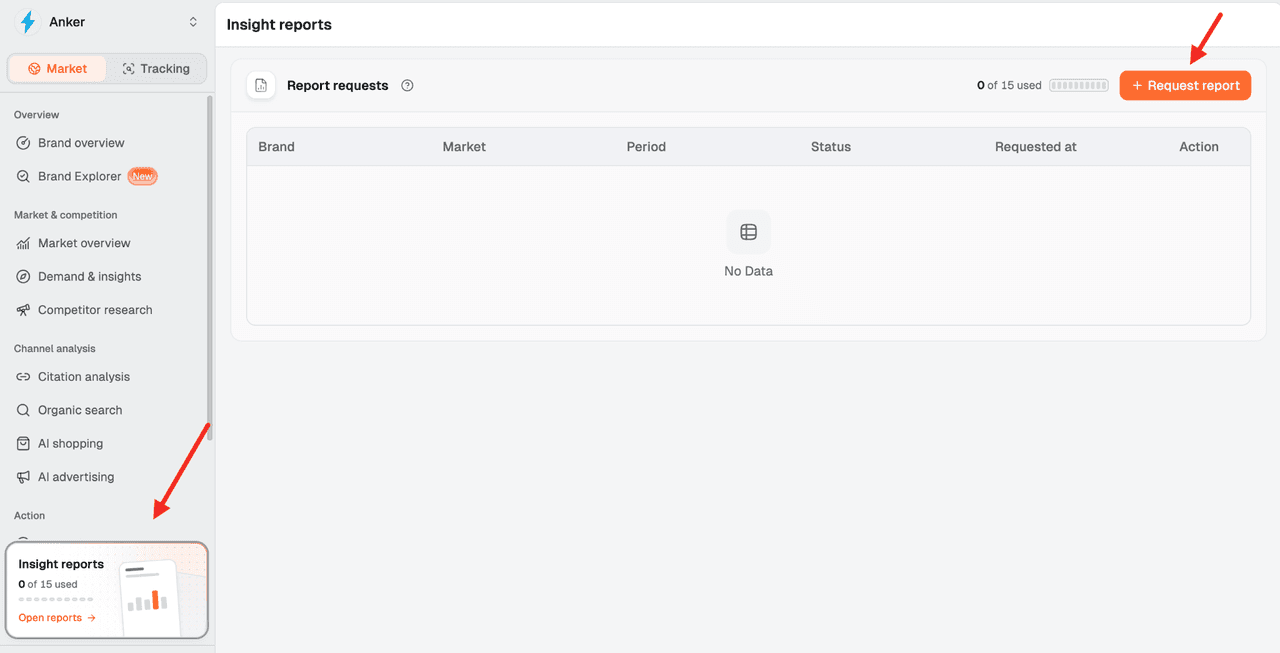
Sign in to Dageno. On the Market page, find Insight reports near the bottom of the left-hand navigation and click Open reports to access the report management page.
Step 2: Start a Report Request
On the Insight Reports page, click + Request report in the upper-right corner to open the report request window.
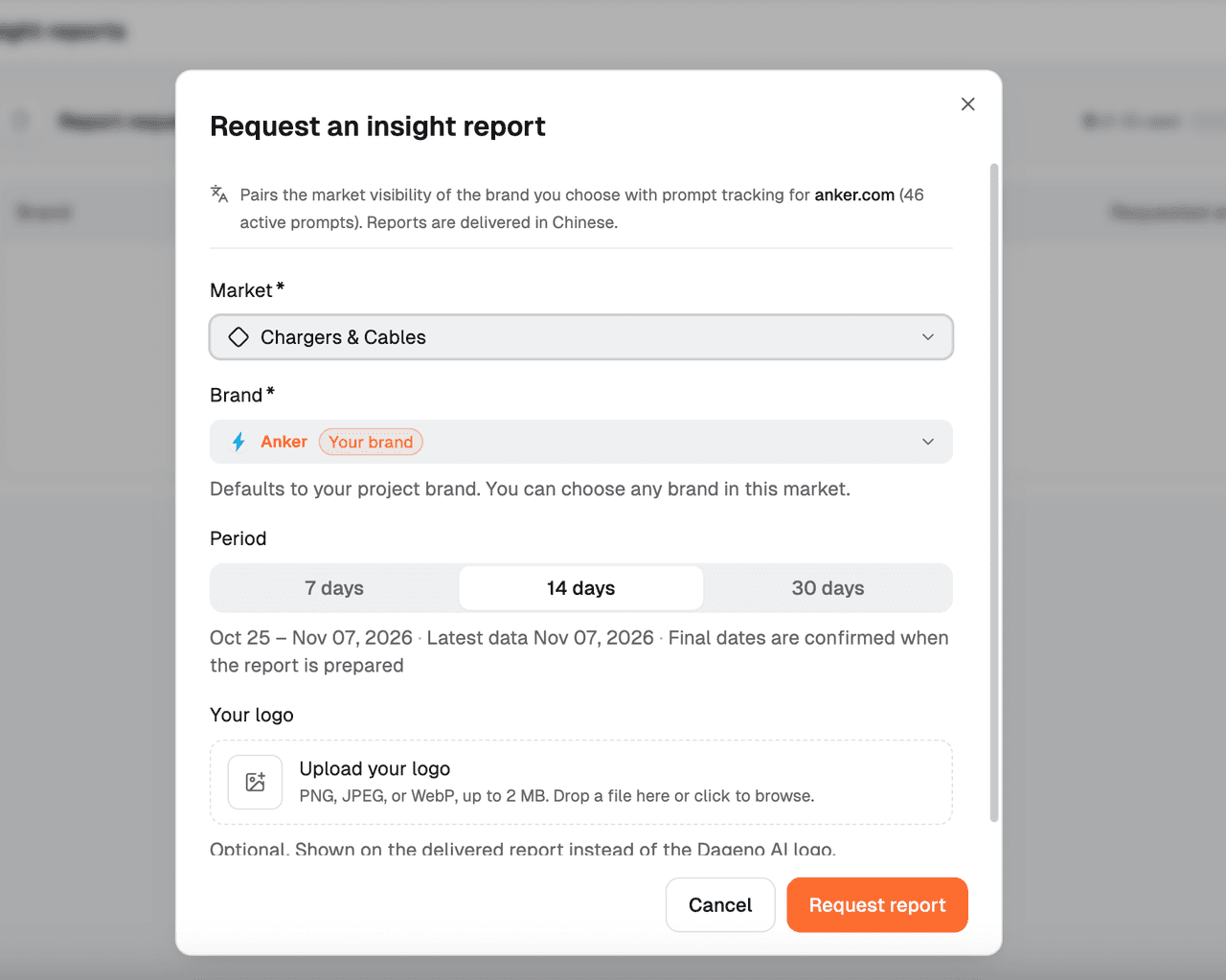
Step 3: Select the Target Market and Brand
In the report request window, configure the following fields:
Market: Select the target market you want to analyze.
Brand: Select the brand for which you want to generate a report. The current project brand is selected by default, but you can also choose other brands in the same market for competitor research.
Step 4: Set the Reporting Period
Under Period, select the analysis timeframe:
7 Days: Suitable for short-term GEO performance reviews.
14 Days: Suitable for biweekly brand visibility analysis.
30 Days: Suitable for monthly client reports and periodic performance reviews.
Choose the period that best matches the client's requirements or your team's reporting frequency.
Step 5: Upload a Custom Logo (Optional)
If the report will be delivered to GEO/SEO agency clients, upload your agency's or company's logo in the Your logo field.
Dageno Insight Reports supports report-level white-label reporting: the generated report replaces the Dageno AI logo with the uploaded custom logo.
This allows agencies to deliver branded GEO reports without having to create a separate custom-branded cover.
Skip this step if white-label reporting is not required.
Step 6: Submit the Request and Check Report Status
After confirming the Market, Brand, Period, and logo settings, click Request report to submit your request.
You can then return to the Insight Reports page to view your report requests and their statuses and track report generation progress.
7. GEO Monthly Report Example: How Should Agencies Present Results?
The following is a fictional example. All figures are for illustrating report structure only.
GEO Monthly Report
Client: Northstar CRM
Market: CRM Software
Reporting Period: 30 Days
Executive Summary
Within the scope of this example monitoring period, Northstar CRM's AI visibility is lower than that of two major competitors.
The client brand has some exposure in CRM recommendation questions for small and midsize businesses, but appears less frequently in questions about enterprise sales automation and complex integrations.
We recommend prioritizing a review of enterprise product feature descriptions and content relevant to these purchasing scenarios.
Brand Visibility Overview
Brand
Example AI Visibility
Competitor A
44%
Competitor B
36%
Northstar CRM
22%
Key Findings
Finding 1: The client brand receives some exposure in general product recommendation questions.
Finding 2: Two competitors appear more frequently in enterprise procurement questions.
Finding 3: Some AI answers cite competitor feature pages and third-party software comparison resources.
Recommended Next Steps
Priority 1: Improve descriptions of enterprise features.
AI answers can change depending on the model, time, and sampling conditions.
Reports should clearly state the monitoring scope and use consistent comparison methods wherever possible.
12. FAQ: GEO Reporting Tools for Agencies
1. What are the best GEO reporting tools for agencies?
GEO reporting tools worth considering include Dageno AI, Peec AI, OtterlyAI, Profound, SE Ranking / SE Visible, Semrush, and Scrunch.
Key selection criteria include client reports, competitive analysis, prompt tracking, data transparency, and white-label capabilities.
2. What is GEO reporting?
GEO reporting is the process of monitoring, analyzing, and reporting how brands perform in generative AI search.
It helps teams understand how AI perceives their brand, where they stand relative to competitors, and what to improve next.
3. What should a GEO client report include?
Recommended sections include an Executive Summary, Market Overview, Brand Visibility, Competitor Benchmarking, AI Platform Performance, Search Intents, Citation Sources, Prompt Tracking, and Next Steps.
When requesting a report, users can upload their own logo through Your logo.
The generated report uses the uploaded logo in place of the Dageno logo.
5. Is Dageno a white-label GEO platform?
Dageno is a GEO/AEO platform for brand, SEO, growth, and content teams.
Its Brand Reports explicitly supports report-level logo white-labeling, but this should not be taken to mean it is a fully white-labeled software platform.
6. Can GEO reporting tools compare competitors?
Yes. Many GEO reporting tools support competitive analysis.
Dageno Brand Reports can display market-level competitive performance and allow users to select other brands in the target market for research.
7. Can GEO reports include prompt tracking?
Yes.
Dageno Brand Reports combines market-level AI visibility data with project-level prompt tracking data in one report.
8. How often should agencies send GEO reports?
Common frequencies are weekly, biweekly, and monthly.
The right schedule depends on client objectives, monitoring scope, and project stage.
9. What is the difference between GEO reporting and SEO reporting?
SEO reporting primarily focuses on rankings, traffic, and webpage performance in traditional search.
GEO reporting focuses on brand performance, competitive positioning, and citation sources in AI-generated answers.
The two approaches can complement each other.
10. How can agencies make GEO reports more actionable?
In addition to visibility data, agencies should explain how AI describes the brand, where competitors perform better, and which information and content the client should prioritize improving next.
Conclusion: A Good GEO Reporting Tool Should Help Clients Understand the Problem and What to Do Next
For GEO/SEO agencies, AI search reporting is becoming a new client delivery requirement.
But a valuable GEO report should do more than count how many times a brand appears in ChatGPT.
It should help clients understand:
How does AI understand and describe our brand?
Where do we stand relative to competitors?
Which user questions and purchase scenarios reveal gaps?
What information and content should we improve first?
Dageno is a GEO/AEO platform for brand, SEO, growth, and content teams. It helps teams understand how AI perceives their brands and competitors so they can decide what to improve next.
For agencies needing GEO client reports, Dageno Brand Reports combines market-level AI visibility and project-level prompt tracking data in a single report, supporting competitor comparisons, AI platform performance, user intent, and citation source analysis.
In addition, Dageno Brand Reports supports white-label report delivery: agencies can upload their own logos, which replace the Dageno logo in generated reports.
This helps agencies turn AI search data into clearer, more professional GEO reports suitable for client presentations.
Turn GEO Data Into Client-Ready Reports.
Help clients understand how AI perceives their brand, how competitors are performing, and what to improve next.
Ye Faye is an SEO and AI growth executive with extensive experience spanning leading SEO service providers and high-growth AI companies, bringing a rare blend of search intelligence and AI product expertise. As a former Marketing Operations Director, he has led cross-functional, data-driven initiatives that improve go-to-market execution, accelerate scalable growth, and elevate marketing effectiveness. He focuses on Generative Engine Optimization (GEO), helping organizations adapt their content and visibility strategies for generative search and AI-driven discovery, and strengthening authoritative presence across platforms such as ChatGPT and Perplexity
 Alexa (Custom plan)