Recommended yesterday, missing today? Identify the affected platforms, questions, and pages, then use nine possible causes, eight diagnostic steps, and an action table to decide what to fix first.
Explore 12,000+ niche markets with no login required
TL;DR
A sudden drop in AI search visibility can stem from changes in monitoring scope, platform updates, restricted crawler access, indexing or display settings, outdated content, or competing sources. Confirm that the decline is real, then address the issue supported by the evidence.
Track brand mentions, page citations, and relative brand rankings separately. Open the answers to check how the brand is recommended. Each metric that declines points to something different to investigate.
For a sharp drop within a day, check data completeness and recent website changes first. For a decline over several weeks, focus on content, buyer needs, and citation sources.
Fix confirmed problems as you find them. Keep a fixed prompt set, complete answers, and change dates so you can review later results under comparable conditions.
Your Brand Was in ChatGPT Yesterday. Why Has It Disappeared Today?
Suppose you check your brand each week using the same prompt set, platforms, and regions, and find that this week's brand mention rate has fallen 40% from last week. A brand that appeared frequently last week is now missing from several answers. Your first thought might be a website problem or a competitor taking your place.
The most useful move is to open the answers from before and after the change and establish exactly what has declined.
Fewer appearances of the brand name mean fewer mentions. Fewer source links to your pages mean fewer citations. A lower position on a comparison leaderboard is a change in relative ranking. There is another possibility: the brand still appears, but a clear recommendation has become “worth considering,” or the product is recommended for a narrower use case. Read the complete answer to judge the strength of the recommendation.
In Dageno, Visibility is the share of responses mentioning the brand within the selected scope. Visibility rank is the brand's position within the comparison set. Check citation records separately for page citations. To distinguish a name appearing, a source link, and a recommendation, see the differences between mentions, citations, and recommendations.
Bing's AI Performance metric documentation likewise defines the report in terms of visible citation activity rather than traditional rankings. Identify what you are measuring first, then decide whether to check monitoring settings, website access, or the content used in the answers.
First, Identify How Your AI Search Visibility Is Falling
Pattern 1: A sharp drop within a single day
First, check whether that day's data collection is complete, then compare the drop date with your website release history. Changes to robots.txt, servers, firewalls, page templates, or indexing settings deserve an early check.
Look at the scope too: are all questions affected, or only one type of product page? If there was a sitewide deployment, start with shared settings. If only a few pages are affected, check their status and content first. Record when you first noticed the decline and the earliest answer showing a problem to focus the investigation.
Pattern 2: A steady decline over several weeks
For a gradual decline, start with changes in content and sources. Identify buying scenarios that are repeatedly losing mentions or citations, then compare old and new answers. Have users' requirements changed? Are prices or features outdated? What additional questions do the sources now being used answer?
You can also break totals down by question type. If general introductions remain stable but budget-related recommendations keep falling, prioritize budget requirements and pricing information. This turns a broad concern about the brand performing worse into a specific issue with a page, an owner, and a way to verify it.
Start with scenarios that matter to the business and show a sustained change. Rewriting the entire website at once makes it difficult to identify which change solved the problem.
Pattern 3: Only one AI platform is declining
Compare platforms using the same region and prompt set. If ChatGPT declines while other platforms remain stable, narrow the investigation to ChatGPT answers, sources, and OAI-SearchBot access logs. Your website may be blocking just one crawler.
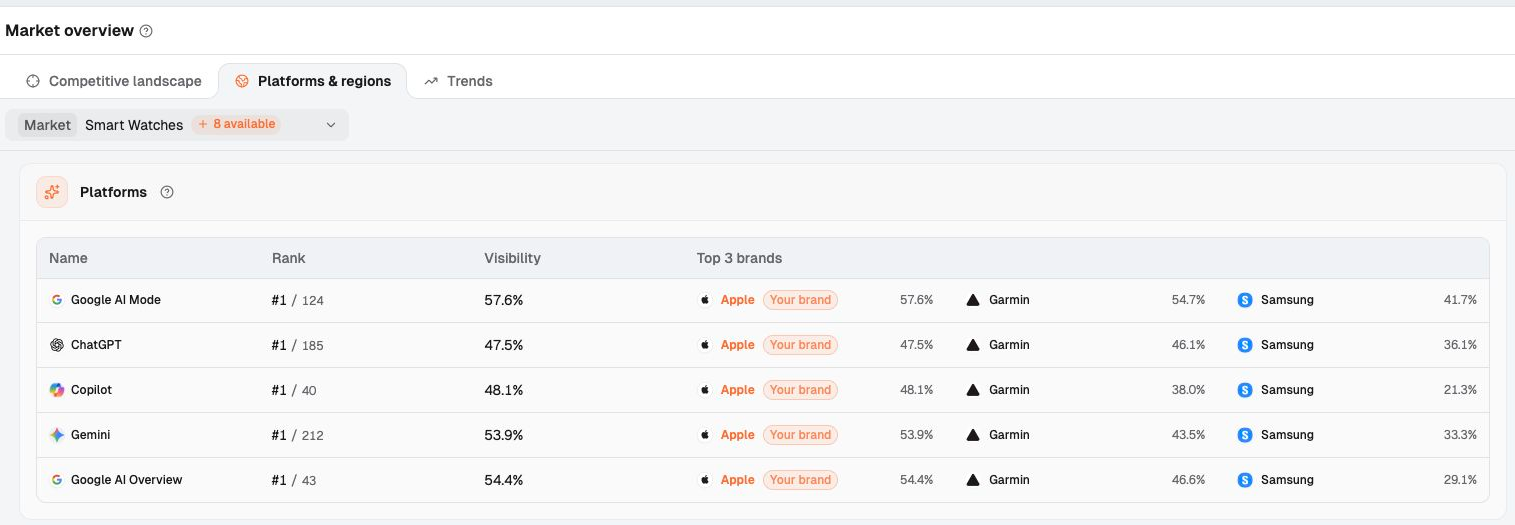
In Market overview → Platforms & regions, you can compare each platform's Visibility and Rank side by side. In the screenshot, “#1 / 185” for ChatGPT means first among 185 brands in the comparison set. To see which brand is recommended first in an answer, read the answer itself. Once you identify the platform, hold the region constant for the next check. Mixing regions can obscure the differences between platforms.
Pattern 4: Traditional SEO is stable, but AI visibility is falling
A page's position in search results, the pages cited in an AI answer, and the brands it recommends are different outcomes. If your pages still rank in search, check the sources used in AI answers to the same buying question and the facts those sources provide.
If Google rankings are stable but AI cites the website while rarely recommending the brand, check whether the page connects the product to specific needs. Our guide to ranking on Google while AI rarely mentions your brand explores this distinction. For now, identify the affected platforms, questions, and pages before checking the causes below.
Why AI Search Visibility Drops: 9 Possible Causes
Cause 1: The AI platform or model has changed
AI search finds information and then builds an answer. In its guide to optimizing for generative AI search, Google explains that it uses retrieval-augmented generation (RAG) to obtain relevant information from its search index. It also uses query fan-out to run related queries concurrently and help answer complex questions.
The pages retrieved, the information selected, and the final answer can all change. Bing also explains that citation volume can be affected by the number and type of user questions, content updates, and system or model updates. Your citation performance can therefore change even when your website's content stays the same.
Check whether multiple brands and sources are fluctuating on the same platform, and review platform announcements alongside your website change log. If the change is concentrated on one platform and website access is working, keep monitoring and run the same questions in the next batch.
The most useful records are the old answers, new answers, cited URLs, and dates. They help establish whether the change persists. A downward curve alone offers little basis for identifying a particular model update as the cause.
Cause 2: AI crawlers have lost access to your website
A firewall rule update can leave normal visitors browsing as usual while search crawlers receive access denials, verification pages, or server errors. Check both robots.txt and the responses to actual requests.
OpenAI's publishers FAQ says sites seeking inclusion in ChatGPT summaries and snippets should allow OAI-SearchBot. Its crawler documentation distinguishes OAI-SearchBot, which supports search, from GPTBot, which supports training, and provides IP information for its search crawler.
In its official robots.txt guidance, Perplexity says PerplexityBot follows these rules and that blocking crawling affects body-content indexing. The domain, title, or a brief factual summary may still remain.
Search experience / crawler
What to check first
How to interpret the result
ChatGPT Search / OAI-SearchBot
robots.txt rules, official search crawler requests, and firewall logs
Configure search and training crawlers separately; blocked pages may still appear as navigational links
Perplexity / PerplexityBot
Whether body-content indexing is blocked, actual responses, and access logs
If a title appears, still check whether the page's body can be retrieved
Google AI Overviews, AI Mode / Googlebot
Googlebot access and crawled content in URL Inspection
Google Search crawling uses Googlebot; check generative AI participation settings separately
AI experiences supported by Bing
Bing indexing eligibility, robots.txt, and webmaster controls
AI Performance reports citation activity; confirm access failures through requests and logs
Run these quick checks yourself: Open the affected URL and robots.txt to check the relevant bot rules. Ask your website team to inspect status codes, firewall verification challenges, and error logs. Verify crawler identity against official information, rather than trusting the name in the request alone.
If logs show an unintended block, correct the specific rule and confirm that the body content is readable. If access works, check indexing and display eligibility next.
Cause 3: The page is online but no longer meets indexing or AI display requirements
A successful page response clears the access stage. Google's AI features documentation requires pages to be indexed and eligible to appear with a snippet in search. Website administrators should first use URL Inspection to check indexing status, crawled content, and Google's selected canonical URL.
Next, check noindex, X-Robots-Tag, and snippet controls. If canonical points to another address, verify the target. If a page redirects, check that the new address carries the original content. As Google's canonical URL guidance explains, canonical expresses your preference to Google. Use URL Inspection to see which page Google actually selected.
Then check whether the body requires a login or returns only an empty shell or error message. For JavaScript pages, focus on whether the key content can actually be retrieved. If a URL is missing from the sitemap, check whether other pages still link to it and whether it remains indexed.
Also check Settings → Search generative AI in Google Search Console. According to the Search generative AI control documentation, Exclude removes content from the relevant generative AI features while allowing it to remain in regular search. Child properties may inherit their parent property's settings.
A page can load. That doesn't mean AI can retrieve it.
Cause 4: Your content has aged while competitors have updated theirs
Suppose you have an article titled “Best CRM Software for Startups 2025.” It is now 2026, but the prices, product list, and feature screenshots still reflect older versions. Readers need to assess purchasing costs today, so old prices directly affect how useful the answer is.
Bing's AI Performance guide recommends keeping content fresh and accurate. Start with facts that could change a buying decision: have plan prices changed, features moved to a higher tier, products been discontinued, or regional and integration support changed?
Review the page's facts against current product information, then check data years, linked sources, screenshots, case-study conditions, and the author's firsthand experience. For each item, record what the page currently says, the latest supporting evidence, and the sentence that needs updating. Prioritize previously cited passages about pricing or conditions of use.
If an older case study remains useful, retain its product version and usage conditions and add a separate update. Historical test data should also keep its original date. Relabeling old results with the current year would mislead readers about when the test took place.
Once the changes are complete, add an accurate update date and explain what changed. Changing only the year in the title leaves readers with an old answer. During follow-up checks, check whether later answers use the updated facts, rather than only watching for a recovery in citations.
Cause 5: Your content lacks distinctive information worth citing
An article can include every definition and still offer little help readers could not find elsewhere. Google's generative AI search guide recommends non-commodity content: content with a distinctive perspective, firsthand experience, or original analysis.
What matters is adding verifiable information: conditions of use, testing methods, limitations, comparison criteria, and sources. Original research is one option. An accurate integration guide can also resolve a recurring question for buyers.
The following is a writing example. The stronger version suits a page that already has the supporting material:
Weak: Our powerful CRM is built for startups and helps your team cut costs.
Strong: Compare your current system with CRM alternatives using the total cost of sales seats, billing terms, and required features. The comparison table lists official pricing sources, sync methods, migration steps, and extra charges so your team can check the setup it needs.
The second version tells readers what they will get and how to verify it. When publishing, include the table and supporting evidence on the page, along with the product's limits. If you ran tests, describe their dates, versions, procedures, and results. If you compiled official information, identify those sources accurately.
Start with one important question: what fact does the user need to make a decision? Find that fact and add evidence. This is more useful than adding another general industry overview.
Cause 6: Users' questions have changed, but your content has not
“Best CRM” identifies only a product category. Suppose a user now asks: “What's the best CRM for a 15-person B2B SaaS company that uses HubSpot for marketing but wants something cheaper for sales?” The answer needs to address costs, marketing data synchronization, sales workflows, and migration effort.
A page that simply lists products “for small businesses” lacks the evidence needed for those conditions. Break the buying task into subquestions, then find page-level evidence for each: how do the existing tools connect? Which fields sync? What determines the cost? Which features cost extra?
Go beyond asking, “Where do I rank for this keyword?” Ask, “What subquestions does AI need to answer for this buying decision, and how much of the supporting evidence does my website provide?”
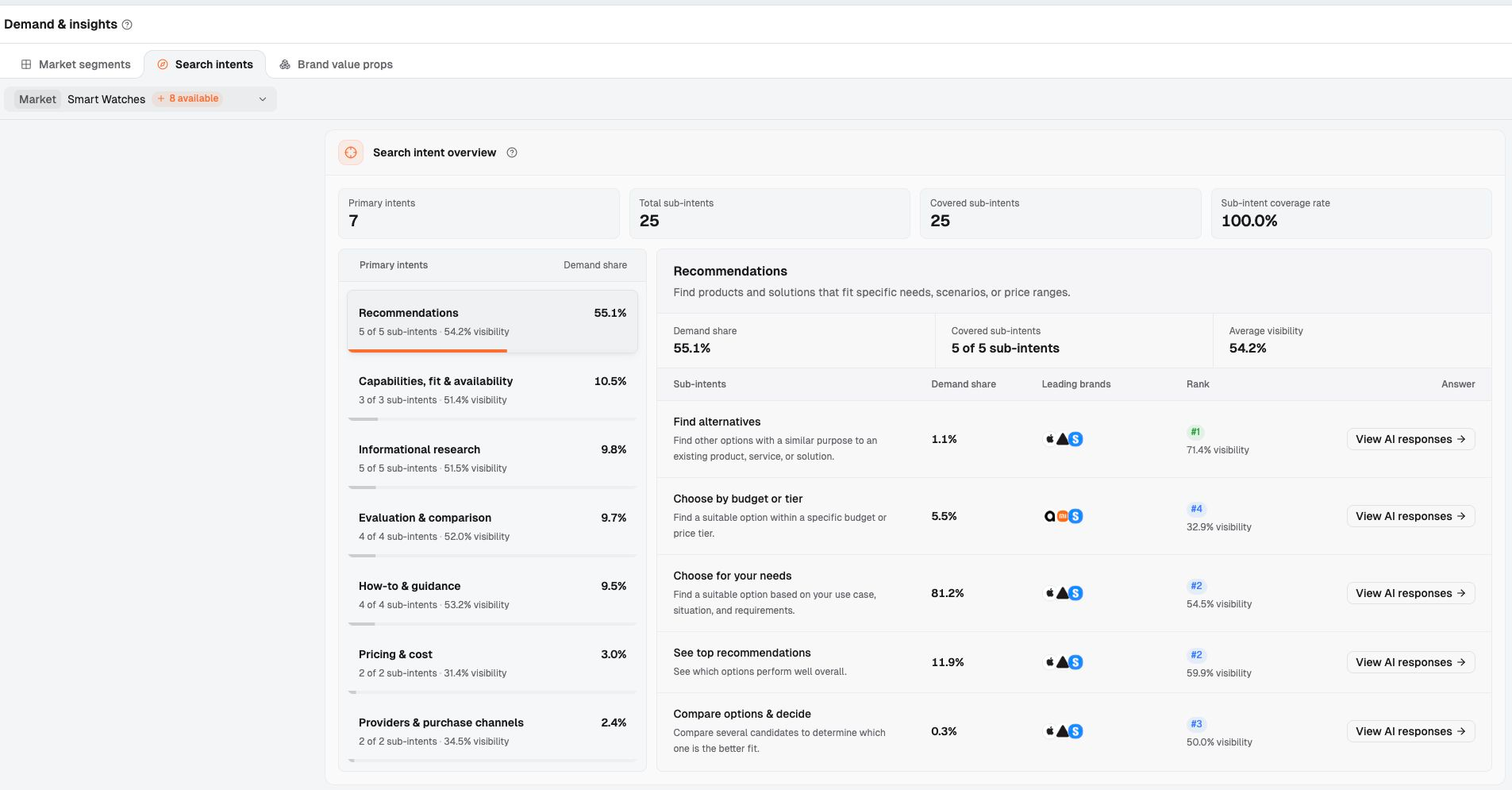
In Dageno's Search intents, start with the specific tasks under Recommendations. In the screenshot, Choose by budget or tier covers budget-based choices, while Find alternatives covers alternatives. Select the affected sub-intent, then use View AI responses to inspect the actual answers and sources.
For example, if budget-related answers repeatedly mention per-seat costs while your website gives only a starting price, ask the product owner to verify required plans and extra charges. If the product meets the requirements, add the details to the pricing information or relevant comparison page. If the total cost exceeds the user's budget, focus monitoring and optimization on buying questions the product genuinely fits.
Demand share helps you understand the mix of needs within the current analysis. To assess whether real user needs have changed, also review sales inquiries, customer questions, and on-site search records. Once you identify recurring new requirements, update the most relevant product or comparison page so readers can check the answer directly.
Cause 7: Competitors or other pages provide more suitable citation material
Answers that once cited you may now use media reviews, competitor documentation, or specialist guides. To understand the change, place the specific URLs from old and new answers side by side.
First, ask what the new source provides. Does it add pricing, explain a test procedure, clarify product limitations, or compare several options under the same conditions? Microsoft's content guidance for AI search answers emphasizes clear, specific information with context, supported by understandable headings and structure. These are useful angles for checking differences between pages.
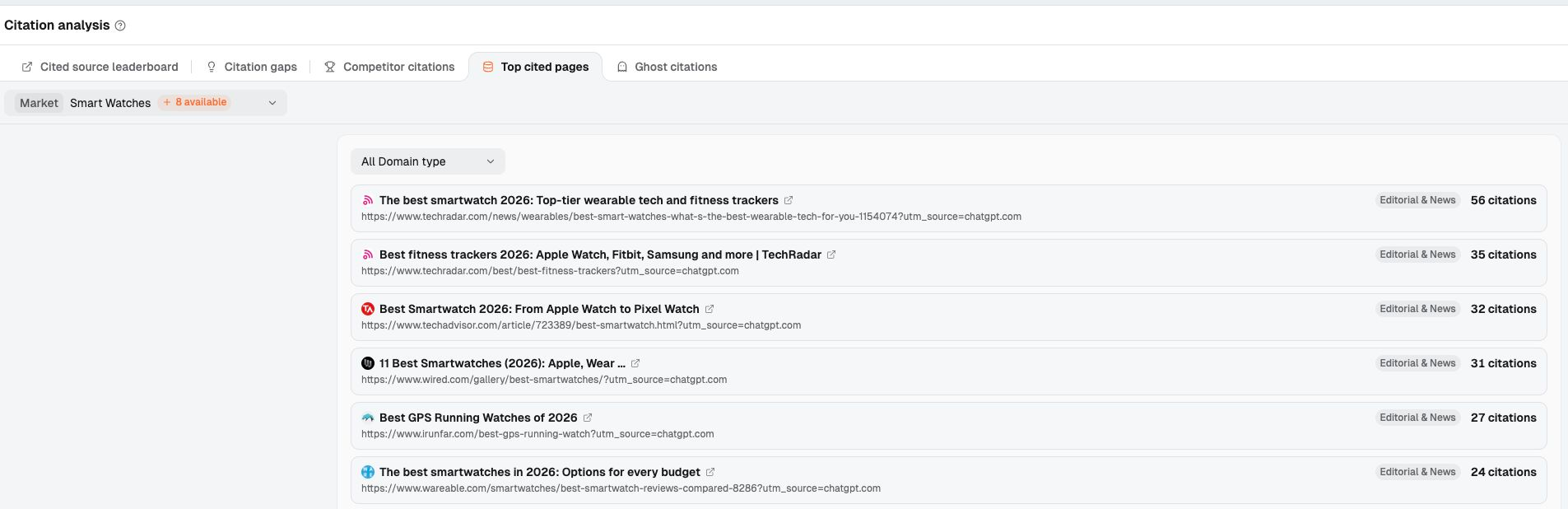
Dageno's Citation analysis → Top cited pages helps you find frequently cited pages. Review the titles, URLs, and citations, then open sources relevant to the declining scenario. Competitor citations and Citation gaps help identify competitor-related sources and gaps in brand coverage. Confirm historical changes by comparing the earlier and later batches of answers.
For a third-party source, first check whether it describes your brand and whether that description is accurate. If it uses outdated feature information, provide the author with current firsthand documentation. If evidence of actual use is missing, prepare a repeatable test procedure or a real case study.
Compare six things: facts, evidence, update dates, relevant experience, structure, and unique information. Turn the gap into a specific task, such as “add the sales-seat billing details,” rather than “improve authority.” If the product fits but competitors receive more recommendations, investigate why AI recommends competitors instead of your product.
Cause 8: A redesign removed useful information
Suppose a redesign aimed at improving conversions replaces pricing comparisons, feature limitations, and FAQs with a large hero image, marketing copy, and a booking button. The page looks cleaner, but readers have less evidence for checking prices and conditions of use.
Compare the readable body content of the old and new pages, passage by passage. Are previously cited sections still there? Did a feature table become an image? Were key details moved behind a login? Does the original URL now redirect to a more general page?
Separate two issues. If the content is still present but retrieval fails, ask the website team to check rendering and responses. If content was removed, have product and content teams identify which facts to restore. Making conversion buttons more prominent and pages shorter can sometimes crowd out information readers need to decide. Keep conversion options available while explaining key facts through text, tables, and Q&A.
Save the text and screenshots of important pages before launch, then check the content actually retrieved afterward. First confirm that the facts have been restored, then monitor later citations for the same questions. This lets you connect page fixes with changes in answers.
Cause 9: Your monitoring method changed, making the report look worse
Before editing content, check the prompt set, platforms, regions, languages, time window, and number of valid responses. Adding questions changes the denominator and may also change question difficulty and the mix of needs.
For example, expanding a prompt set from 50 to 500 questions could lower the overall mention rate if the new questions cover scenarios the brand has yet to serve. The new prompt set could also perform better or similarly. The most useful comparison isolates the original questions to see whether their results changed too.
Record the mention rate and number of valid responses for both periods, and state whether the decline is a relative change or a percentage-point difference. Keep metric denominators consistent as well. Dageno's Visibility uses all responses within the selected scope as its denominator and measures the share mentioning the brand. In Effect tracking, URL citation rate uses responses already collected within the date range as its denominator and measures the share citing that URL. Brand mention rate looks only at responses citing that URL and measures the share that mention the brand. Interpret percentages with different scopes separately.
Also distinguish citation counts from response coverage. In Cited source leaderboard, citations is the number of times a source is cited; Cited in …% of responses is the percentage of responses that cite it. Use the same field and scope when comparing periods.
Check for missing records, failed collection, and processing that is still incomplete. Bing says AI Performance uses sampled data and has processing delays. For any monitoring report, confirm that the current window is complete before comparing it with a complete historical window.
How to Investigate an AI Search Visibility Drop: 8 Steps
Use these eight steps to organize the work. Leave a clear result from each step so the next owner can continue the investigation. Address confirmed access or indexing failures as soon as you find them.
Step 1: Confirm that the data is comparable
List the questions, platforms, regions, languages, dates, and number of valid responses for both periods. Separate newly added prompt sets, complete the collection records, and compare again. The output should be a set of answers with a consistent scope that you can revisit, along with the specific metric that declined.
Step 2: Determine whether one or several platforms are affected
Break the same prompt set down by platform, then by region. Record where the problem is concentrated and when it started. For a single platform, prioritize its crawling requirements and answer sources. For simultaneous declines across platforms, check shared settings and content changes first.
Step 3: Determine whether the decline is sitewide or page-specific
List URLs losing citations separately from questions receiving fewer brand mentions. A brand may still appear through third-party pages, so investigate the two lists separately. Check whether the issue is concentrated in one directory, template, product, or buying scenario.
Step 4: Check access, indexing, and display settings
Give the affected pages to the website and SEO owners to check crawler logs, status codes, body content, indexing, and relevant display controls. Attach a specific URL, discovery date, and evidence to each issue, rather than leaving only a suspicion that a crawler might be blocked.
Step 5: Compare the decline with recent changes
Review deployments, migrations, template updates, pricing changes, and content edits or removals. Place change dates beside the dates of the problem to identify pages worth checking. If the timing is close, investigate whether the change actually affected access or key facts.
Step 6: Compare previous and current citation sources
Extract source URLs from earlier and later answers to the same question. Open the pages now being used and record which subquestions they answer. Prioritize information that affects the buying decision, and create a specific list of gaps.
Step 7: Identify the missing fact or evidence
Replace “the content needs to be better” with an achievable task: update outdated prices, add integration requirements, explain suitability, or document the methods and results of existing tests. Specify who will provide the material, which page will contain it, and which sources will verify it.
Step 8: Recheck under the same conditions after the fix
Record the release date. First verify that the page and settings are correct, then review mentions, citations, and descriptions in later comparable answers. If results have yet to improve, continue gathering evidence for the remaining possible causes. Keep each round's changes and observation window on record.
AI Search Visibility Drop: Findings and Actions
After the investigation, use this table to assign work. Add the confirmed facts to the relevant row and agree on a review date.
Confirmed finding
Primary owner
First action
What to verify
Prompt set, scope, or denominator changed; data is incomplete
Analytics / monitoring owner
Rebuild a comparable scope, separate old and new prompt sets, or complete the records
Consistent settings, valid responses, and metric definitions
A specific search crawler is unintentionally blocked or repeatedly receives errors
Website / operations
Correct the rule or service failure
Verified requests, logs, and readable body content
noindex, an incorrect canonical URL, or a generative AI exclusion setting
SEO / website administrator
Correct the misconfiguration and confirm the target URL
Indexing, canonical URL, and display settings
Prices, features, or versions are outdated
Product / content owner
Update facts and sources
Alignment with the current product and use of those facts in later answers
Current sources provide key evidence your content lacks
Content / product / PR
Add facts or provide accurate material to relevant third parties
Updated sources and later answers to similar questions
A redesign removed key information or made the body difficult to retrieve
Website / content owner
Restore useful facts and fix retrieval
Differences between old and new content, plus later citation records
Platform fluctuations are confirmed, with no site issue found
Analytics owner
Set the next review date and record evidence still needed
Comparable answers, platform announcements, and source changes
How to Be Ready for the Next AI Visibility Drop
The most important preparation in routine monitoring is keeping enough evidence for comparison. Organize regular reviews around four groups of information.
First: markets, needs, and competitors. Clarify which market the business serves, what decisions buyers are making, and which brands they usually compare. Start with Dageno's Brand overview, then use Search intents to find important buying tasks. Even a precise mention rate offers little business guidance if you select the wrong market.
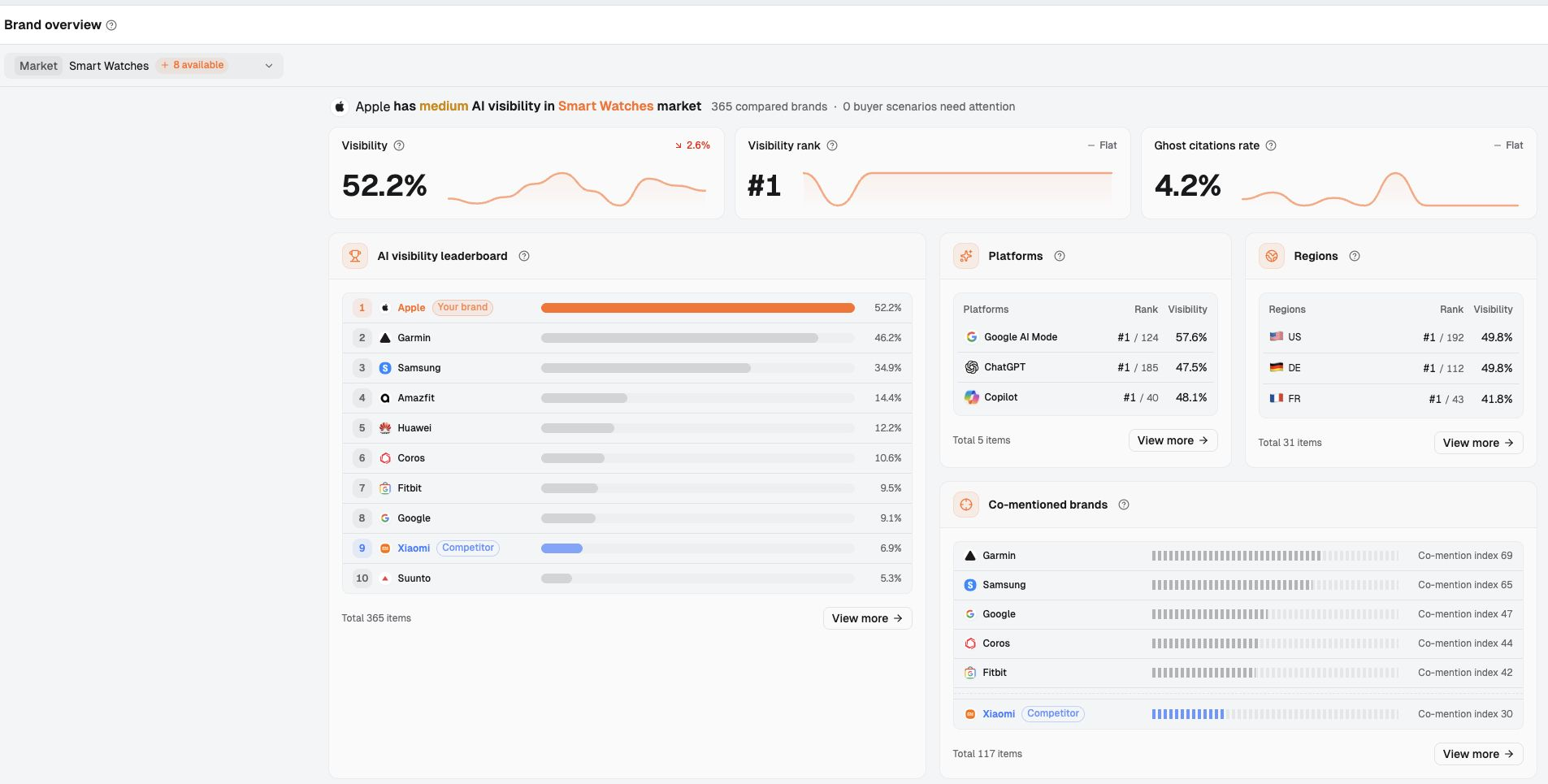
In the overview, confirm Market first, then read Visibility and Visibility rank. One shows how often the brand appears; the other shows its relative position. Next, open Platforms or Regions to narrow the scope, then check the individual answers.
Second: fixed prompts, platforms, and regions. Keep representative questions for core buying tasks and record the language, region, platform, and run conditions. Add questions to explore new needs while retaining the original prompt set for long-term comparison. Record the date and reason whenever settings change.
Third: answers, citations, and pages. Save complete answers, recommendation wording, source URLs, and collection dates. Use Effect tracking to review citation records for priority pages in already-collected responses. Check whether prices, features, and intended users are described accurately. Use your own website analytics to examine visits and clicks.
Fourth: trends and change records. Compare complete windows on a schedule your team agrees on, and keep website releases, content updates, and monitoring adjustments together. When a problem appears, start gathering evidence from the specific scenario that changed most. The next time a curve drops, your team will have old answers, pages, and settings to consult and can identify the first action sooner.
Why has ChatGPT suddenly stopped recommending my website?
Possible causes include platform updates, restricted crawler access, outdated content, or changes in citation sources. First distinguish fewer links to your website from fewer brand recommendations. Then align the questions used before and after the decline, check OAI-SearchBot access and current sources, and use repeated, comparable answers to establish whether the change persists.
Is it normal for AI search visibility to change every day?
Yes, it's normal for AI answers and citations to change over time. Investigate when the decline continues across several complete windows or recommendations repeatedly disappear from important buying scenarios. Start by checking the number of valid responses and the monitoring conditions, then compare answers and changes in sources for the same types of questions.
Can robots.txt affect visibility in ChatGPT and Perplexity?
Yes, it affects whether the relevant crawler can retrieve or index website content, which affects that content's opportunity to appear in search answers. For ChatGPT Search, check the rules for OAI-SearchBot; for Perplexity, check PerplexityBot. Use actual request responses and access logs alongside those rules to confirm whether a crawler is being blocked.
Why is my brand missing from AI search when its SEO rankings are strong?
Start by checking whether the ranking page answers the current buying question, then examine the facts and sources AI uses. Product names, conditions of use, and comparison evidence should clearly match the user's needs. For Google, also check indexing, snippet eligibility, and the generative AI participation settings that apply to the page.
How long does it take to recover from an AI search visibility drop?
There is no fixed timeline. Recovery depends on the cause, progress on the fix, how quickly the platform processes the content again, and the observation window. First confirm that the technical or content issue is fixed. Then keep checking later answers to the same questions, recording changes in mentions, citations, and descriptions separately.
Dageno is the research and insights team at Dageno AI, publishing industry reports and expert analysis on AI Search Visibility, Generative Engine Optimization (GEO), and AI-powered search discovery.