UCP Integration Hub in Merchant Center: What to Know Now
Google Merchant Center has a new menu: UCP integration. It is not a new protocol. It moves onboarding into Merchant Center: pick capabilities, test in a sandbox, validate in production, read the report. We read Google’s help articles and developer guide to explain what is new, how much work integration takes, why GA4 will not see native checkout visits, and what each type of merchant should do now.
Explore 12,000+ niche markets with no login required
Updated by
AI-assisted for research support
14 Min Read•
Updated on Oct 10, 2026
Google Merchant Center recently gained a new menu item: UCP integration. We'll call it the UCP integration hub.
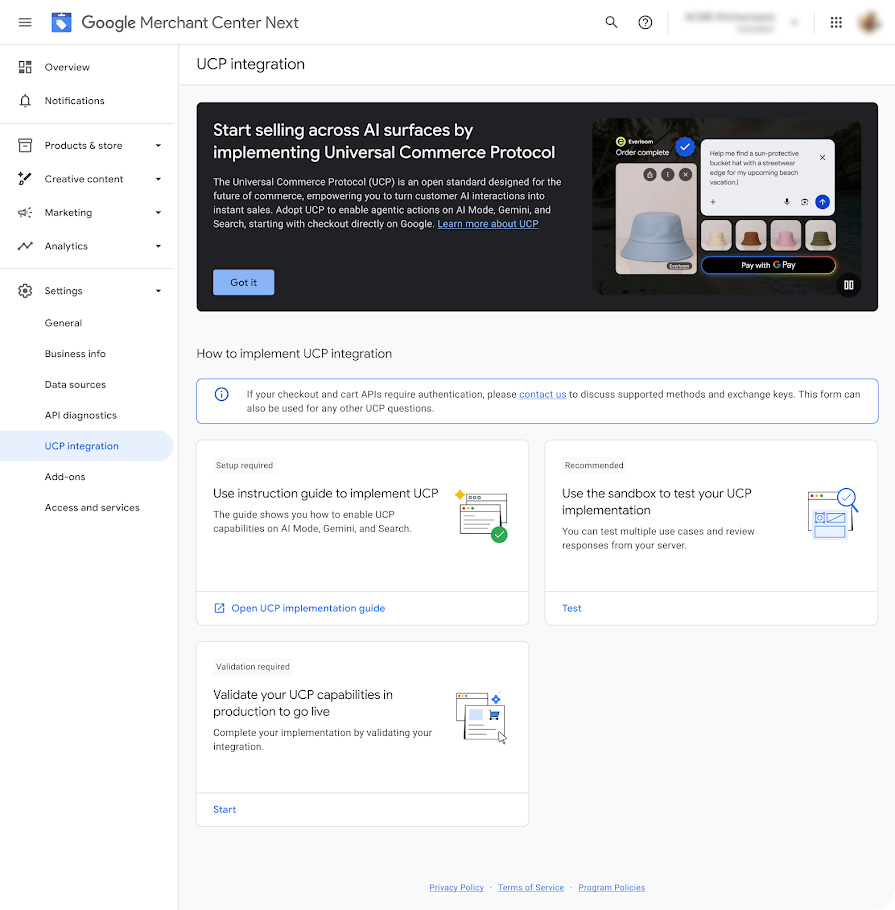
What does native checkout through UCP look like for a shopper? Say a user asks Gemini to "pick me a sun hat for the beach." Gemini shows a few products. For products that have native checkout enabled, the user can tap Buy, pay with Google Pay, and never open the merchant's website.
To get that Buy button on their own products, merchants have to build the interfaces defined by Google's UCP (Universal Commerce Protocol). The UCP integration hub is where merchants handle that inside Merchant Center: applying, testing, going live, and reading the numbers.
UCP itself is not new. Google published it in January 2026. So this is not a protocol launch or a protocol upgrade. The only new thing is this entry point in the Merchant Center back end. It is rolling out gradually in the U.S., and Google says Australia and Canada will follow in 2027.
Figure 1: The UCP integration page in Merchant Center. The sun hat example is in the top right. Source: Google Merchant Center Help.
We read Google's two help articles and the developer guide. Three conclusions up front:
The process is clearer, but integration is not easier. Merchants still have to build the interfaces themselves, or wait for their e-commerce platform to do it.
If your store runs on a hosted platform, when you can use this depends mostly on the platform's timeline.
Whether you integrate or not, it is worth completing your product and returns data in Merchant Center now.
Here is each point in turn.
What is actually new
Four things.
First, you can choose how checkout works. There are three options:
Capability you pick
What the shopper sees
What you have to build
Cart transfer
Adds items to a cart on Google, then jumps to your site to pay
A cart interface (Cart API)
Native checkout
Pays with Google Pay without leaving Google
Three checkout interfaces, plus order status updates sent back to Google
Identity linking
Signs in with the shopper's account on your site to get member benefits
Login authorization (OAuth 2.0); only available after you pick native checkout
None of the three changes one thing: you are still the seller of this order. Payment, shipping, and after-sales stay with you. Google's documentation calls this the merchant of record.
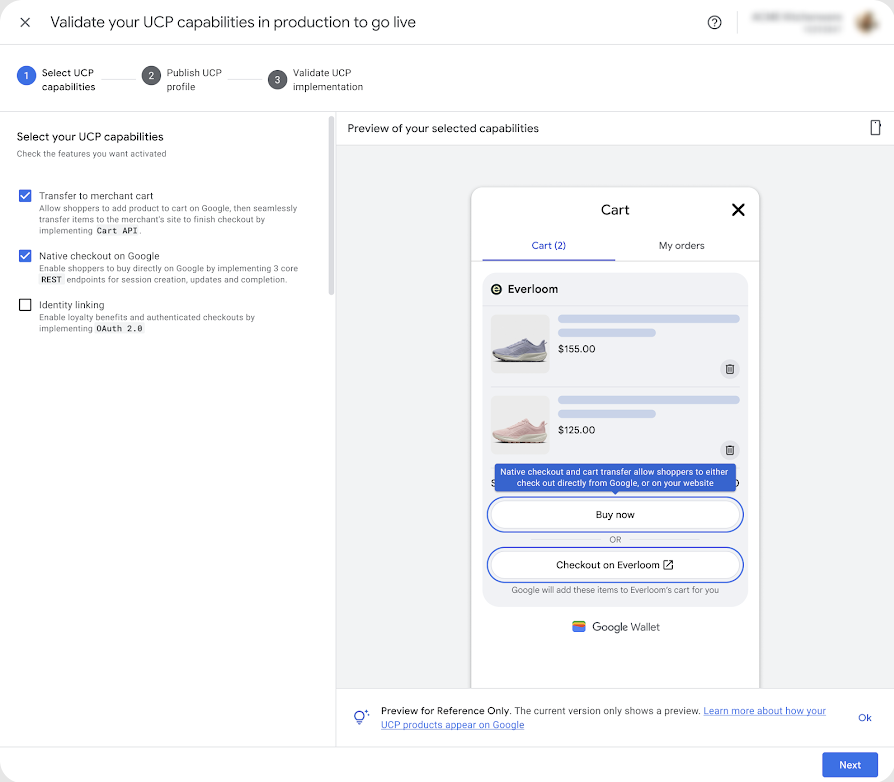
Because the capabilities can be chosen separately, merchants do not have to do everything at once. They can start with the lighter option.
Figure 2: Capabilities are ticked on the left, with a preview of what shoppers see on the right. "Buy now" is native checkout; "Checkout on Everloom" sends the shopper to the merchant's site to pay. Source: Google Merchant Center Help.
Second, there is a test environment. Google calls it a sandbox: a practice ground that creates no real orders. You enter the address of your site's UCP profile and an API key, and the sandbox simulates "a shopper created a cart" and "a shopper placed an order." You can check whether your server responds correctly.
Third, the hub tells you what is missing. If a product feed attribute (the product data you submit to Google), a returns setting, or an account configuration needs changing, Merchant Center flags it.
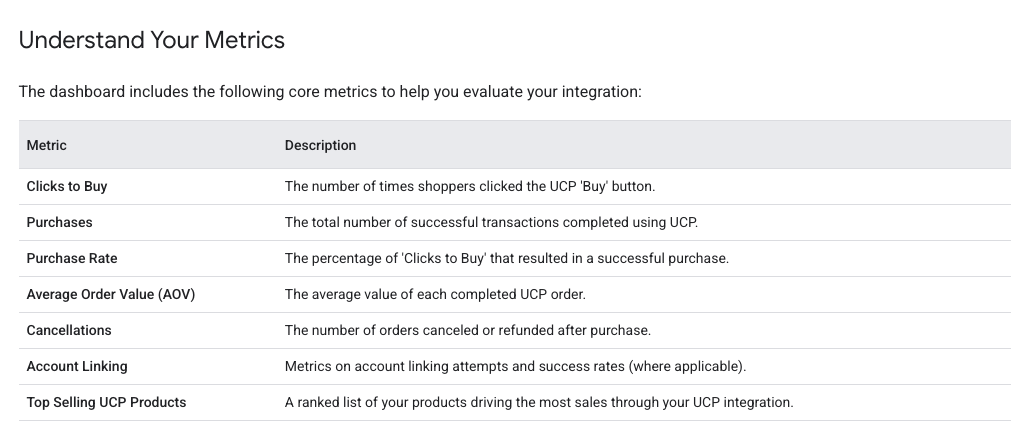
Fourth, there is a new report. The Analytics tab shows seven numbers: how many times shoppers clicked Buy, how many purchases went through, the purchase rate, average order value, how many orders were cancelled or refunded, the success rate of account linking, and which products sold the most.
Figure 3: The seven metrics on the Analytics tab. Source: Google UCP developer guide.
Is it just a few clicks?
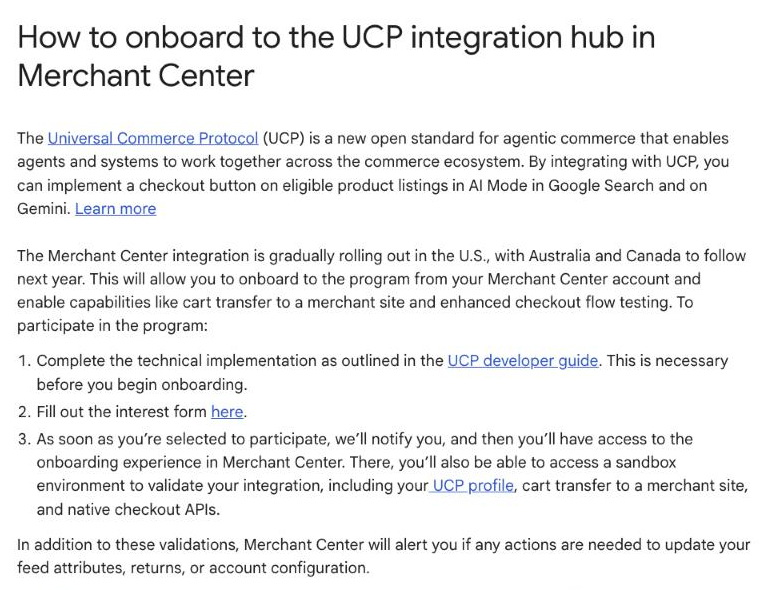
No. Google's help article lists the order like this:
Build the interfaces by following the developer guide first. The article specifically notes this must be done before you start the onboarding flow in Merchant Center.
Fill out an interest form.
Wait until Google selects you and notifies you. Only then can you start onboarding in Merchant Center.
Figure 4: The three steps in Google's help article.
Once you are in, you test in the sandbox first, then validate in production. Finally, Google's support team reviews everything before you go live.
An analogy: the hub is like a driving test center. It tells you what is on the test, lets you practice, then schedules the real exam. But you still have to know how to drive.
The "knowing how to drive" part differs a lot between the two checkout options:
Cart transfer is light. Google calls it the fast validation path. It does not require a complete product feed setup, product notices, or customer service details.
Native checkout is much heavier. You need three interfaces for creating, updating, and completing orders, Google Pay integration, and notifications to Google whenever an order's status changes.
If your site runs on a platform like Shopify, whether and when these interfaces exist depends on the platform. Google's advice is direct: ask your platform about its UCP plans.
There are product requirements too, mainly for native checkout:
Returns policy must be complete. Whether returns cost money, the return window, and a link to the full policy: all three are required. The checkout page displays them.
At least one customer service contact. A URL, an email address, or a phone number. The "contact merchant" link on the order confirmation page uses it.
Products with regulatory warnings must carry them. For example, products that need a label under California's Proposition 65.
Product IDs must match. The ID in your feed has to match the ID in your checkout system. If they differ, you need a mapping.
After integrating, can you still see the data?
Yes, but in a different place.
Start with native checkout. The shopper stays inside Google's interface from start to finish and never opens your website. So the GA4 (Google Analytics 4) code and ad pixels installed on your site do not run for this order.
The order itself is not lost. In the final step, Google calls your interface to place the order, and it lands in your order system as usual. For how many purchases went through and the purchase rate, use the Analytics report described above. Google's developer documentation also says this data can be read through the Merchant API, currently marked Alpha.
So reviewing these orders later means looking in two places: your own order system and the Merchant Center report. The visit will not appear in GA4.
Now cart transfer. The shopper ends up back on your site to pay, so you can see the payment step. But what they asked on Google and how they picked you is still invisible.
Our view: choose by asking what you care about more. If you want the shortest path to purchase, pick native checkout. If you care about the checkout page experience and the data on your site, pick cart transfer. You can also do both.
Who can use it now?
This is easy to misread, because Google has two documents describing two different things.
One describes the hub, the back-end entry point. It is rolling out gradually in the U.S., with Australia and Canada in 2027. Even in the U.S. not everyone has it. You have to build the interfaces, fill out the form, and be selected.
The other describes UCP checkout, the feature. Its stated scope is eligible products in the U.S., Canada, and Australia, and merchants participating in the program. The same document notes that checkout is currently available only to some merchants.
So the fact that the hub appeared in the U.S. first does not mean products in other regions have nothing to do with UCP checkout. What is certain right now is that neither is fully open yet.
Some products cannot use UCP checkout for now: subscriptions, installment plans, custom engraving, used and refurbished items, pre-orders, large items needing special shipping, services bundled with installation or extended warranties, and virtual goods such as game currency.
What different kinds of merchants should do now
If your store runs on a platform like Shopify. The platform handles the interfaces. You have three small jobs. First, ask the platform or check your admin to confirm the current status of UCP checkout. According to a September 2026 Search Engine Land report, eligible U.S. Shopify stores have had native checkout turned on by default, so it is worth checking whether yours is on or off. Second, check that your returns policy and customer service details in Merchant Center are complete. Third, decide where you will review these orders in future, because GA4 will not show the visits behind them.
If your site is custom-built. You can go through Google's process directly. Have your developers read the UCP developer guide and estimate the work before filling out the interest form. Start with cart transfer, and consider native checkout once that works.
If you mainly sell outside the U.S. You will not see the hub yet. Google's documentation currently mentions only the U.S., Canada, and Australia, with no timeline for other regions. What you can do now is complete your Merchant Center data and watch for notices from your platform.
If you sell subscriptions, custom items, or pre-orders. These categories are out of scope for now, so there is no need to invest development time in UCP. If your store also carries standard products, evaluate only that part.
If you only sell on a marketplace like Amazon and have no site of your own. This update needs nothing from you for now. Integrating with UCP requires your own Merchant Center account and checkout system. Whether a marketplace store joins is the marketplace's decision.
Whichever group you are in, there is one thing you can do today. Google's help article says the best preparation is to keep all your Merchant Center data, from product feeds to brand assets, as complete and current as possible. That data already affects how your products appear across Google.
This update adds no new capabilities to UCP. It moves the integration work into Merchant Center. So there is no rush to integrate. Do the preparation above first, and it will all be useful when the hub reaches you.
Are your products in AI's shortlist?
UCP integration solves "how to accept the purchase." For merchants with their own online store, there is another question worth watching all the time: when shoppers ask an AI for product recommendations, do your products show up? Which competitors appear with them? And does the displayed offer come from your store or from another retailer?
All of this is visible in AI product cards: the cards in AI answers that carry an image, a price, and a seller.
Dageno organizes what appears in those product cards by market and by individual product: which brands appear most, which products those are, which sellers provide the offers, and which competitors share the screen. Sellers can use that to decide what to investigate and optimize first.
Here is an example from a monitoring sample of the smart watch market.
Dageno uses "brand product visibility" to measure how often a brand's products appear in these product cards. On that metric, Garmin is at 58.17%, ranking first. Apple is at 39.16% and Samsung at 34.22%.
Figure 5: Brand product visibility in the smart watch market, from Dageno's AI shopping monitoring. The trend chart covers September 11 to 15, 2026.
Open the Garmin Enduro 3 from the list and you see two things. First, who is selling it: its product card carries 9 offers, from sellers including Best Buy, Garmin's own site, Home Depot, and REI. Second, what it appears alongside: 6 products from other brands share the screen.
Figure 6: Product detail for the Garmin Enduro 3. On the left, the sellers whose offers appear in product cards. On the right, other brands' products shown alongside it.
To be clear, this is monitoring data from product cards in AI answers, not Google UCP transaction data. It cannot tell you which products are eligible for UCP, whether a Buy button will appear, or how many units sold. What it can tell you is which products AI is showing in your category right now, where the offers come from, and who else is on the screen.
Start by checking your own AI product competition
Want to know how your products perform in AI shopping on ChatGPT, Google AI Mode, and Gemini? You can look up your market on Dageno for free and check three things:
Where do you and your competitors appear? Which products regularly make AI's shortlist, and where your products are missing.
What product information is AI showing? The prices, ratings, and seller offers in the product cards, and whether your own store is among the sellers.
What to fix first? Concrete optimization points across product pages, feeds, and related content. After the changes, keep monitoring to see whether the product display shifts.
The analysis is based on monitoring samples. It does not promise a fixed ranking, a product card placement, or sales.
See How Your Products Show Up in AI Shopping, for Free
Dageno is the research and insights team at Dageno AI, publishing industry reports and expert analysis on AI Search Visibility, Generative Engine Optimization (GEO), and AI-powered search discovery.