In recent years, one shift has become increasingly obvious: content operations are moving from a traffic mindset to a growth mindset.
As AI search and content distribution become more complex, simply doing SEO, publishing content, and tracking impressions or clicks is no longer enough. Content teams are now expected to understand the full user journey: how users arrive, why they stay, why they fail to convert, and what should be optimized at each step.
In other words, content roles are gradually evolving from content executors into participants and even designers of growth systems.
This has become very clear to me while working on content growth projects.
Metrics such as impressions, clicks, rankings, indexing status, and article volume still matter. But the real driver of outcomes is not whether a site has more content. It is whether existing content successfully connects search demand with business action.
This is especially true for B2B SaaS, independent websites, e-commerce sites, and manufacturing websites. Many pages are not completely without traffic. Instead, traffic arrives and then fails to move further down the funnel. Users enter through search, but the page does not properly receive their intent. Users read the article, but do not see a CTA. Users click a CTA, but do not reach a key event.
The issue is not a lack of data. The issue is the absence of a decision-making chain that connects:
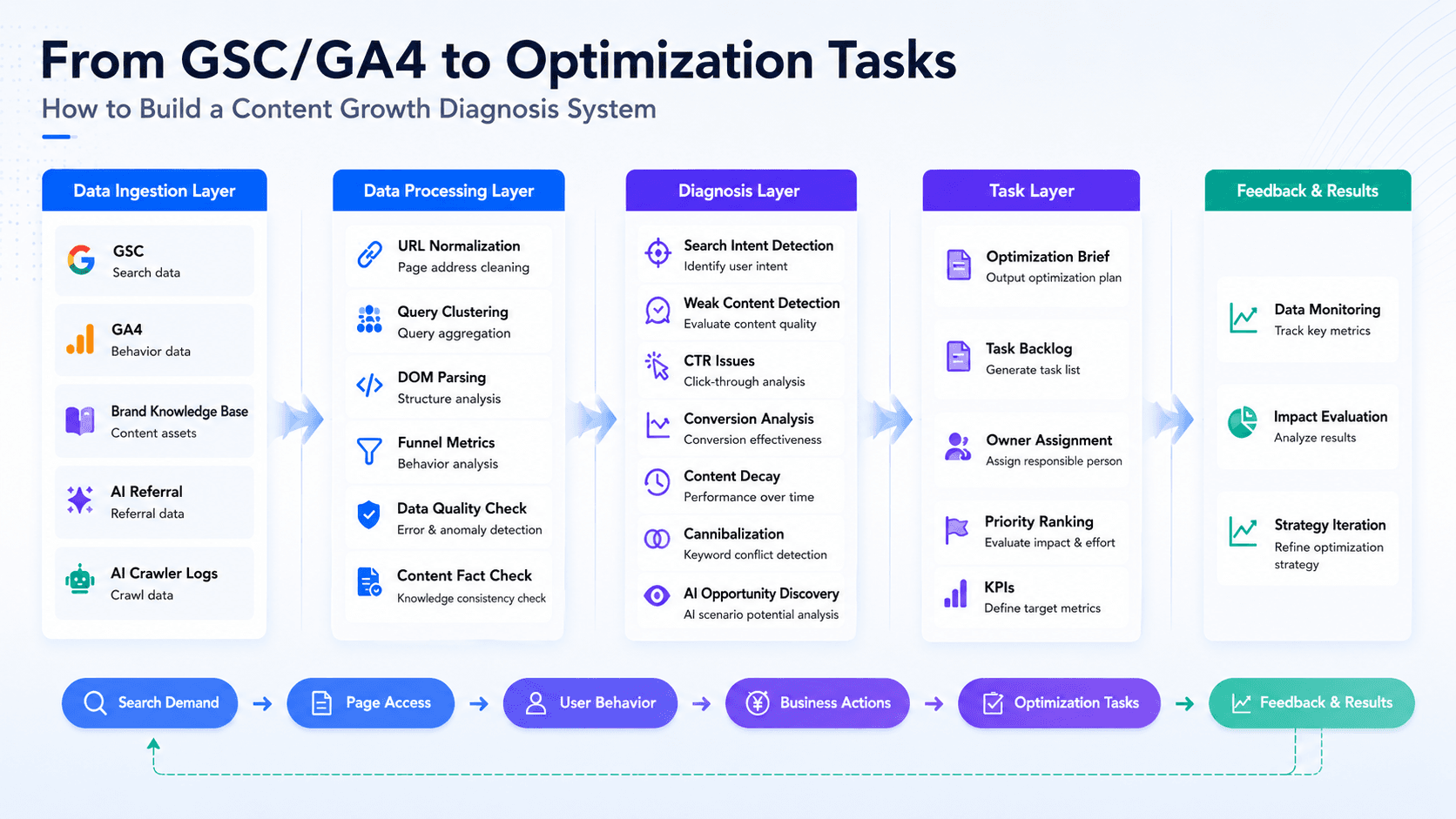
Search demand → Page intent matching → User behavior → Business action → Optimization task → Performance feedback
To solve this, we built an internal content growth diagnostic system and have validated it across multiple independent websites in e-commerce, manufacturing, consumer electronics, and AI SaaS.
This system is not a standard SEO report. It is also not a tool that simply asks AI to generate generic optimization suggestions. Instead, it connects GSC, GA4, the brand knowledge base, AI referrals, and AI crawler logs into a page-level diagnostic workflow.
It helps teams answer the following questions:
Which queries and intents bring users to a page?
Does the page properly match and satisfy that intent?
After users land on the page, do they read, see CTAs, and click?
Is the product information on the page accurate?
Do AI products bring visits, and can AI crawlers access the page?
How can the evidence be converted into an actionable optimization task?
Which metrics should be tracked after the page is updated?
The overall data flow works like this:
First, data is connected. Then data from different sources is aligned to the same URL. Query clusters are used to identify search intent. Page DOM analysis is used to determine whether the content satisfies that intent. GSC and GA4 funnel data are combined to identify where users drop off. The brand knowledge base is used to verify content facts. AI/GEO signals are used to evaluate AI referral traffic and crawler accessibility. Finally, all evidence is converted into optimization tasks, and performance is continuously tracked after updates go live.
Below is a walkthrough of the full workflow.
1. Data Ingestion: Put Search, Behavior, Facts, and AI Signals Into One Chain
The first layer is data ingestion. We mainly connect five types of data:
Google Search Console, or GSC
Google Analytics 4, or GA4
Brand knowledge base
AI referral sessions
AI crawler logs
1.1 GSC and GA4
GSC is responsible for search-side performance. It provides impressions, clicks, CTR, average position, and detailed query-level performance.
Through GSC, the system can identify which queries help users discover a page, and which pages still receive impressions but are starting to lose click-through rate.
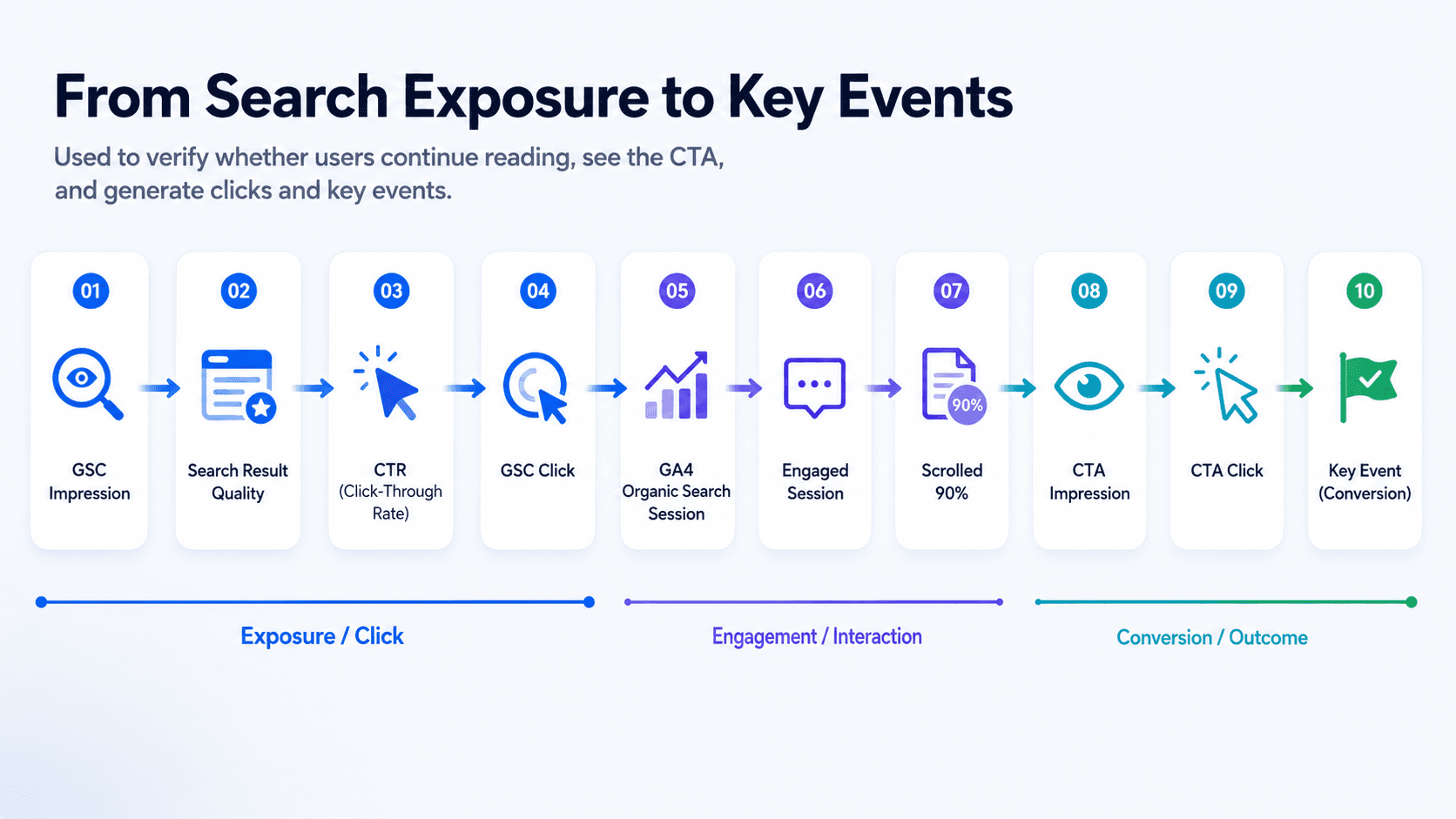
GA4 is responsible for on-site behavior. It provides organic search landing sessions, engagement rate, scroll behavior, CTA impressions, CTA clicks, sign-ups, and key events.
Through GA4, the system can determine whether users continue reading after they land on the page, whether they see product entry points, whether they click CTAs, and whether they enter business-critical actions.
GSC and GA4 only become powerful when they are used together.
If we only look at GSC, we can only see what happens in search results. If we only look at GA4, we can only see what happens after users enter the site. When the two are connected, the system can identify exactly where an article is stuck.
For example:
High impressions but low CTR
Prioritize the title, meta description, and search result relevance.
High clicks but low engagement
Prioritize the opening section, table of contents, page structure, and content-intent match.
Good engagement but low CTA clicks
Prioritize product modules, CTA copy, and CTA placement.
CTA clicks exist but key events remain low
Continue checking the registration path, demo path, or landing page flow.
1.2 Brand Knowledge Base
The brand knowledge base is responsible for product fact verification.
Teams can sync the latest product features, pricing plans, screenshot versions, brand messaging, competitor comparison standards, FAQ answers, and important product updates into the knowledge base.
The system then compares page content against the knowledge base to determine whether product information in an article has become outdated.
The purpose of this module is to give the LLM a current, unified, and trustworthy source of product facts.
Without a brand knowledge base, the system can only infer whether content may be outdated based on publication date, year-related wording, screenshots, or SERP freshness. After the knowledge base is connected, the system can generate much more specific tasks, such as:
Replace outdated product screenshots
Correct pricing plan descriptions
Rewrite competitor comparison tables
Sync the latest FAQ answers
1.3 AI Referrals and AI Crawler Logs
AI/GEO data is split into two categories:
AI referral sessions
AI crawler logs
AI referral sessions come from GA4. They show whether products such as ChatGPT or Perplexity bring real visits to the website, and whether those visits generate engagement or key events.
AI crawler logs come from server logs, Cloudflare, CDN logs, or edge logs. They show whether crawlers such as GPTBot, PerplexityBot, and ClaudeBot have accessed a page, whether the status code is normal, and whether access is affected by robots rules, WAF, CDN configuration, or missing logs.
This distinction is important:
AI crawlers are not GA4 traffic sources.
GA4 is suitable for measuring referral sessions from AI products. Crawler access must be checked through logs.
A page may have been crawled by GPTBot but have no ChatGPT referral sessions. Another page may already have Perplexity referral traffic, but incomplete crawler logs. Only when both signals are reviewed together can the team determine whether a page needs more quotable content or whether technical accessibility should be checked first.
2. Data Processing: Align URLs First, Then Build Page-Level Evidence
After the data is connected, the system does not immediately generate suggestions. It first processes the data.
The goal of the processing layer is to turn scattered data into page-level evidence.
2.1 URL-Level Data Alignment
The first step is URL alignment.
GSC, GA4, and server logs often record page addresses differently.
For example, the same article may appear in GSC as a full URL, in GA4 with tracking parameters, and in server logs as only a page path. If the system does not standardize these addresses first, the same article will be split into multiple records: search clicks in one place, on-site sessions in another, CTA clicks elsewhere, and crawler access in yet another location.
Therefore, the system first cleans page addresses by removing UTM parameters, ad click parameters, page anchors, and other elements that do not change the page content itself. It then maps the same article to one canonical page URL.
Only after this step can impressions, clicks, sessions, CTAs, key events, and AI crawler records be correctly attributed to the same article.
2.2 Query Clustering
A query cluster means grouping similar search queries based on user intent.
GSC often contains a large number of fragmented queries. If the content team looks at these queries one by one, it is difficult to understand what users are actually trying to accomplish.
The system groups queries by search intent and labels them with intent types, such as:
Definition intent
Tool-selection intent
Comparison intent
Commercial intent
Pricing intent
Support intent
Navigational intent
In the future, this can also be mapped to user intent in AI marketing and AI search scenarios.
This changes the team’s view from thousands of scattered keywords to a smaller number of user needs.
It is also important to clarify the boundary of this feature:
This is not precise query-to-conversion attribution.
The system does not pretend to know that one specific query directly caused one specific sign-up. Instead, it solves the problem of search intent and content matching: which user needs bring people to the page, and whether the page has corresponding content to receive those needs.
2.3 Page DOM Parsing
The third step is page DOM parsing.
The system crawls and analyzes the page structure, including:
Title
H1
H2
H3
FAQ sections
Tables
CTAs
Internal links
Body content snippets
It then determines whether each query cluster has a corresponding content position on the page.
For example, if users search for tool comparison queries but the page only explains concepts, with no tool selection criteria, comparison table, or use cases, the system can identify weak intent matching.
2.4 Data Quality Assessment
Not all data is suitable for automatic task generation.
The system also checks whether:
GSC data is missing
GA4 data is missing
URLs are correctly matched
Sample size is sufficient
Event tracking is complete
The brand knowledge base is available
AI crawler logs are connected
Data quality directly determines what the system is allowed to do:
Data Quality
System Behavior
High
Generate task drafts
Medium
Generate tasks only after manual confirmation
Low
Show diagnostics only, without automatic task generation
Invalid
Do not judge or generate tasks
This step is critical.
A content diagnostic system should not only know how to generate recommendations. It should also know when the evidence is insufficient and automation should not be used.
3. Diagnostic Loop: From Search Demand to Page Matching, User Behavior, and Business Action
After data processing is complete, the system enters the diagnostic layer.
3.1 Search Side: Which Queries and Intents Bring Users In?
The system first reviews GSC queries and query clusters.
For the same AI visibility-related page, user intent may vary significantly:
“What is AI visibility?” indicates conceptual understanding.
“Best AI visibility tools for SaaS” indicates tool selection.
“Track brand mentions in ChatGPT” indicates a specific workflow.
If a page previously served mainly definition-based queries, but new impressions now come from tool-selection, comparison, or workflow queries, the system identifies that user demand has changed.
This step answers one question:
What task is the user trying to complete when entering the page?
3.2 Page Side: Does the Page Match the User’s Search Intent?
After query clusters are identified, the system analyzes the page DOM.
Different intents require different content structures:
Intent Type
Content Needed
Definition intent
Clear definition, explanation, and FAQ
Tool-selection intent
Tool list, selection criteria, use cases, and CTA
Comparison intent
Tables, pricing, differences, and use cases
Workflow intent
Steps, metrics, templates, and common mistakes
Commercial intent
Product modules, case studies, CTA, and next-step path
The system checks whether these elements appear in the Title, H1, H2, FAQ, tables, CTAs, or whether they are missing entirely.
If a query cluster has search impressions but the page covers that need only shallowly, the system marks it as a content gap, a new query opportunity, or weak search intent matching.
This step answers:
Did the page properly receive and satisfy the user’s need?
3.3 Behavior Side: Do Users Read, See CTAs, and Click?
Content matching alone is not enough. GA4 behavior data is needed to verify whether users actually continue taking action.
The system builds a page funnel from search exposure to business action.
This is one of the most important perspectives in the diagnostic process because it helps locate where users are stuck.
For example:
If users land on the page but engagement is low, the problem may be the opening section, table of contents, content structure, or page loading experience.
If users read the page but CTA impressions are low, the CTA may be placed too deep.
If CTA impressions are normal but clicks are low, the CTA copy, product module, or user intent may be mismatched.
If CTA clicks exist but sign-up clicks, demo clicks, or key events are low, the issue may be in the subsequent registration, demo, or landing page path.
This step answers:
Are users stuck at reading, CTA exposure, CTA click, or business conversion?
3.4 Fact Side: Is the Content Outdated, and Is Product Information Accurate?
For B2B SaaS content, outdated content is not only a matter of publication date.
An article published last year may still be accurate. Another article updated last month may already contain incorrect pricing, features, screenshots, or competitor comparisons.
The brand knowledge base aligns page content with the latest product facts. The system checks whether:
Features mentioned on the page still exist
Pricing is still current
Screenshots are outdated
Competitor comparisons follow the current standard
FAQ answers are consistent with official answers
This module prevents two common problems:
Old articles continue giving users incorrect product information.
The LLM generates misleading recommendations based on outdated page content.
This step answers:
Are the system’s recommendations based on the latest product facts?
3.5 AI/GEO Side: Can AI Sources Access and Cite the Page?
The AI/GEO module mainly makes two judgments.
First, AI referral sessions show whether AI products bring real visits. For example, the system checks whether ChatGPT, Perplexity, and similar sources bring sessions, and whether those sessions generate engagement or key events.
Second, AI crawler logs show whether AI crawlers can access the page. The system checks whether GPTBot, PerplexityBot, ClaudeBot, and similar crawlers have visited the page, whether they returned 200, 304, 403, or 404, whether there is a blocked reason, and whether logs are missing.
These two signals together determine the next action:
If the page has AI referrals but weak conversion, prioritize content matching and CTA optimization.
If crawler status is abnormal, prioritize robots rules, WAF, CDN, or log integration checks.
If crawler access is normal but the page lacks clear definitions, steps, FAQs, and answer-style summaries, prioritize quotable content.
If AI referrals are growing but key events are weak, AI traffic exists, but business-side page matching still needs improvement.
This step answers:
In AI search and LLM citation scenarios, is the problem traffic, content, or technical visibility?
4. Issue Type Identification: Turn Diagnostic Results Into an Operations Queue
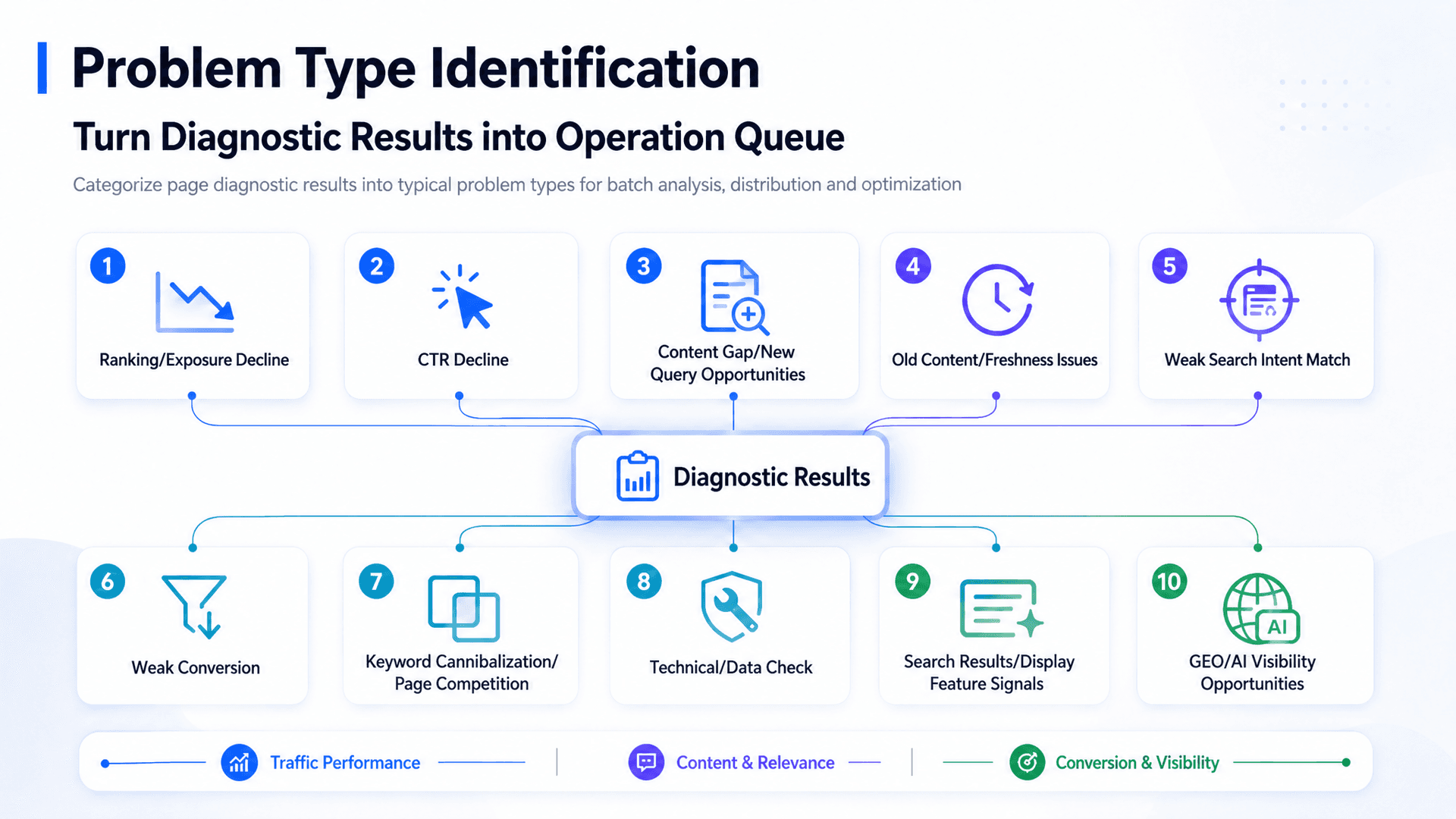
After completing the diagnostic steps above, the system assigns each page to a specific issue type.
The value of issue grouping is that content optimization becomes batch operations instead of one-off article editing.
Common issue groups include:
Traffic decline
CTR decline
Weak content or weak search intent matching
Old or outdated content
Conversion weakness
Duplicate or competing pages
Missing content opportunities
Technical or data issues
GEO or AI visibility issues
The page group does not only display issue names. It also shows:
Triggering evidence
Page funnel snapshot
Main affected query clusters
Content positions
Data quality
Recommended action summary
Owner
Status
This allows content owners to manage work by issue group every week.
For example:
This week: handle CTR decline.
Next week: handle weak conversion.
The following week: handle outdated content and page cannibalization.
The team no longer randomly edits whichever page looks wrong. Instead, they can move through optimization work by issue type and priority.
5. Task Generation: The System Outputs Optimization Recommendations
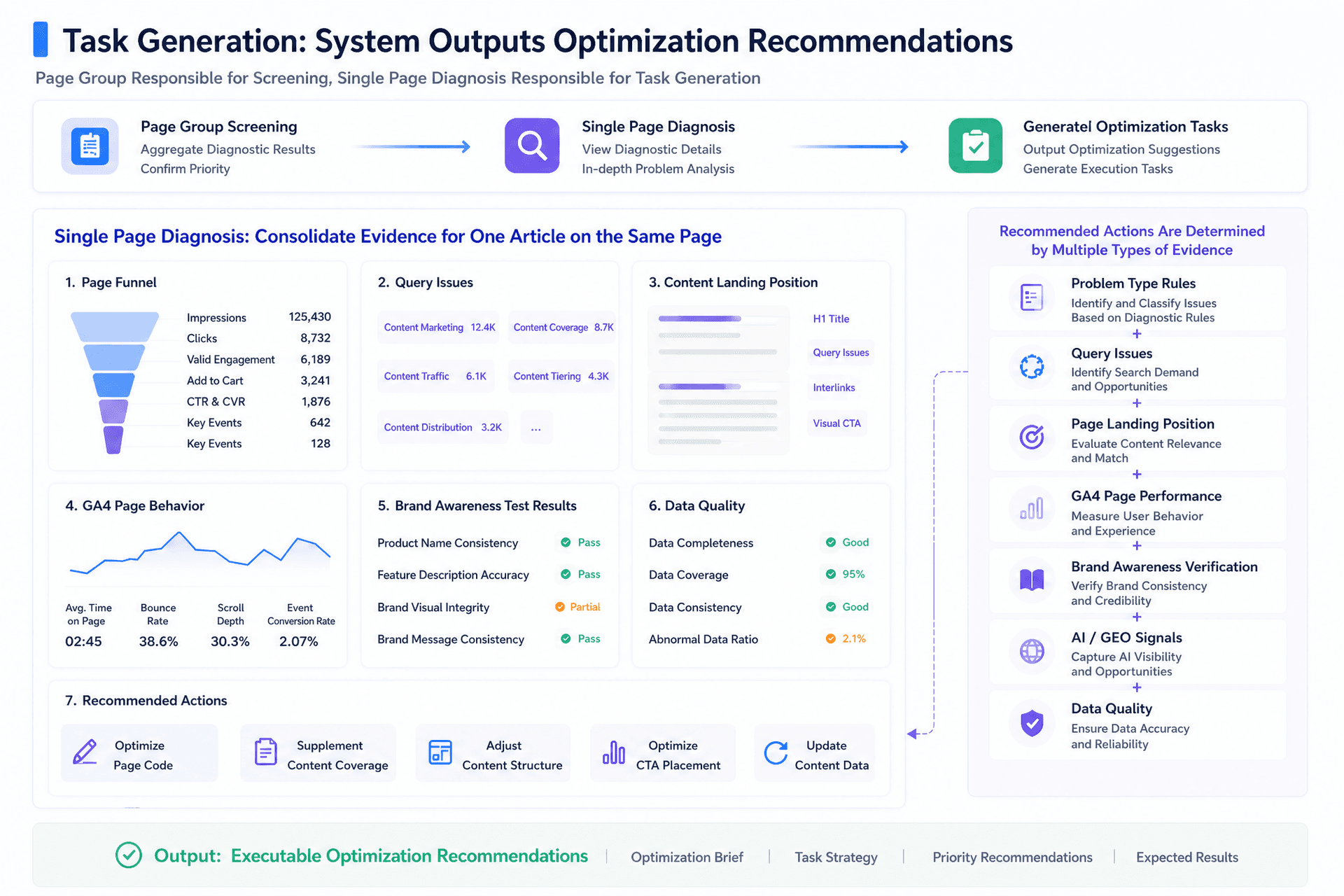
Page groups are used for filtering. Single-page diagnostics are used for task generation.
When entering a single-page diagnostic view, the system places all evidence for an article on one page:
Page funnel
Query clusters
Content matching positions
GA4 page behavior
Brand knowledge base verification results
Data quality
Recommended actions
Recommended actions are mainly determined by a combination of evidence types:
textCopy
Issue type rules
+ Query clusters
+ Page content matching positions
+ GA4 page performance
+ Brand knowledge base verification
+ AI/GEO signals
+ Data quality
The output is not a vague suggestion like “optimize this article.” It should become a task that clearly explains:
Why this page needs to be updated
Which part of the page has a problem
What should be changed
Who should own the task
Which metrics should be checked after the update
6. Example: How the Full Diagnostic Chain Works on One Page
The system groups these queries into a tool-selection intent cluster.
This means users are not just trying to understand a concept. They are looking for a category of tools, comparing tool capabilities, and may even be ready to start a trial or purchase process.
Step 3: DOM Analysis Finds Weak Intent Matching
The system parses the page DOM and finds that the opening section and H2 structure still mainly explain the concept.
The page does not provide clear tool selection criteria, comparison dimensions, or use cases.
In other words, the search-side intent has shifted toward tool selection, but the page still behaves like a concept explanation article.
Step 4: GA4 Adds Behavioral Evidence
GA4 shows that the page has relatively high engagement, but low CTA clicks.
This means users are willing to read, but the page does not guide them smoothly toward a product action.
Step 5: The Brand Knowledge Base Verifies Product Facts
The brand knowledge base finds that product screenshots in the page are outdated, and some feature descriptions have not been updated to the latest version.
If this is not corrected, the LLM may continue using outdated product information when generating optimization recommendations.
Step 6: AI Crawler Logs Check Technical Accessibility
AI crawler logs show that GPTBot can crawl the page normally.
This means the priority issue is not technical crawling. The more urgent problems are whether the content is quotable enough, whether product information is accurate, and whether the CTA matches tool-selection users.
Final Task Draft
The system generates a task draft like this:
markdownCopy
Page: /blog/top-tools-to-track-ai-mentions-in-llms

Issue Type:
- Weak search intent matching
- Weak conversion
- Outdated content

Triggering Evidence:
- Tool-selection queries have search impressions
- The opening section and H2 structure still focus on concept explanation
- Engagement is high, but CTA clicks are low
- The brand knowledge base finds outdated product screenshots
- GPTBot crawling is normal

Recommended Actions:
- Add a tool selection criteria module
- Add a tool comparison table
- Update product screenshots
- Change the generic sign-up CTA to "View AI Mention Monitoring Solution"
- Add FAQ content
- Add step-by-step content that is easier for LLMs to cite

Metrics to Track After Update:
- CTR
- Organic search sessions
- CTA clicks
- Demo clicks
- Key events
- AI referrals
- Crawler status
In this way, an article moves from “unclear data performance” to a concrete task.
The team knows:
Why the article needs to be changed
Where the problem is
What needs to be updated
Who should handle it
Which metrics should be reviewed afterward
7. Performance Monitoring and Review
A real content growth loop also needs to feed performance data back into the system after an article is updated.
The current version can already run the main workflow from data ingestion to page diagnosis and task draft generation.
The next stage is to add post-execution performance tracking, connecting each content update with subsequent metric changes.
The system will record:
Task generation time
Updated modules
Launch time
Owner
Task status
Follow-up performance data
This allows teams to evaluate whether each optimization action actually produces results.
8. What Still Needs to Be Built
At this point, the system can already run the main diagnostic chain. However, several capabilities still need to be improved.
8.1 Query Intent Clustering
The current version mainly relies on text similarity and rule-based judgment. In vertical industries, this already covers most common queries.
However, long-tail queries, emerging terms, and queries that are semantically similar but intent-wise different may still be grouped incorrectly.
In the future, the system will combine keyword matching and LLM-based judgment to classify query clusters more accurately.
For low-confidence intent clusters, the system will automatically mark them as “manual confirmation required,” preventing incorrect tasks from being generated when evidence is insufficient.
8.2 Automatic Brand Knowledge Base Updates
The current brand knowledge base is still mainly maintained through manual import. This works well for first centralizing core information such as product features, pricing, screenshots, FAQ answers, and competitor messaging standards.
But in the long run, the knowledge base cannot rely only on manual maintenance.
The next step is to connect product changelogs, CMS data, or internal documentation sources, so that the knowledge base version can update automatically as the product evolves.
This will make outdated content checks less dependent on manual review. The system will also be able to identify outdated features, old screenshots, incorrect pricing, and product descriptions that no longer match the current messaging more quickly.
8.3 Performance Tracking
The system can already determine which article should be updated, why it should be updated, where it should be changed, and how to generate an evidence-backed optimization task.
The next step is to add performance tracking after task execution and connect each content update with later metric changes.
Once this is complete, content teams will be able to understand:
Whether an optimization actually created growth
Which types of updates are more effective
Which pages still need further iteration
Conclusion
The goal of this content growth diagnostic system is not to provide another SEO report.
Its goal is to turn organic traffic optimization into a process that is:
Executable
Trackable
Reviewable
Connected to business outcomes
It connects search data, page content, user behavior, brand facts, AI/GEO visibility, optimization tasks, and performance feedback into one closed loop.
As a result, the content team no longer receives a vague instruction like “optimize the article.”
If you are also building an independent website for overseas markets, focusing on content growth or AI search, and would like to discuss this solution or learn more about the system's implementation details, you can add WeChat: dudulhc.
Dageno is the research and insights team at Dageno AI, publishing industry reports and expert analysis on AI Search Visibility, Generative Engine Optimization (GEO), and AI-powered search discovery.